
Self-Hosting Wazuh: Open-Source SIEM for Home and Small Business Security
Most homelab guides focus on uptime and performance monitoring. But there's another question worth asking: is anyone poking at your servers?
Photo by Denny Müller on Unsplash
Wazuh is an open-source security platform — a SIEM (Security Information and Event Management) system combined with intrusion detection, log analysis, vulnerability scanning, and file integrity monitoring. It's what enterprises use to monitor their infrastructure, and it runs on your own hardware for free.
If you run anything accessible from the internet — a VPN endpoint, a reverse proxy, SSH, a web app — Wazuh gives you visibility into what's happening at the security layer.
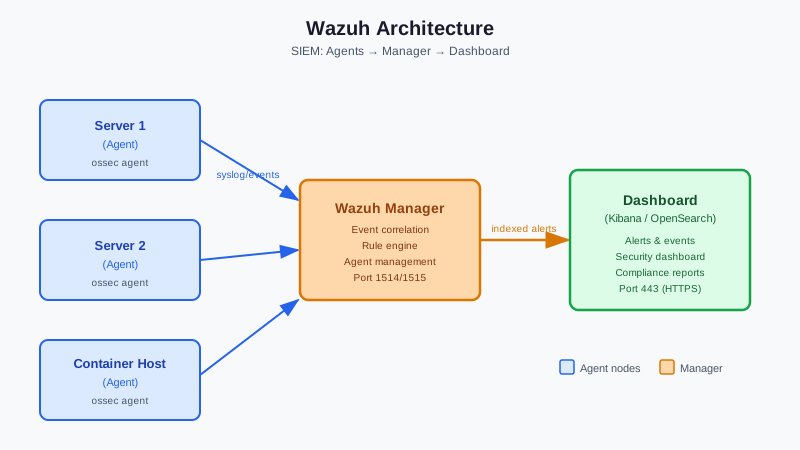
What Wazuh Does
Wazuh collects and analyzes security events from agents installed on your systems:
- Log analysis: Parses system logs, auth logs, application logs, and detects suspicious patterns
- File integrity monitoring: Alerts when critical files change (config files, system binaries, web app files)
- Rootkit detection: Scans for known rootkit signatures and hidden processes
- Vulnerability detection: Cross-references installed packages against CVE databases
- Compliance monitoring: Maps findings to PCI-DSS, HIPAA, NIST, and other frameworks
- Active response: Can automatically block IPs, disable accounts, or run custom scripts in response to events
The architecture has two parts:
- Wazuh Manager (server): Receives events from agents, runs analysis, stores data
- Wazuh Agent (lightweight daemon): Installed on each system you want to monitor, ships events to the manager
Hardware Requirements
Wazuh is resource-intensive compared to most self-hosted tools. The server component needs real resources:
| Setup | RAM | CPU | Storage |
|---|---|---|---|
| Small (1–5 agents) | 4GB | 2 cores | 50GB |
| Medium (5–25 agents) | 8GB | 4 cores | 200GB |
| Large (25+ agents) | 16GB+ | 8+ cores | 500GB+ |
Storage grows with agent count and log verbosity. Wazuh ships with Elasticsearch (OpenSearch) for log storage, which is the main resource consumer.
For a homelab with 3–5 servers, a VM with 4GB RAM and 4 cores is a good starting point.
Installation: Docker Compose (Recommended)
The official Wazuh Docker deployment is the easiest setup path for homelab use.
Prerequisites: Docker and Docker Compose
# Clone the official docker deployment
git clone https://github.com/wazuh/wazuh-docker.git -b v4.10.2
cd wazuh-docker/single-node

# Generate certificates
docker-compose -f generate-indexer-certs.yml run --rm generator

# Start Wazuh
docker-compose up -d
This starts three containers:
- wazuh.manager: Core SIEM engine
- wazuh.indexer: OpenSearch for log storage
- wazuh.dashboard: Kibana-based web UI (port 443)
Access the dashboard at https://your-server:443. Default credentials: admin / SecretPassword (change immediately).
Production volumes
For persistent storage, the docker-compose maps volumes for:
- Wazuh configuration:
/var/ossec/etc/ - Alert logs:
/var/ossec/logs/alerts/ - OpenSearch data:
/var/lib/wazuh-indexer/
Ensure these volumes are backed up.
Want more security guides? Get guides like this in your inbox — Self-Hosted Weekly delivers one free deep-dive every week.
Installing Agents
Deploy the Wazuh agent on every system you want to monitor.
Linux
# Debian/Ubuntu
curl -s https://packages.wazuh.com/key/GPG-KEY-WAZUH | gpg --no-default-keyring \
  --keyring gnupg-ring:/usr/share/keyrings/wazuh.gpg --import
echo "deb [signed-by=/usr/share/keyrings/wazuh.gpg] https://packages.wazuh.com/4.x/apt/ stable main" | \
  tee /etc/apt/sources.list.d/wazuh.list
apt-get update && apt-get install wazuh-agent

# Configure the manager address
sed -i "s/MANAGER_IP/your-wazuh-manager-ip/" /var/ossec/etc/ossec.conf

# Start and enable
systemctl daemon-reload
systemctl enable --now wazuh-agent
Windows
Download the MSI installer from the Wazuh dashboard, or deploy via GPO or configuration management.
macOS
curl -so wazuh-agent.pkg \
  https://packages.wazuh.com/4.x/macos/wazuh-agent-4.10.2-1.pkg
installer -pkg wazuh-agent.pkg -target /
/Library/Ossec/bin/wazuh-control start
Registering Agents
After installation, agents need to register with the manager. From the Wazuh dashboard:
- Go to Agents → Deploy new agent
- Select your OS and fill in the manager IP
- Run the provided command on the target machine
Alternatively, use API enrollment for scripted deployments:
# On the manager
/var/ossec/bin/manage_agents  # Interactive enrollment
# Or via API
curl -k -u admin:password -X POST \
  "https://localhost:55000/agents" \
  -H 'Content-Type: application/json' \
  -d '{"name": "my-server", "ip": "192.168.1.50"}'
Key Rules and Detections Out of the Box
Wazuh ships with thousands of detection rules. Notable defaults:
| Category | What It Detects |
|---|---|
| Authentication | Failed SSH logins, brute force, sudo escalation |
| Rootkits | Hidden files, suspicious processes, syscall anomalies |
| Web attacks | SQL injection, XSS patterns in web server logs |
| System changes | Modified /etc/passwd, new SUID files, changed cron jobs |
| Package vulnerabilities | CVEs in installed system packages |
Viewing alerts
The dashboard's Events and Security Alerts sections show all alerts with severity levels:
- Level 1–3: Informational
- Level 4–6: Low priority
- Level 7–12: Medium priority
- Level 13+: High priority, requires immediate attention
Practical Configuration
Enabling file integrity monitoring
Edit /var/ossec/etc/ossec.conf on each agent to watch specific directories:
<syscheck>
  <frequency>43200</frequency>  <!-- Check every 12 hours -->
  <directories check_all="yes">/etc,/usr/bin,/usr/sbin</directories>
  <directories check_all="yes" report_changes="yes">/var/www/html</directories>
</syscheck>
The report_changes attribute shows the actual diff for text file changes — invaluable for detecting unauthorized web app modifications.
Active response: auto-blocking brute force
Enable automatic IP blocking after repeated failed auth attempts:
<!-- In ossec.conf on the manager -->
<active-response>
  <command>firewall-drop</command>
  <location>local</location>
  <rules_id>5712</rules_id>  <!-- SSH brute force rule -->
  <timeout>600</timeout>  <!-- Block for 10 minutes -->
</active-response>
This automatically adds firewall rules to drop traffic from attacking IPs. Adjust the timeout and rules ID to match your threat model.
Email notifications
<global>
  <email_notification>yes</email_notification>
  <smtp_server>smtp.yourdomain.com</smtp_server>
  <email_from>[email protected]</email_from>
  <email_to>[email protected]</email_to>
  <email_maxperhour>12</email_maxperhour>
  <email_alert_level>12</email_alert_level>  <!-- Only high severity -->
</global>
Integrating with Other Self-Hosted Tools
Grafana
Wazuh exposes an API that can be queried by Grafana. Several community dashboards exist for visualizing Wazuh data in Grafana, useful if you already have a Grafana instance.
Slack/Discord notifications
Use Wazuh's custom integration scripts to forward high-severity alerts to Slack or Discord:
# /var/ossec/integrations/custom-slack
#!/bin/bash
ALERT_LEVEL=$1
WEBHOOK_URL="https://hooks.slack.com/services/..."
curl -X POST "$WEBHOOK_URL" \
  -H 'Content-type: application/json' \
  -d "{\"text\": \"Wazuh Alert: $ALERT_LEVEL\"}"
Fail2ban replacement
Wazuh's active response can replace fail2ban for SSH brute force protection. If you're already using fail2ban, you can either run both or consolidate to Wazuh for centralized management.
Is Wazuh Worth It for a Homelab?
Yes, if:
- You run services accessible from the internet
- You want centralized security visibility across multiple machines
- You're learning security skills (Wazuh is used in enterprise environments — experience here is transferable)
- You're responsible for others' data (NAS with family photos, self-hosted email, etc.)
Maybe not, if:
- You only run services on a purely local network with no external access
- Your hardware is extremely constrained (under 4GB RAM available for Wazuh)
- You just want basic SSH brute force protection (fail2ban is much lighter)
Alternatives
| Tool | Use Case |
|---|---|
| Fail2ban | Just SSH protection, much lighter |
| Crowdsec | Community-powered threat blocking, lighter than Wazuh |
| OSSEC | The older project Wazuh forked from, less maintained |
| Security Onion | Full enterprise SOC in a box, even more resource-intensive |
| Graylog | Log management without the SIEM/detection layer |
For pure log management without security detection, Loki (part of the Grafana stack) is a better fit. Wazuh is specifically for security monitoring.