
Renovate: Automate Dependency Updates Across Your Self-Hosted Projects
Keeping dependencies up to date is one of those maintenance tasks that's easy to let slip. An npm package with a known CVE, a Docker image that's six months out of date, a Helm chart from before a breaking change — these accumulate until you have a significant security and maintenance debt.
Photo by Patrick Lindenberg on Unsplash
Renovate solves this by automatically detecting outdated dependencies across your projects and opening pull requests to update them. It's the same tool used by thousands of open-source projects, and it runs self-hosted for free.
What Renovate Supports
Renovate has remarkably wide ecosystem coverage:
| Ecosystem | Examples |
|---|---|
| Node.js | package.json, npm, Yarn, pnpm, Bun |
| Container images | Dockerfile, Docker Compose, docker-compose.yml |
| GitHub Actions | .github/workflows/*.yml |
| Kubernetes | Helm charts, Kustomize, raw YAML images |
| Python | requirements.txt, pyproject.toml, Pipfile |
| Go | go.mod, go.sum |
| Rust | Cargo.toml |
| Terraform | Provider versions, module versions |
| .NET | NuGet packages |
| Ansible | Galaxy roles and collections |
| Ruby | Gemfile |
This makes it useful not just for application code but for your entire infrastructure-as-code setup.
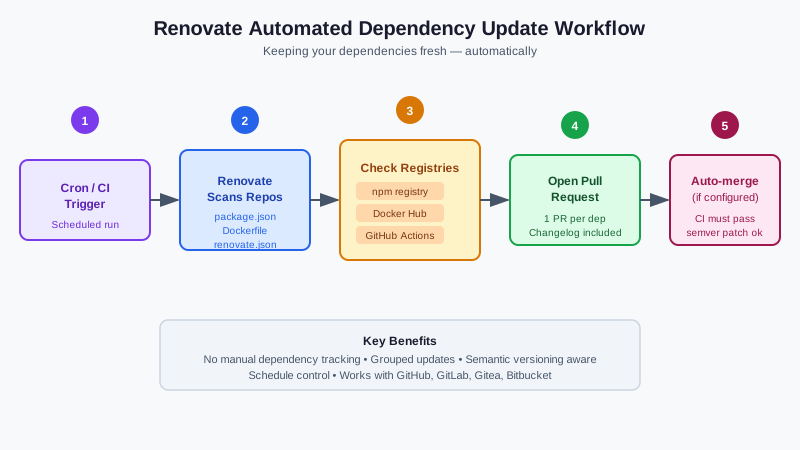
Architecture: How It Works
Renovate runs as a scheduled job (cron or CI/CD pipeline) that:
- Scans configured repositories for dependency files
- Checks registries (npm, Docker Hub, GitHub releases, etc.) for newer versions
- Groups updates intelligently (e.g., all patch versions together)
- Opens pull requests with the changelog and version diff
- Automerges if configured and tests pass
The self-hosted version (renovate npm package) gives you full control over configuration and doesn't require sharing repository access with a third-party service.
Deployment Options
Option 1: GitHub Actions (Simplest)
Run Renovate as a scheduled GitHub Actions workflow — no server needed.
Create .github/workflows/renovate.yml:
name: Renovate
on:
  schedule:
    - cron: '0 4 * * *'  # Daily at 4am UTC
  workflow_dispatch:      # Manual trigger

jobs:
  renovate:
    runs-on: ubuntu-latest
    steps:
      - uses: actions/checkout@v4
      - name: Self-hosted Renovate
        uses: renovatebot/github-action@v40
        with:
          token: ${{ secrets.RENOVATE_TOKEN }}
        env:
          LOG_LEVEL: debug
Create a GitHub personal access token with repo scope and add it as RENOVATE_TOKEN in repository secrets.
Option 2: Self-Hosted with Gitea/Forgejo
For self-hosted Git platforms, run Renovate directly:
# Install
npm install -g renovate

# Run against a Gitea instance
RENOVATE_TOKEN=your-gitea-token \
RENOVATE_PLATFORM=gitea \
RENOVATE_ENDPOINT=https://git.yourdomain.com \
renovate your-username/your-repo
Schedule this as a cron job or systemd timer.
Option 3: Docker Compose
For multi-repository setups, a containerized deployment is cleaner:
services:
  renovate:
    image: renovate/renovate:latest
    environment:
      - RENOVATE_TOKEN=${RENOVATE_TOKEN}
      - RENOVATE_PLATFORM=github
      - LOG_LEVEL=info
    volumes:
      - ./renovate-config.json:/usr/src/app/config.js
    restart: no  # Run as one-shot
Trigger via docker-compose run renovate in a cron job.
Want more devops guides? Get guides like this in your inbox — Self-Hosted Weekly delivers one free deep-dive every week.
Configuration
Renovate is configured via renovate.json (or renovate.json5) in each repository.
Minimal configuration
{
  "$schema": "https://docs.renovatebot.com/renovate-schema.json",
  "extends": [
    "config:recommended"
  ]
}
This enables the recommended defaults: groups related updates, automerges patch versions for dev dependencies, and creates PRs during business hours.
Docker-focused homelab configuration
{
  "$schema": "https://docs.renovatebot.com/renovate-schema.json",
  "extends": ["config:recommended"],
  "timezone": "America/Los_Angeles",
  "schedule": ["after 10pm on saturday"],
  "prHourlyLimit": 5,
  "prConcurrentLimit": 10,
  "packageRules": [
    {
      "matchDatasources": ["docker"],
      "matchUpdateTypes": ["minor", "patch"],
      "automerge": true,
      "automergeType": "pr",
      "requiredStatusChecks": null
    },
    {
      "matchDatasources": ["docker"],
      "matchUpdateTypes": ["major"],
      "labels": ["major-update"],
      "reviewers": ["your-username"]
    }
  ]
}
This configuration:
- Runs updates on Saturday evenings
- Automerges minor/patch Docker image updates
- Flags major version Docker updates for manual review
Pinning vs. range updates
By default, Renovate updates dependencies to the latest version. For Docker images in production, you may want to pin to specific digests for reproducibility:
{
  "packageRules": [
    {
      "matchDatasources": ["docker"],
      "pinDigests": true
    }
  ]
}
This replaces image: postgres:16 with image: postgres:16@sha256:abc123... — guaranteed reproducible deployments. Renovate then opens PRs to update the digest when the underlying image changes.
Grouping Updates
Renovate can group related updates into a single PR to reduce noise:
{
  "packageRules": [
    {
      "groupName": "all non-major updates",
      "matchUpdateTypes": ["minor", "patch"],
      "groupSlug": "all-minor-patch"
    },
    {
      "groupName": "linting tools",
      "matchPackageNames": ["eslint", "biome", "prettier", "@types/eslint"],
      "groupSlug": "linting"
    }
  ]
}
Useful Presets
Renovate has a preset system for common configurations:
| Preset | Effect |
|---|---|
config:recommended |
Sensible defaults for most projects |
schedule:weekly |
Run updates once per week |
:semanticCommits |
Conventional commit messages on PRs |
:pinAllExceptPeerDependencies |
Pin everything except peer deps |
docker:enableMajor |
Include major Docker image updates |
helpers:pinGitHubActionDigests |
Pin GitHub Action versions to SHA |
{
  "extends": [
    "config:recommended",
    "schedule:weekly",
    ":semanticCommits",
    "helpers:pinGitHubActionDigests"
  ]
}
Dependency Dashboard
When Renovate runs, it creates a Dependency Dashboard issue in your repository listing all detected updates, their status, and any pending PRs. This gives you a centralized view of your dependency state across all ecosystems.
The dashboard also lets you manually trigger updates by checking a checkbox in the issue — useful when you want to force a specific update outside the normal schedule.
Security Updates: Immediate Processing
For security vulnerabilities, you don't want to wait for the weekly schedule. Configure Renovate to handle OSV/GHSA security updates immediately:
{
  "vulnerabilityAlerts": {
    "labels": ["security"],
    "schedule": ["at any time"],
    "automerge": true
  }
}
This automerges security patches immediately when they're available, regardless of your normal schedule.
Monitoring Multiple Repositories
For homelabs with many repositories, configure Renovate's global config file to discover repositories automatically:
// config.js
module.exports = {
  platform: 'github',
  token: process.env.RENOVATE_TOKEN,
  autodiscover: true,  // Scan all accessible repos
  autodiscoverFilter: 'your-org/*',  // Limit to specific org
  onboarding: true,  // Auto-create renovate.json in repos without one
};
With autodiscover, Renovate finds all repositories you have access to and processes those that have a renovate.json file (or creates one if onboarding is enabled).
Alternatives
| Tool | Approach |
|---|---|
| Dependabot | GitHub-native, free, less configurable, no self-hosting |
| Snyk | Security-focused, paid for full features |
| Watchtower | Updates running Docker containers directly (more aggressive) |
| Diun | Docker image update notifications without PRs |
Renovate is the most configurable and broadest in ecosystem coverage. Dependabot is simpler for pure GitHub use but can't match Renovate's customization. Watchtower/Diun are for update notifications rather than full automation with PR review.
Getting Started
- Create a bot account on your Git platform (GitHub/Gitea)
- Grant it read/write access to target repositories
- Add
renovate.jsonto each repository with your desired configuration - Deploy Renovate using one of the methods above
- Check the Dependency Dashboard issue for initial findings
Renovate's initial scan often reveals significant accumulated debt — dozens of outdated packages you didn't know about. Start with automerging minor/patch updates and manually reviewing major versions. Over time, you'll establish a rhythm where your dependencies stay current with minimal manual work.