
Reactive Resume: Self-Hosted Open Source Resume Builder
Building a resume should be straightforward: enter your information, choose a layout, export to PDF. Instead, the resume builder market has turned into a minefield. Most "free" tools let you build a resume but paywall the PDF export. Others plaster watermarks on your download. Services like Canva, Zety, and Resume.io hook you in with pretty templates and then charge $20-30/month for what amounts to formatted text output. And every single one of them stores your personal career history, contact information, and employment details on their servers.
Photo by KOBU Agency on Unsplash
Reactive Resume is a free, open-source resume builder that you can self-host. It gives you a real-time WYSIWYG editor, dozens of professional templates, PDF export with no watermarks, and optional AI assistance for writing bullet points. Your resume data stays on your server, and there's no paywall -- every feature is available for free.

Why Self-Host a Resume Builder
The case for self-hosting a resume builder goes beyond just saving money:
- Privacy -- Resumes contain your full name, address, phone number, email, employment history, and skills. Handing this data to a SaaS company means it can be breached, sold, or used for marketing.
- No paywalls -- Every feature in Reactive Resume is free. No premium templates, no export fees, no "upgrade to remove watermark" nags.
- No lock-in -- Export your data anytime as JSON. Import it into any Reactive Resume instance. Switch servers without losing anything.
- Team use -- Deploy once for your entire household, team, or organization. Everyone gets their own account.
- AI integration on your terms -- Use OpenAI or any compatible API to help write resume content, without a third party mediating (and charging extra for) the AI features.
Features
Reactive Resume is a full-featured resume builder that competes with commercial tools:
- Real-time preview -- Edit on the left, see the formatted result on the right instantly
- Multiple templates -- Professional, modern, minimal, and creative layouts
- Custom sections -- Add any section type (projects, certifications, volunteering, publications, languages, etc.)
- Multi-page support -- Resumes automatically flow to additional pages when content exceeds one page
- Drag and drop -- Reorder sections and items by dragging
- PDF export -- High-quality PDF output using a headless Chrome renderer
- JSON import/export -- Full data portability
- Multiple resumes -- Create and manage multiple resume versions (one for each job type, for example)
- Sharing -- Generate a public link to share your resume as a web page
- OpenAI integration -- AI-powered suggestions for improving bullet points and summaries
- Multi-language -- Interface translated into 20+ languages
- Responsive -- Works on desktop and tablets
- Dark mode -- Full dark mode support for late-night resume editing sessions
Docker Compose Setup
Reactive Resume requires several services: the main application, a PostgreSQL database, MinIO for file storage (profile photos, etc.), and a Chrome instance for PDF rendering.
# docker-compose.yml
services:
  reactive-resume:
    image: amruthpillai/reactive-resume:latest
    container_name: reactive-resume
    ports:
      - "3000:3000"
    environment:
      # Application
      - PORT=3000
      - NODE_ENV=production
      - PUBLIC_URL=http://localhost:3000
      - STORAGE_URL=http://localhost:9000/default

      # Database
      - DATABASE_URL=postgresql://reactive_resume:change_me_password@postgres:5432/reactive_resume

      # Authentication
      - ACCESS_TOKEN_SECRET=change_me_access_secret_min_32_chars
      - REFRESH_TOKEN_SECRET=change_me_refresh_secret_min_32_chars

      # Storage (MinIO)
      - STORAGE_ENDPOINT=minio
      - STORAGE_PORT=9000
      - STORAGE_REGION=us-east-1
      - STORAGE_BUCKET=default
      - STORAGE_ACCESS_KEY=minioadmin
      - STORAGE_SECRET_KEY=minioadmin
      - STORAGE_USE_SSL=false

      # Chrome (PDF rendering)
      - CHROME_TOKEN=chrome_token_change_me
      - CHROME_URL=ws://chrome:3000

      # Optional: OpenAI for AI features
      # - OPENAI_API_KEY=sk-your-key-here

      # Optional: Email (for password reset, etc.)
      # - [email protected]
      # - SMTP_URL=smtp://user:[email protected]:587

      # Optional: Disable signups after creating your account
      # - DISABLE_SIGNUPS=true
    depends_on:
      - postgres
      - minio
      - chrome
    restart: unless-stopped

  postgres:
    image: postgres:16-alpine
    container_name: reactive-resume-db
    volumes:
      - postgres_data:/var/lib/postgresql/data
    environment:
      - POSTGRES_USER=reactive_resume
      - POSTGRES_PASSWORD=change_me_password
      - POSTGRES_DB=reactive_resume
    restart: unless-stopped

  minio:
    image: minio/minio:latest
    container_name: reactive-resume-minio
    command: server /data
    volumes:
      - minio_data:/data
    environment:
      - MINIO_ROOT_USER=minioadmin
      - MINIO_ROOT_PASSWORD=minioadmin
    restart: unless-stopped

  chrome:
    image: ghcr.io/browserless/chromium:latest
    container_name: reactive-resume-chrome
    environment:
      - TOKEN=chrome_token_change_me
      - TIMEOUT=10000
      - CONCURRENT=10
      - EXIT_ON_HEALTH_FAILURE=true
    restart: unless-stopped

volumes:
  postgres_data:
  minio_data:
Initial Setup
# Start all services
docker compose up -d

# Wait for services to initialize (MinIO needs bucket creation)
sleep 10

# Create the MinIO bucket
docker exec reactive-resume-minio \
  mc alias set local http://localhost:9000 minioadmin minioadmin && \
  mc mb local/default && \
  mc anonymous set download local/default
Navigate to http://your-server:3000 and create your account. The first user registered has no special admin privileges -- Reactive Resume uses a flat user model where every user has equal access to resume-building features.
Want more productivity guides? Get guides like this in your inbox — Self-Hosted Weekly delivers one free deep-dive every week.
Building Your Resume
Getting Started
- Create a new resume -- Click "Create Resume" and give it a title (e.g., "Software Engineer - 2026")
- Choose a template -- Browse available templates and pick one that matches your industry
- Fill in sections -- The editor has pre-built sections for:
- Personal information (name, email, phone, location, website)
- Summary / objective
- Work experience
- Education
- Skills
- Languages
- Certifications
- Projects
- Volunteering
- References
- Custom sections (anything else you need)
The Editor Interface
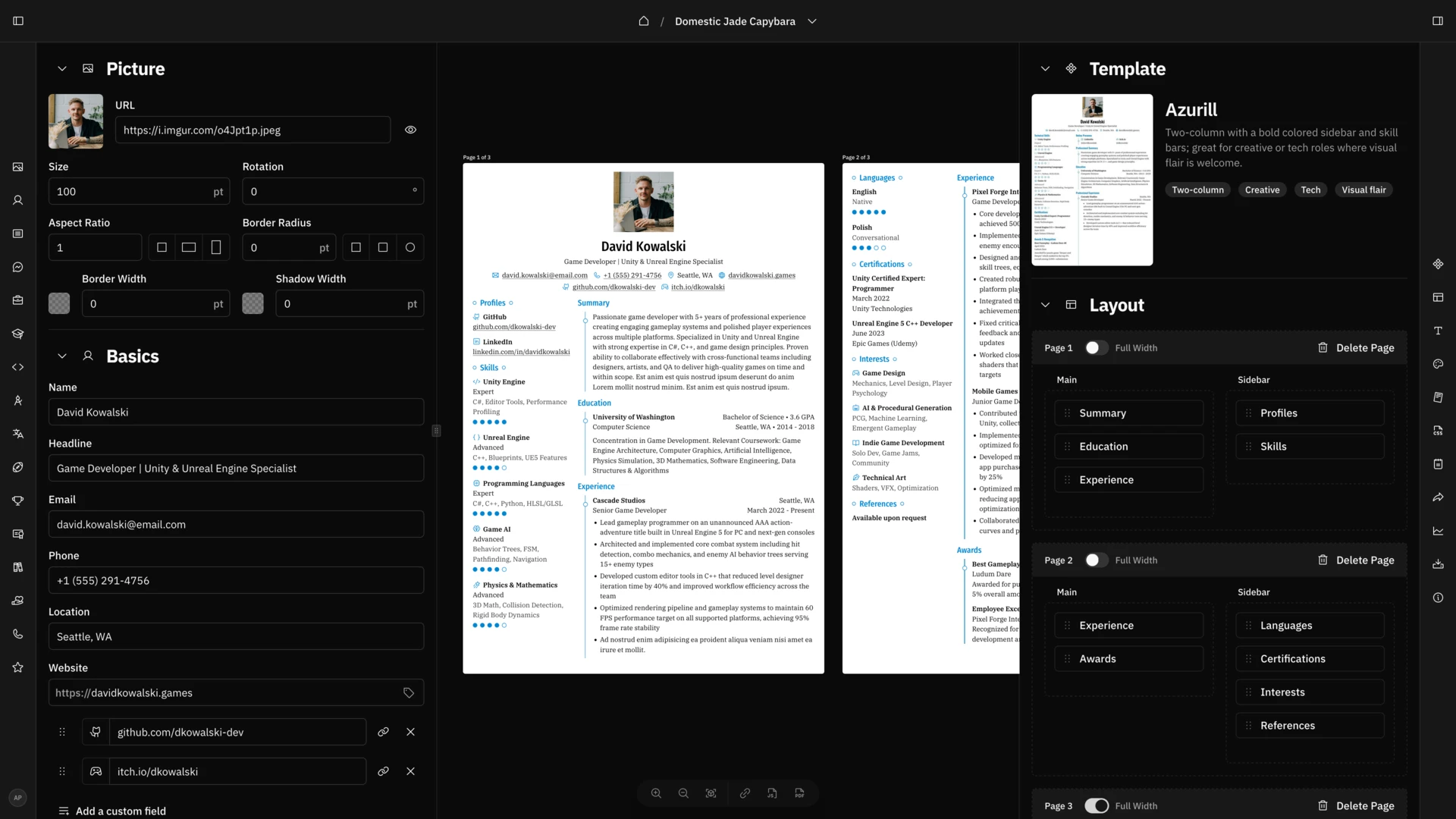
The editor uses a two-panel layout:
- Left panel: Form fields for entering your information
- Right panel: Live preview showing exactly how the resume will look when exported
Every change you make on the left is instantly reflected on the right. There's no "save" button -- everything is auto-saved continuously.
Customizing the Design
Each template supports extensive customization:
- Colors -- Primary and secondary accent colors
- Typography -- Font family, heading size, body text size
- Spacing -- Section spacing, item spacing, page margins
- Layout -- Single column, two-column, or sidebar layout
- Section order -- Drag sections to reorder them
- Visibility -- Toggle sections on/off without deleting content
Multiple Resume Versions
A powerful workflow is to maintain multiple versions of your resume:
- Base resume -- Contains everything: all experience, all projects, all skills
- Targeted versions -- Duplicated from the base, with sections toggled on/off and descriptions tailored for specific roles
Reactive Resume makes this easy with its duplicate feature -- clone any resume and modify it for a specific job application.
AI Integration
Reactive Resume can use OpenAI (or any compatible API) to help write resume content:
Setting Up AI
Add your API key to the environment:
environment:
  - OPENAI_API_KEY=sk-your-openai-key
What AI Can Do
- Improve bullet points -- Select a bullet point and ask AI to make it more impactful (quantify achievements, use stronger action verbs)
- Generate summaries -- Get an AI-written professional summary based on your experience
- Spell and grammar check -- Catch errors in your descriptions
- Tailor content -- Adjust wording to match a specific job description
The AI features are entirely optional. The resume builder is fully functional without them.
Using Alternative AI Providers
Reactive Resume works with any OpenAI-compatible API endpoint. To use a different provider:
environment:
  - OPENAI_API_KEY=your-api-key
  - OPENAI_BASE_URL=https://api.together.xyz/v1  # or any compatible endpoint
This lets you use providers like Together.ai, Groq, or a local Ollama instance for AI features without relying on OpenAI directly.
PDF Export
Reactive Resume uses a headless Chrome instance (via Browserless) to render resumes to PDF. This produces pixel-perfect output that matches exactly what you see in the preview.
To export:
- Open your resume in the editor
- Click the "Export" or download button
- Select PDF format
- The PDF is generated server-side and downloaded to your browser
The Chrome-based rendering ensures that fonts, layouts, and spacing are identical across all systems. Unlike HTML-to-PDF converters that can produce inconsistent results, this approach gives you exactly what you see.
JSON Export
You can also export your resume data as JSON for:
- Backup -- Save your data outside the application
- Migration -- Import into another Reactive Resume instance
- Version control -- Store resume data in Git alongside your projects
- Automation -- Build custom workflows around your resume data
Sharing Resumes
Reactive Resume can generate a public URL for your resume, turning it into a web page:
- Open your resume
- Click "Share"
- Toggle public sharing on
- Copy the generated URL
This is useful for:
- Including a live resume link in your email signature
- Sharing your resume on professional profiles
- Sending to recruiters without generating a new PDF each time
The shared page is a clean, responsive web page that looks identical to the PDF version.
Production Deployment
Environment Variables for Production
environment:
  - PUBLIC_URL=https://resume.yourdomain.com
  - STORAGE_URL=https://resume.yourdomain.com/storage
  - DISABLE_SIGNUPS=true  # After creating accounts
Reverse Proxy with Caddy
resume.yourdomain.com {
    reverse_proxy reactive-resume:3000
}
Reverse Proxy with Nginx
server {
    listen 443 ssl;
    server_name resume.yourdomain.com;

    ssl_certificate /path/to/cert.pem;
    ssl_certificate_key /path/to/key.pem;

    client_max_body_size 20M;

    location / {
        proxy_pass http://localhost:3000;
        proxy_http_version 1.1;
        proxy_set_header Upgrade $http_upgrade;
        proxy_set_header Connection "upgrade";
        proxy_set_header Host $host;
        proxy_set_header X-Real-IP $remote_addr;
        proxy_set_header X-Forwarded-For $proxy_add_x_forwarded_for;
        proxy_set_header X-Forwarded-Proto $scheme;
    }
}
Backup and Restore
Database Backup
docker exec reactive-resume-db \
  pg_dump -U reactive_resume reactive_resume > backup-$(date +%Y%m%d).sql
MinIO Data Backup
docker run --rm \
  -v minio_data:/data \
  -v $(pwd)/backups:/backup \
  alpine tar czf /backup/minio-$(date +%Y%m%d).tar.gz -C /data .
Full Restore
# Restore database
cat backup.sql | docker exec -i reactive-resume-db \
  psql -U reactive_resume reactive_resume

# Restore MinIO
docker run --rm \
  -v minio_data:/data \
  -v $(pwd)/backups:/backup \
  alpine tar xzf /backup/minio-backup.tar.gz -C /data
Comparison with Commercial Resume Builders
| Feature | Reactive Resume | Canva | Zety | Resume.io |
|---|---|---|---|---|
| Price | Free | Free (limited) / $13/mo | $24/mo | $24/mo |
| PDF export | Free | Free | Paywall | Paywall |
| Templates | 10+ | 100+ | 20+ | 30+ |
| AI features | OpenAI (BYO key) | Built-in | Built-in | Built-in |
| Data ownership | Self-hosted | Canva's servers | Zety's servers | Resume.io's servers |
| Privacy | Full control | Their privacy policy | Their privacy policy | Their privacy policy |
| Custom sections | Yes | Limited | Limited | Limited |
| ATS-friendly | Yes | Varies | Yes | Yes |
Reactive Resume won't match Canva's template library, but it provides professional, ATS-friendly templates that work well for most industries. The privacy and cost advantages are significant -- you never have to worry about a subscription expiring and losing access to your resume.
Who Should Use Reactive Resume
Reactive Resume is ideal for:
- Job seekers who want a professional resume builder without paying monthly fees
- Privacy-conscious users who don't want their career history stored by third parties
- Families and teams who want a shared resume-building tool
- Frequent job changers who maintain multiple resume versions
- Developers and technical professionals who appreciate open-source tools and data portability
The Docker setup requires a bit more effort than signing up for a SaaS tool, but once running, Reactive Resume provides a resume-building experience that matches or exceeds paid alternatives -- with full data ownership and zero recurring costs.