
Self-Hosting NetBird: Mesh VPN and Zero-Trust Networking
Traditional VPNs route all traffic through a central server. That works, but it's a bottleneck — a server in New York connecting to a server in London via a VPN gateway in Frankfurt is taking the scenic route. Mesh VPNs solve this by creating direct, encrypted tunnels between every pair of devices. Two machines in the same data center talk directly; they don't bounce off a relay on another continent.
NetBird is an open-source mesh VPN built on WireGuard that you can fully self-host. Unlike Tailscale (which requires their coordination servers), NetBird lets you run the entire control plane yourself — the management server, the signaling server, and the TURN relay. Your network topology, peer information, and access policies never leave your infrastructure.
Why NetBird
The mesh VPN space has a few strong options: Tailscale, Headscale, ZeroTier, Nebula, and NetBird. Here's why NetBird is worth considering:
- Fully self-hostable — every component runs on your infrastructure
- WireGuard-based — proven, audited encryption protocol
- Zero-trust access controls — define who can talk to what based on identity, groups, and policies
- NAT traversal — peers connect directly even behind firewalls (uses ICE/STUN/TURN)
- DNS management — automatic DNS for peers (machine.netbird.cloud becomes machine.your-domain)
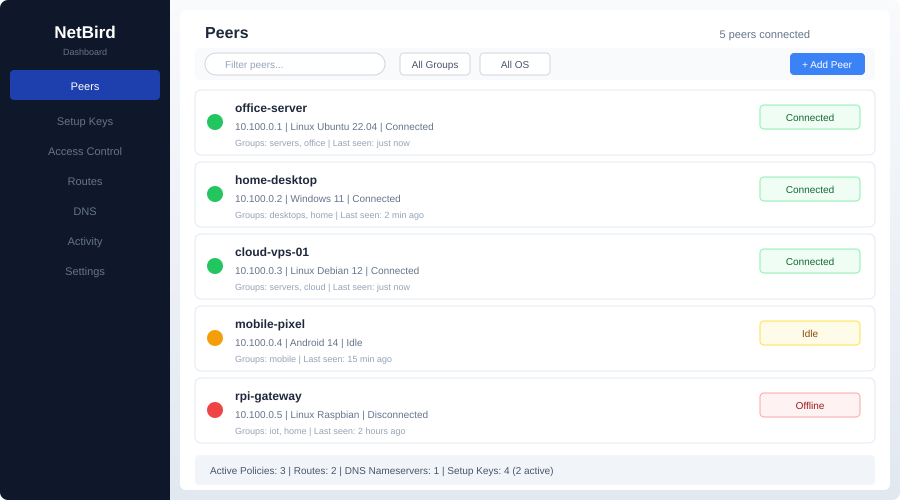
- Web UI — manage peers, groups, routes, and policies from a dashboard
- Multi-platform — Linux, macOS, Windows, iOS, Android clients
- SSO integration — OIDC-compatible (works with Authentik, Keycloak, Auth0, Google)
NetBird vs. Tailscale vs. Headscale
| Feature | NetBird | Tailscale | Headscale |
|---|---|---|---|
| Open source | Yes (all components) | Client only | Coordination server |
| Self-hosted control plane | Yes | No | Yes |
| WireGuard-based | Yes | Yes | Yes |
| Web UI | Yes (built-in) | Yes (SaaS) | Third-party (Headplane) |
| Access control policies | Yes (built-in) | Yes (ACLs) | Yes (ACLs) |
| Route management | Yes | Yes | Yes |
| DNS | Yes | MagicDNS | Limited |
| SSO/OIDC | Yes | Google/Microsoft/GitHub | OIDC |
| TURN relay | Self-hosted | Tailscale-hosted (DERP) | Tailscale DERP |
| Pricing | Free (self-hosted) | Free (up to 100 devices) | Free |
| Mobile apps | Yes | Yes | Uses Tailscale clients |
The key differentiator: NetBird is designed from the ground up for self-hosting, with a built-in web UI and access control system. Headscale is a reverse-engineered Tailscale coordination server — it works, but it reimplements a proprietary protocol. NetBird's architecture is its own, purpose-built for self-hosting.
That said, Tailscale's hosted service is hard to beat for simplicity. If you don't need self-hosting, Tailscale's free tier handles 100 devices. NetBird makes sense when you need full control over the control plane or want zero-trust policies without a SaaS dependency.
How NetBird Works
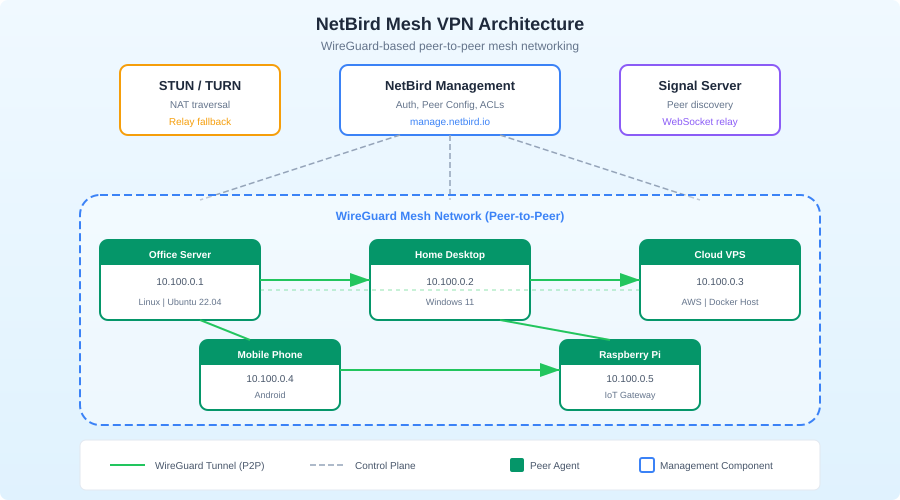
NetBird's architecture has four components:
Management Server — the control plane. Stores peer information, group membership, access policies, and routes. Peers check in here for configuration updates.
Signal Server — handles peer-to-peer connection negotiation. When two peers want to talk, the signal server helps them exchange connection information (like ICE candidates in WebRTC). It doesn't relay actual traffic.
TURN Relay — a fallback relay for peers that can't establish direct connections (symmetric NATs, strict firewalls). Traffic is encrypted end-to-end even through the relay.
NetBird Agent — runs on each peer device. Establishes WireGuard tunnels, manages routes, and enforces access policies locally.
In practice, most connections are direct peer-to-peer. The signal server and TURN relay are only used during connection setup and as fallback.
Self-Hosting NetBird: Setup
Server requirements
The NetBird control plane is lightweight:
- Minimum: 1 GB RAM, 1 CPU core
- Recommended: 2 GB RAM, 2 CPU cores
- Storage: 1 GB (database is small)
- Network: A public IP or domain name that peers can reach
- Ports: 443 (HTTPS), 3478 (TURN/STUN), 33073 (Signal), 10000 (Management API)
Prerequisites
You'll need:
- A domain name pointing to your server (e.g.,
netbird.yourdomain.com) - An OIDC identity provider (Authentik, Keycloak, Zitadel, Auth0, or Google)
- Docker and Docker Compose
Quick setup with the install script
NetBird provides a setup script that configures everything:
export NETBIRD_DOMAIN=netbird.yourdomain.com

curl -fsSL https://github.com/netbirdio/netbird/releases/latest/download/getting-started-with-zitadel.sh \
  -o setup.sh

chmod +x setup.sh
./setup.sh
This script sets up NetBird with Zitadel as the identity provider, all in Docker. It's the fastest way to get running.
Manual Docker Compose setup
For more control, here's a manual configuration:
version: "3.8"

services:
  management:
    container_name: netbird-management
    image: netbirdio/management:latest
    volumes:
      - ./management.json:/etc/netbird/management.json
      - mgmt-data:/var/lib/netbird
    ports:
      - "443:443"
      - "33073:33073"
    command:
      - "--port=443"
      - "--log-file=console"
      - "--log-level=info"
      - "--dns-domain=netbird.yourdomain.com"
    restart: always

  signal:
    container_name: netbird-signal
    image: netbirdio/signal:latest
    ports:
      - "10000:80"
    restart: always

  coturn:
    container_name: netbird-coturn
    image: coturn/coturn:latest
    ports:
      - "3478:3478/udp"
      - "3478:3478/tcp"
    command:
      - "-n"
      - "--log-file=stdout"
      - "--min-port=49152"
      - "--max-port=65535"
      - "--realm=netbird.yourdomain.com"
      - "--external-ip=${SERVER_PUBLIC_IP}"
      - "--listening-port=3478"
      - "--lt-cred-mech"
      - "--user=netbird:${TURN_PASSWORD}"
      - "--no-cli"
    restart: always

  dashboard:
    container_name: netbird-dashboard
    image: netbirdio/dashboard:latest
    ports:
      - "80:80"
    environment:
      NETBIRD_MGMT_API_ENDPOINT: "https://netbird.yourdomain.com:443"
      NETBIRD_MGMT_GRPC_API_ENDPOINT: "https://netbird.yourdomain.com:443"
      AUTH_AUDIENCE: "${AUTH_CLIENT_ID}"
      AUTH_CLIENT_ID: "${AUTH_CLIENT_ID}"
      AUTH_AUTHORITY: "https://auth.yourdomain.com/application/o/netbird/"
      AUTH_SUPPORTED_SCOPES: "openid profile email"
      AUTH_REDIRECT_URI: ""
      AUTH_SILENT_REDIRECT_URI: ""
      USE_AUTH0: "false"
    restart: always

volumes:
  mgmt-data:
The management.json file configures the management server:
{
  "Stuns": [
    {
      "Proto": "udp",
      "URI": "stun:netbird.yourdomain.com:3478"
    }
  ],
  "TURNConfig": {
    "Turns": [
      {
        "Proto": "udp",
        "URI": "turn:netbird.yourdomain.com:3478",
        "Username": "netbird",
        "Password": "your-turn-password"
      }
    ],
    "TimeBasedCredentials": false
  },
  "Signal": {
    "Proto": "https",
    "URI": "netbird.yourdomain.com:10000"
  },
  "HttpConfig": {
    "AuthAudience": "your-auth-client-id",
    "AuthIssuer": "https://auth.yourdomain.com/application/o/netbird/",
    "OIDCConfigEndpoint": "https://auth.yourdomain.com/application/o/netbird/.well-known/openid-configuration"
  }
}
Starting the control plane
docker compose up -d
Access the dashboard at http://your-server (the dashboard container serves on port 80).
Want more networking guides? Get guides like this in your inbox — Self-Hosted Weekly delivers one free deep-dive every week.
Adding Peers
Linux
# Install the NetBird client
curl -fsSL https://pkgs.netbird.io/install.sh | sh

# Connect to your management server
sudo netbird up --management-url https://netbird.yourdomain.com:443
The first time you run this, it opens a browser for SSO authentication. After authentication, the peer registers with your management server and establishes WireGuard tunnels to other peers.
macOS
brew install netbirdio/tap/netbird
sudo netbird up --management-url https://netbird.yourdomain.com:443
Windows
Download the installer from the NetBird GitHub releases page, install it, and configure the management URL in the system tray application.
Docker (for servers without a GUI)
For headless servers, use a setup key instead of browser-based SSO:
- Generate a setup key in the NetBird dashboard under Setup Keys
- On the server:
sudo netbird up \
  --management-url https://netbird.yourdomain.com:443 \
  --setup-key YOUR_SETUP_KEY
Setup keys can be reusable (for automated provisioning) or single-use (for one-time enrollment).
Access Control Policies
This is where NetBird really shines. Instead of "everyone can talk to everyone" (the default VPN model), you define granular policies.
Groups
Organize peers into groups:
- Servers — your production servers
- Developers — developer machines
- Monitoring — monitoring infrastructure
- All — default group for every peer
Policies
Policies define which groups can communicate:
| Source | Destination | Ports | Action |
|---|---|---|---|
| Developers | Servers | TCP 22, 443 | Allow |
| Monitoring | Servers | TCP 9090, 9100 | Allow |
| Servers | Servers | All | Allow |
| All | All | ICMP | Allow |
This is zero-trust networking: connections are denied by default and only allowed when a policy explicitly permits them. A developer's laptop can SSH into servers but can't access the monitoring stack directly. The monitoring system can scrape metrics from servers but can't SSH into them.
Network routes
NetBird can route traffic to networks behind a peer. If your office network is 192.168.1.0/24 and a NetBird peer sits on that network, you can create a route that makes the entire office network accessible to other peers:
- Go to Network Routes in the dashboard
- Create a route: network
192.168.1.0/24, routing peeroffice-gateway - Assign the route to groups that should have access
This replaces traditional site-to-site VPNs with a single NetBird peer acting as a gateway.
DNS Configuration
NetBird provides automatic DNS for peers. Each peer gets a DNS name like server1.netbird.yourdomain.com. You can also add custom DNS nameservers for specific domains:
- Route
*.internal.yourdomain.comthrough your internal DNS server - Route everything else through public DNS
This is configured in the dashboard under DNS > Nameservers.
Monitoring and Troubleshooting
Check peer status
# Show connection status
sudo netbird status

# Detailed output with peer connections
sudo netbird status --detail
The output shows each peer, its WireGuard endpoint, connection type (direct or relayed), and latency.
Common issues
Peers can't connect directly (always relayed):
- Check that UDP traffic can reach the TURN server on port 3478
- Symmetric NATs prevent direct connections — this is normal, the relay handles it
- Ensure STUN is working:
stun netbird.yourdomain.com:3478
Peer shows "disconnected":
- Verify the peer can reach the management server on port 443
- Check that the setup key hasn't expired
- Review management server logs:
docker logs netbird-management
DNS not resolving:
- Ensure the NetBird client is configured as a DNS resolver
- On Linux, check
/etc/resolv.conf— systemd-resolved can conflict - Use
netbird statusto verify DNS configuration
Backup and Disaster Recovery
Back up the management server data:
# Database and configuration backup
docker exec -t netbird-management tar -czf - /var/lib/netbird > netbird-backup.tar.gz

# Or if using SQLite (default)
cp /path/to/mgmt-data/store.db netbird-store-backup.db
The management server stores all peer registrations, groups, policies, and routes. Losing this data means re-registering every peer. Back it up.
Honest Trade-offs
NetBird is great if you:
- Want full control over your VPN control plane
- Need zero-trust access policies (not just "everyone can talk to everyone")
- Have a mix of cloud servers, office networks, and remote devices
- Want to eliminate traditional site-to-site VPN appliances
- Need SSO integration for VPN authentication
- Want a web dashboard for managing peers and policies
Consider Tailscale instead if you:
- Want zero setup effort (their hosted service is turnkey)
- Have fewer than 100 devices (Tailscale's free tier is generous)
- Don't need to self-host the control plane
- Value their MagicDNS and Funnel features
Consider Headscale instead if you:
- Already use Tailscale clients and want a self-hosted coordination server
- Want the Tailscale ecosystem (client apps, exit nodes) with self-hosted control
- Don't need the built-in web UI or policy engine (or are willing to use third-party tools)
Consider plain WireGuard instead if you:
- Have a simple hub-and-spoke topology (one server, a few clients)
- Don't need automatic peer discovery or NAT traversal
- Want the simplest possible setup with no moving parts
- Have static IP addresses for all peers
The bottom line: NetBird occupies a sweet spot between "set up WireGuard manually" and "use Tailscale's SaaS." It gives you a production-ready mesh VPN with access controls, DNS, and a web UI, all running on your infrastructure. The setup is more involved than Tailscale, but you get full sovereignty over your network. For homelabs and small businesses that take network security seriously, it's an excellent choice.