Headscale: Run Your Own Tailscale Control Server (Free and Open Source)
Tailscale is one of the best networking tools ever made — it turns your devices into a secure mesh network with zero configuration, automatic NAT traversal, and a dead-simple client. The technology is outstanding.
Photo by Axel Richter on Unsplash
The catch: it's a paid service. Free plan has a 3-device limit. Beyond that, it's $5–$6/user/month.
Headscale solves this. It's an open-source, self-hosted implementation of the Tailscale control server — the brain that coordinates which devices can talk to each other. You keep using the official Tailscale client on all your devices, but your headscale server replaces Tailscale's hosted infrastructure.
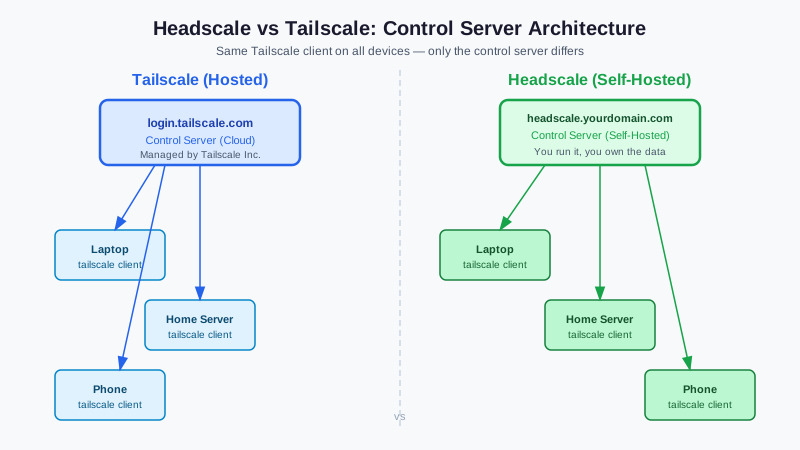
How Tailscale Actually Works (And Where Headscale Fits)
Tailscale has two components:
- Client (installed on each device): Manages the WireGuard tunnel between devices
- Control server (Tailscale's infrastructure): Coordinates the network — authenticates users, distributes IP addresses, manages ACLs, enables device discovery
The client software is open source. The control server is Tailscale's proprietary hosted service (what you pay for).
Headscale reimplements the control server API. You configure the Tailscale client to connect to your headscale server instead of login.tailscale.com. The WireGuard tunneling between devices still works identically — headscale just handles the coordination.
What Headscale Gives You
- Unlimited devices at no cost
- Full control over user accounts, access rules, and network topology
- Privacy: no third party sees your network topology or authentication events
- Self-hosted auth: OIDC integration with your existing identity provider
- CLI management: script and automate network operations
What You Give Up
- MagicDNS: Available in headscale with configuration (it's built in)
- Tailscale-specific features: Tailscale Funnels (inbound internet exposure), Tailscale SSH are not available
- Mobile apps: iOS and Android Tailscale apps work, but the user experience for registration is more manual
- Ongoing maintenance: You're running a server now; it needs updates and backups
Want more networking guides? Get guides like this in your inbox — Self-Hosted Weekly delivers one free deep-dive every week.
Prerequisites
- A Linux server reachable from the internet (a small VPS or home server with port forwarding)
- Port 443 (or your chosen port) accessible from the internet
- An SSL certificate (Let's Encrypt or your CA)
Headscale itself uses minimal resources — a $4/month VPS handles hundreds of devices easily.
Installation
Docker Compose (Recommended)
Create a directory and config file:
mkdir -p /opt/headscale/config
Create /opt/headscale/config/config.yaml:
server_url: https://headscale.yourdomain.com
listen_addr: 0.0.0.0:8080
metrics_listen_addr: 0.0.0.0:9090

private_key_path: /var/lib/headscale/private.key
noise:
  private_key_path: /var/lib/headscale/noise_private.key

ip_prefixes:
  - fd7a:115c:a1e0::/48
  - 100.64.0.0/10

derp:
  server:
    enabled: false
  urls:
    - https://controlplane.tailscale.com/derpmap/default

database:
  type: sqlite
  sqlite:
    path: /var/lib/headscale/db.sqlite

log:
  level: info

dns_config:
  magic_dns: true
  base_domain: yourdomain.internal
  nameservers:
    - 1.1.1.1

acls_policy_path: /etc/headscale/acls.hujson
Create docker-compose.yml:
services:
  headscale:
    image: headscale/headscale:latest
    volumes:
      - headscale-data:/var/lib/headscale
      - ./config:/etc/headscale
    ports:
      - "8080:8080"
      - "9090:9090"
    command: serve
    restart: unless-stopped

volumes:
  headscale-data:
docker-compose up -d
Reverse Proxy with Nginx
Put headscale behind Nginx to handle SSL:
server {
    listen 443 ssl;
    server_name headscale.yourdomain.com;

    ssl_certificate /etc/letsencrypt/live/headscale.yourdomain.com/fullchain.pem;
    ssl_certificate_key /etc/letsencrypt/live/headscale.yourdomain.com/privkey.pem;

    location / {
        proxy_pass http://127.0.0.1:8080;
        proxy_http_version 1.1;
        proxy_set_header Upgrade $http_upgrade;
        proxy_set_header Connection "upgrade";
        proxy_set_header Host $host;
        proxy_set_header X-Real-IP $remote_addr;
        proxy_set_header X-Forwarded-For $proxy_add_x_forwarded_for;
        proxy_set_header X-Forwarded-Proto $scheme;

        # Required for Tailscale
        proxy_buffering off;
        proxy_read_timeout 3600;
        proxy_send_timeout 3600;
    }
}
Or use Caddy for automatic SSL:
headscale.yourdomain.com {
    reverse_proxy localhost:8080 {
        flush_interval -1
    }
}
Managing Users and Devices
Create a user (namespace)
headscale users create myname
Generate a pre-authentication key
headscale preauthkeys create --user myname --reusable --expiration 24h
This generates a key that devices use to register without interactive login.
Register a device
On the device you want to add:
# Linux
tailscale up --login-server https://headscale.yourdomain.com --authkey your-preauth-key

# Or interactive login (requires browser)
tailscale up --login-server https://headscale.yourdomain.com
# Then visit the shown URL to authenticate
The device appears in your headscale server and gets an IP from your configured prefix.
List and manage devices
headscale nodes list
headscale nodes delete --identifier 1
headscale routes list
headscale routes enable --route 192.168.1.0/24 --identifier 2
Subnet routing
To use headscale as a VPN gateway that exposes your home network:
- Enable IP forwarding on the server/router device
- Advertise the subnet:
tailscale up --login-server https://headscale.yourdomain.com \ --advertise-routes=192.168.1.0/24 - Enable the route:
headscale routes enable --route 192.168.1.0/24
Now any device on your headscale network can reach 192.168.1.x through the advertising node.
ACL Policies
Control which devices can talk to which with ACL policies in /etc/headscale/acls.hujson:
{
  "acls": [
    {
      "action": "accept",
      "src": ["*"],
      "dst": ["*:*"]
    }
  ]
}
This default allows all devices to communicate. For more restrictive setups:
{
  "hosts": {
    "homelab": "100.64.0.1/32",
    "laptop": "100.64.0.2/32"
  },
  "acls": [
    {
      "action": "accept",
      "src": ["laptop"],
      "dst": ["homelab:22,443,80"]
    }
  ]
}
OIDC Authentication
For OIDC integration with Keycloak, Authentik, or other providers:
# In config.yaml
oidc:
  only_start_if_oidc_is_available: true
  issuer: https://auth.yourdomain.com/realms/master
  client_id: headscale
  client_secret: your-client-secret
  scope:
    - openid
    - profile
    - email
  extra_params:
    domain_hint: yourdomain.com
  allowed_domains:
    - yourdomain.com
With OIDC, users can log in with their existing SSO credentials — no need to create separate headscale accounts.
Headscale vs. Alternatives
| Solution | Pros | Cons |
|---|---|---|
| Headscale | Free, open source, full Tailscale client compatibility | Self-hosted complexity, no Funnels/SSH |
| Tailscale | No maintenance, excellent UX, all features | Monthly cost, data on Tailscale's servers |
| WireGuard + wg-easy | Maximum control, well-understood protocol | Manual peer management, no auto-routing |
| Netbird | Fully open-source coordination + clients | Smaller ecosystem, newer |
| ZeroTier | Excellent NAT traversal, free tier generous | Proprietary control plane |
Headscale is the right choice if you're already using Tailscale clients and want to eliminate the ongoing cost and data-sovereignty concerns.
Updating Headscale
With Docker Compose, updating is straightforward:
docker-compose pull headscale
docker-compose up -d
The database schema is automatically migrated on startup. Backup /var/lib/headscale/ before major version updates.