Karakeep (Hoarder): Self-Hosted AI-Powered Bookmark Manager
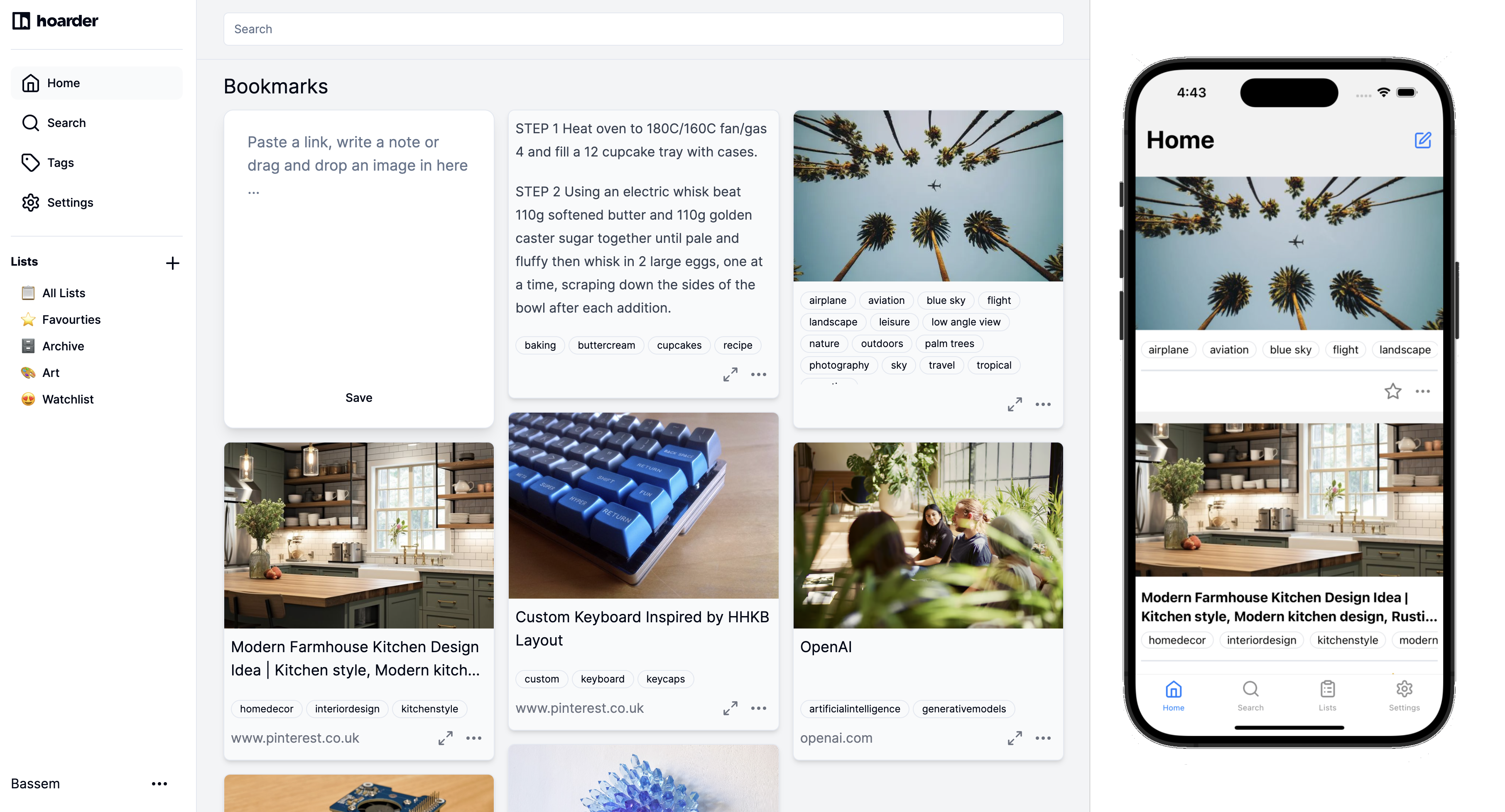
We all have the same problem: you find something interesting online, bookmark it, and never see it again. Browser bookmarks become a graveyard of unsorted links. Read-later apps like Pocket help, but they are SaaS services that own your data and charge subscription fees. Karakeep (formerly known as Hoarder) takes a different approach: it is a self-hosted bookmark manager that uses AI to automatically tag and categorize everything you save. Links, notes, images -- throw anything at it and the AI organizes it for you.
Photo by Jake Lorefice on Unsplash
What Makes Karakeep Different
Most bookmark managers require you to manually organize your saves into folders or apply tags. This is why they fail -- nobody maintains their bookmark taxonomy over time. Karakeep flips this by using a local AI model (via Ollama or OpenAI) to automatically generate relevant tags when you save something.
Save an article about Docker networking? Karakeep reads the page content and tags it with "docker," "networking," "containers," "devops" automatically. Save a recipe? It gets tagged with "cooking," "recipe," and the cuisine type. You never have to think about organization.
Core features:
- AI auto-tagging -- Automatic tag generation using local LLMs (Ollama) or OpenAI
- Full-text search -- Search across all saved content, not just titles and URLs
- Multiple content types -- Save links, notes, and images
- Browser extension -- One-click save from Chrome and Firefox
- Mobile apps -- iOS and Android apps for saving on the go
- RSS feeds -- Your bookmarks available as RSS feeds for integration with other tools
- Archive snapshots -- Saves page content so it survives link rot
- Lists -- Manual curation when you want to group related bookmarks
- API -- REST API for programmatic access
Self-Hosting with Docker
Karakeep needs three services: the app itself, a Meilisearch instance for full-text search, and a Chrome browser for page screenshots and content extraction. Optionally, add Ollama for local AI tagging.
Create your compose file:
version: "3.8"

services:
  karakeep:
    image: ghcr.io/hoarder-app/hoarder:latest
    container_name: karakeep
    restart: unless-stopped
    depends_on:
      - meilisearch
      - chrome
    ports:
      - "3000:3000"
    volumes:
      - karakeep-data:/data
    environment:
      MEILI_ADDR: "http://meilisearch:7700"
      BROWSER_WEB_URL: "http://chrome:9222"
      DATA_DIR: "/data"
      NEXTAUTH_SECRET: "your-secret-at-least-32-characters"
      NEXTAUTH_URL: "https://bookmarks.yourdomain.com"
      # For local AI with Ollama (recommended)
      OLLAMA_BASE_URL: "http://host.docker.internal:11434"
      INFERENCE_TEXT_MODEL: "llama3.2"
      INFERENCE_IMAGE_MODEL: "llava"
      # Or use OpenAI instead
      # OPENAI_API_KEY: "sk-your-key"

  chrome:
    image: gcr.io/zenika-hub/alpine-chrome:latest
    container_name: karakeep-chrome
    restart: unless-stopped
    command:
      - --no-sandbox
      - --disable-gpu
      - --disable-dev-shm-usage
      - --remote-debugging-address=0.0.0.0
      - --remote-debugging-port=9222
      - --hide-scrollbars

  meilisearch:
    image: getmeili/meilisearch:v1.12
    container_name: karakeep-meilisearch
    restart: unless-stopped
    volumes:
      - meilisearch-data:/meili_data
    environment:
      MEILI_NO_ANALYTICS: "true"

volumes:
  karakeep-data:
  meilisearch-data:
Start everything:
docker compose up -d
Navigate to http://your-server:3000 and create your account. The first user becomes the admin.
Setting Up AI Tagging with Ollama
The AI tagging is what sets Karakeep apart, and running it locally with Ollama means no API costs and no data leaving your server.
If you do not already have Ollama running, install it on your host:
curl -fsSL https://ollama.com/install.sh | sh
Pull the models Karakeep uses:
# Text model for analyzing page content and generating tags
ollama pull llama3.2

# Vision model for analyzing images (optional)
ollama pull llava
The text model (llama3.2 at ~2GB) handles most tagging. The vision model (llava at ~4.7GB) is optional but enables AI analysis of saved images and screenshots. If your server has limited RAM, skip the vision model.
How the AI Tagging Works
When you save a link:
- Chrome fetches the page and takes a screenshot
- Meilisearch indexes the full text content
- The text content is sent to your configured LLM
- The LLM analyzes the content and returns relevant tags
- Tags are attached to the bookmark automatically
Processing happens asynchronously, so saving is instant. Tags appear within a few seconds to a minute depending on your hardware and model size.
Tuning Tag Quality
The quality of auto-generated tags depends on your model choice:
- llama3.2 (3B) -- Fast, decent tags, runs on modest hardware (8GB RAM)
- llama3.1 (8B) -- Better tag quality, needs 16GB+ RAM
- OpenAI GPT-4o-mini -- Best quality, but requires API key and sends content externally
You can also manually add or remove tags after the AI generates them. Over time, the combination of AI suggestions and your manual refinements creates a well-organized collection.
Want more productivity guides? Get guides like this in your inbox — Self-Hosted Weekly delivers one free deep-dive every week.
Browser Extensions and Mobile Apps
Browser Extension
Install the Karakeep extension for Chrome or Firefox. Configure it with your server URL and API key (generated in Settings > API Keys). Then:
- Click the extension icon to save the current page
- Right-click any link and select "Save to Karakeep"
- Highlight text and save it as a note
The extension sends the URL to your server, which handles fetching, screenshot, indexing, and AI tagging.
Mobile Apps
Karakeep has native iOS and Android apps. Configure them with your server URL and credentials. The mobile apps support the share sheet, so you can share links from any app directly to Karakeep.
This is particularly useful for saving content from social media apps, Reddit, YouTube, and anywhere else you discover things on your phone.
Full-Text Search
Meilisearch powers Karakeep's search, and it is excellent. Search queries match against:
- Page titles and URLs
- Full page text content (not just metadata)
- Your manual notes
- AI-generated tags
- Image descriptions (if using a vision model)
Search is typo-tolerant and fast. Even with thousands of bookmarks, results appear instantly.
Managing Your Collection
Beyond AI tags, Karakeep provides several organizational tools:
- Lists -- Create curated collections (e.g., "Weekend Reading," "Work References," "Gift Ideas")
- Favorites -- Star important bookmarks for quick access
- Archive -- Move processed bookmarks out of the main view without deleting
- Filters -- Filter by tag, content type (link/note/image), or date range
- Bulk operations -- Select multiple items to tag, move, or delete
The search and AI tagging together mean you rarely need manual organization. Save everything, search when you need something specific.
Comparison with Alternatives
Karakeep vs Linkwarden
Linkwarden is a polished bookmark manager with collections, tags, and page archiving. It does not have AI tagging -- organization is entirely manual. If you are disciplined about organizing bookmarks, Linkwarden's clean interface and collaboration features are excellent. If you want "save and forget" with AI handling the organization, Karakeep is the better choice.
Karakeep vs Wallabag
Wallabag is a mature read-later application focused on article reading. It strips pages down to readable content, supports offline reading, and has good mobile apps. Wallabag is optimized for reading articles; Karakeep is optimized for collecting and finding anything. Use Wallabag if your primary workflow is "save articles to read later." Use Karakeep if you want a general-purpose collection manager.
Karakeep vs Raindrop.io
Raindrop.io is a SaaS bookmark manager with a beautiful UI, nested collections, and full-text search on Pro ($3/month). It has no AI features but has the most polished interface in the category. Karakeep matches its search capabilities, adds AI tagging, and keeps everything self-hosted. Raindrop.io wins on UI polish; Karakeep wins on privacy and AI features.
Karakeep vs Shiori
Shiori is a minimalist bookmark manager inspired by Pocket. It is lightweight and simple -- save links, read them later. No AI, limited search, basic tagging. If you want maximum simplicity with minimal resource usage, Shiori works. Karakeep is for people who want intelligence applied to their bookmark collection.
Resource Usage
Karakeep's stack uses moderate resources due to the Chrome and Meilisearch components:
- Karakeep app -- ~200 MB RAM
- Chrome -- ~300-500 MB RAM (headless, for screenshots and content extraction)
- Meilisearch -- ~100-200 MB RAM (scales with collection size)
- Ollama -- ~4-8 GB RAM when actively processing (depending on model)
Total: ~1-2 GB without Ollama active, 5-10 GB during AI processing. Ollama unloads models from memory after inactivity, so the steady-state usage is manageable.
A machine with 8 GB RAM can run Karakeep with a small Ollama model comfortably. For larger models or heavy usage, 16 GB is recommended.
Backup
Back up the data volume and Meilisearch data:
# Stop services to ensure consistency
docker compose stop

# Back up volumes
docker run --rm -v karakeep-data:/data -v $(pwd):/backup alpine \
  tar czf /backup/karakeep-data-$(date +%Y%m%d).tar.gz /data

docker run --rm -v meilisearch-data:/data -v $(pwd):/backup alpine \
  tar czf /backup/meilisearch-data-$(date +%Y%m%d).tar.gz /data

# Restart
docker compose start
When to Use Karakeep
Karakeep is ideal for digital hoarders -- people who save lots of content and struggle to organize it. If you have hundreds of browser bookmarks across devices, a Pocket account full of unread articles, and screenshots of things you wanted to remember, Karakeep gives you a single place to dump everything with AI handling the filing. Save first, search later.