
Zammad: Self-Hosted Helpdesk and Ticketing System
Every growing team hits the point where support requests outgrow a shared inbox. Emails get missed, nobody knows who's handling what, and customers wait days for responses that should take hours. A helpdesk system fixes this by turning unstructured communication into trackable, assignable, prioritizable tickets.
Photo by Tomas Martinez on Unsplash
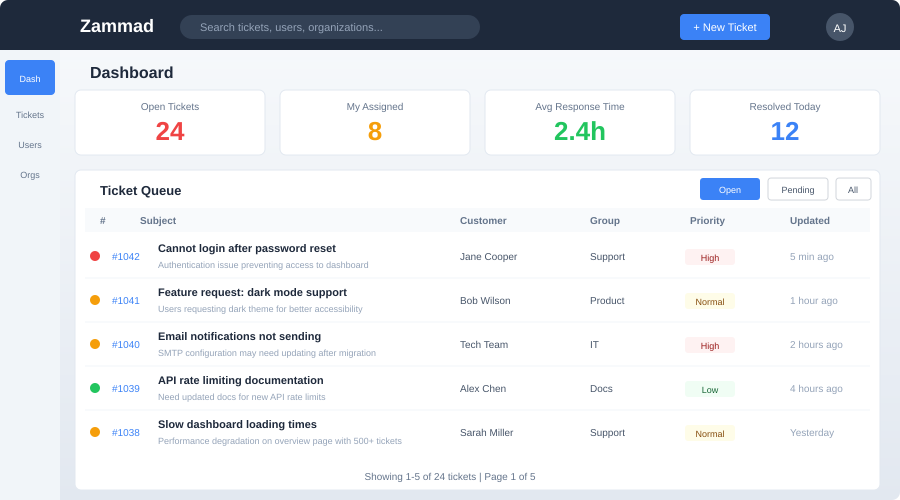
Zammad is an open source helpdesk and ticketing system that handles email, chat, phone, social media, and web forms in a single interface. It's built with Ruby on Rails and ships with a polished web UI, a knowledge base, SLA management, and reporting. Think of it as a self-hosted alternative to Zendesk or Freshdesk, without the per-agent pricing that makes commercial helpdesks expensive as your team scales.
Why Zammad?
The helpdesk space has plenty of options, both hosted and self-hosted. Zammad stands out for several reasons:
- Multi-channel inbox -- Email, web forms, chat, Twitter, Telegram, and SMS all feed into a unified ticket queue
- Modern UI -- Clean, responsive interface that agents actually enjoy using
- Knowledge base -- Built-in help center with categories, articles, and full-text search
- SLA management -- Define response and resolution time targets with escalation rules
- Triggers and automations -- Auto-assign, auto-tag, auto-respond based on ticket content or metadata
- Full-text search -- Elasticsearch-powered search across all tickets, articles, and attachments
- Reporting -- Agent performance, ticket volume trends, SLA compliance metrics
- Branding -- Customize colors, logos, and email templates to match your organization
- LDAP/SSO -- Integrate with Active Directory, SAML, or OAuth for agent authentication
- API -- REST API for integrations with your existing tools
The trade-off compared to simpler tools like osTicket: Zammad requires more resources (Elasticsearch, PostgreSQL, Redis) and has a heavier footprint. But the UI quality and feature set justify the overhead for teams that rely on their helpdesk daily.
Architecture
Zammad runs several interconnected services:
- Rails application -- The core web application and API server
- WebSocket server -- Powers real-time updates in the browser (new tickets, live chat)
- Background workers -- Process emails, run triggers, send notifications
- PostgreSQL -- Primary data store for tickets, users, and configuration
- Elasticsearch -- Full-text search index for fast ticket and knowledge base search
- Redis -- Session storage and caching
- Memcached -- Additional caching layer
This is not a lightweight application. Plan for at least 4 GB of RAM, ideally 8 GB for production use with Elasticsearch.
Docker Deployment
Zammad provides official Docker Compose files that orchestrate all the required services.
Prerequisites
- Docker and Docker Compose installed
- At least 4 GB RAM available
- A domain name with DNS pointing to your server
- A reverse proxy (Caddy, Nginx, or Traefik) for HTTPS
Docker Compose Setup
# docker-compose.yml
services:
  zammad-railsserver:
    image: ghcr.io/zammad/zammad:latest
    container_name: zammad-railsserver
    command: ["zammad-railsserver"]
    depends_on:
      - zammad-memcached
      - zammad-postgresql
      - zammad-redis
    volumes:
      - zammad-storage:/opt/zammad/storage
    environment: &zammad-env
      POSTGRESQL_HOST: zammad-postgresql
      POSTGRESQL_USER: zammad
      POSTGRESQL_PASS: zammad
      POSTGRESQL_DB: zammad_production
      MEMCACHE_SERVERS: zammad-memcached:11211
      REDIS_URL: redis://zammad-redis:6379
      ELASTICSEARCH_HOST: zammad-elasticsearch
      RAILS_TRUSTED_PROXIES: "['127.0.0.1', '::1']"
    restart: unless-stopped

  zammad-websocket:
    image: ghcr.io/zammad/zammad:latest
    container_name: zammad-websocket
    command: ["zammad-websocket"]
    depends_on:
      - zammad-railsserver
    environment:
      <<: *zammad-env
    restart: unless-stopped

  zammad-worker:
    image: ghcr.io/zammad/zammad:latest
    container_name: zammad-worker
    command: ["zammad-worker"]
    depends_on:
      - zammad-railsserver
    volumes:
      - zammad-storage:/opt/zammad/storage
    environment:
      <<: *zammad-env
    restart: unless-stopped

  zammad-nginx:
    image: ghcr.io/zammad/zammad:latest
    container_name: zammad-nginx
    command: ["zammad-nginx"]
    ports:
      - "8080:8080"
    depends_on:
      - zammad-railsserver
      - zammad-websocket
    volumes:
      - zammad-storage:/opt/zammad/storage
    restart: unless-stopped

  zammad-elasticsearch:
    image: bitnami/elasticsearch:8
    container_name: zammad-elasticsearch
    environment:
      - discovery.type=single-node
      - ES_JAVA_OPTS=-Xms512m -Xmx512m
    volumes:
      - elasticsearch-data:/bitnami/elasticsearch/data
    restart: unless-stopped

  zammad-memcached:
    image: memcached:1.6-alpine
    container_name: zammad-memcached
    command: memcached -m 256
    restart: unless-stopped

  zammad-postgresql:
    image: postgres:16-alpine
    container_name: zammad-postgresql
    environment:
      POSTGRES_USER: zammad
      POSTGRES_PASSWORD: zammad
      POSTGRES_DB: zammad_production
    volumes:
      - postgresql-data:/var/lib/postgresql/data
    restart: unless-stopped

  zammad-redis:
    image: redis:7-alpine
    container_name: zammad-redis
    volumes:
      - redis-data:/data
    restart: unless-stopped

volumes:
  zammad-storage:
  elasticsearch-data:
  postgresql-data:
  redis-data:
Starting Zammad
docker compose up -d
The first startup takes several minutes as the database is initialized and Elasticsearch indexes are built. Access Zammad at http://your-server:8080 once the railsserver container reports healthy.
Initial Setup Wizard
On first access, Zammad walks you through a setup wizard:
- Create admin account -- Set your admin username, email, and password
- Organization name -- Your company or team name
- Email notification settings -- Configure SMTP for outbound notifications
- Email channel -- Connect an email account to receive tickets via email
- Base URL -- Set the public URL where Zammad is accessible
Want more productivity guides? Get guides like this in your inbox — Self-Hosted Weekly delivers one free deep-dive every week.
Configuring Email Channels
Email is usually the primary channel for a helpdesk. Zammad can connect to email accounts via IMAP/POP3 and send replies via SMTP.
Adding an email channel
- Go to Admin > Channels > Email
- Click Add Email Account
- Enter the email address (e.g.,
[email protected]) - Configure IMAP settings (server, port, credentials)
- Configure SMTP settings for sending
- Set the default group (ticket queue) for incoming emails
Zammad polls the mailbox periodically and creates tickets for new messages. Replies from agents are sent via SMTP with proper threading headers, so the conversation appears correctly in the customer's email client.
Multiple email addresses
You can add multiple email channels for different purposes:
[email protected]-- General support queue[email protected]-- Billing-related tickets[email protected]-- Security reports
Each address can route to a different group with different agents and SLA rules.
Knowledge Base
Zammad includes a built-in knowledge base for self-service support. Agents can write articles, organize them into categories, and make them publicly accessible or internal-only.
Setting up the knowledge base
- Go to Admin > Knowledge Base
- Enable the knowledge base and configure the public URL
- Create categories (e.g., "Getting Started", "Billing", "API Documentation")
- Write articles with the rich text editor
- Set visibility: public (accessible without login), internal (agents only), or draft
The knowledge base supports full-text search and can be embedded in your website or linked from automated ticket responses.
SLA Management
Service Level Agreements define your response time commitments. Zammad tracks SLA compliance per ticket and escalates when deadlines approach.
Configuring SLAs
- Go to Admin > SLAs
- Create an SLA with conditions (e.g., applies to tickets in the "Support" group with "High" priority)
- Set time targets:
- First response time -- How quickly the first agent reply should happen
- Update time -- Maximum time between agent replies
- Solution time -- Total time to resolve the ticket
- Define business hours (SLA clocks only tick during working hours)
When a ticket approaches or exceeds its SLA deadline, it's highlighted in the ticket queue and can trigger escalation notifications.
Triggers and Automations
Triggers fire when specific conditions are met on ticket creation or update.
Common trigger examples
Auto-assign based on email address:
- Condition: Ticket email channel is
[email protected] - Action: Set group to "Billing", set priority to "Normal"
Auto-respond to new tickets:
- Condition: Ticket is created
- Action: Send confirmation email to customer with ticket number
Escalation notification:
- Condition: Ticket SLA deadline is in 30 minutes
- Action: Email the agent and their supervisor
Tag based on content:
- Condition: Ticket body contains "password reset"
- Action: Add tag "password-reset", set priority to "Low"
Zammad vs Alternatives
| Feature | Zammad | FreeScout | osTicket | GLPI |
|---|---|---|---|---|
| Language | Ruby on Rails | PHP (Laravel) | PHP | PHP |
| RAM usage | 2-4 GB | 256-512 MB | 256-512 MB | 512 MB-1 GB |
| UI quality | Excellent | Good | Dated | Functional |
| Multi-channel | Email, chat, social, phone | Email + modules | Email, web forms | Email, web forms |
| Knowledge base | Built-in | Plugin | Built-in (basic) | Built-in |
| SLA management | Yes | No (paid module) | Basic | Yes |
| Full-text search | Elasticsearch | Database | Database | Database |
| Real-time updates | WebSocket | Polling | Polling | Polling |
| API | REST | REST | Limited | REST |
| LDAP/SSO | Yes | No (paid) | LDAP plugin | Yes |
| Asset management | No | No | No | Yes (core feature) |
| Learning curve | Moderate | Low | Low | Moderate |
Choose Zammad when
- You need a polished, modern helpdesk UI
- Multi-channel support (beyond email) matters
- SLA tracking and reporting are requirements
- You have the server resources (4+ GB RAM)
- You want a Zendesk-like experience without Zendesk pricing
Choose FreeScout when
- You want the simplest possible self-hosted helpdesk
- Your team is small (1-5 agents)
- You only need email-based ticketing
- Server resources are limited
- You want a Help Scout alternative
Choose osTicket when
- You need a battle-tested, stable ticketing system
- UI modernness is not a priority
- You want minimal resource requirements
- Email and web form channels are sufficient
Choose GLPI when
- You need IT asset management alongside helpdesk
- You're managing IT infrastructure and equipment
- You need inventory tracking, license management, and CMDB
- Helpdesk is secondary to asset management
Reverse Proxy Configuration
Zammad's bundled Nginx container listens on port 8080. Put it behind your existing reverse proxy for HTTPS:
Caddy:
support.yourdomain.com {
    reverse_proxy localhost:8080
}
Nginx:
server {
    server_name support.yourdomain.com;

    client_max_body_size 50M;

    location / {
        proxy_pass http://localhost:8080;
        proxy_set_header Host $host;
        proxy_set_header X-Real-IP $remote_addr;
        proxy_set_header X-Forwarded-For $proxy_add_x_forwarded_for;
        proxy_set_header X-Forwarded-Proto $scheme;
    }

    location /ws {
        proxy_pass http://localhost:8080;
        proxy_http_version 1.1;
        proxy_set_header Upgrade $http_upgrade;
        proxy_set_header Connection "upgrade";
    }
}
Backup Strategy
Back up the PostgreSQL database and the storage volume:
# Database backup
docker exec zammad-postgresql pg_dump -U zammad zammad_production > zammad-backup-$(date +%Y%m%d).sql

# Storage backup (attachments, images)
docker run --rm -v zammad-storage:/data -v $(pwd):/backup alpine \
  tar czf /backup/zammad-storage-$(date +%Y%m%d).tar.gz /data
Elasticsearch data does not need to be backed up separately -- it can be rebuilt from the database using zammad run rails r 'SearchIndexBackend.reindex'.
Production Tips
Resource tuning
- Elasticsearch -- The
ES_JAVA_OPTS=-Xms512m -Xmx512msetting allocates 512 MB to the JVM heap. Increase for larger installations - PostgreSQL -- Tune
shared_buffers,work_mem, andeffective_cache_sizefor your available RAM - Workers -- The default worker count handles moderate load. For high-volume installations, scale the worker container
Email deliverability
Ensure your outbound emails don't land in spam:
- Set up SPF, DKIM, and DMARC for your domain
- Use a dedicated IP or a reputable SMTP relay (Fastmail, Postmark, SES)
- Test deliverability with tools like mail-tester.com
Keeping Zammad updated
docker compose pull
docker compose up -d
Zammad publishes regular releases with security fixes and new features. Major version upgrades occasionally require database migrations, which run automatically on container startup.
Verdict
Zammad is the most polished self-hosted helpdesk available. The multi-channel support, SLA management, and knowledge base put it in the same category as commercial tools costing $50-100 per agent per month. The trade-off is resource consumption -- you need a server with real headroom to run Elasticsearch, PostgreSQL, Redis, and the Rails application comfortably.
For small teams that just need email ticketing, FreeScout or osTicket will serve you well with far fewer resources. But if your support operation has outgrown a shared inbox and you need proper SLA tracking, multi-channel support, and a UI your agents won't dread opening every morning, Zammad delivers. The setup is heavier than most self-hosted tools, but the result is a helpdesk that competes with the commercial options on features while keeping your data entirely under your control.