Wallos: Self-Hosted Subscription and Recurring Payment Tracker
Subscription creep is real. It starts with Netflix, adds Spotify, picks up a cloud storage plan, absorbs a gym membership, and before you know it you're paying $300/month across fifteen different services -- half of which you barely use. The average American household spends over $200/month on subscriptions, and studies consistently show that people underestimate their subscription spending by 2-3x.
Tracking this manually in a spreadsheet works until it doesn't. You forget to add a new subscription, the prices change without you noticing, and annual subscriptions are easy to miss entirely. Dedicated subscription tracking apps exist (Truebill/Rocket Money, Bobby, Subly), but they either require bank account access, charge their own subscription fee (the irony), or store your financial data on their servers.
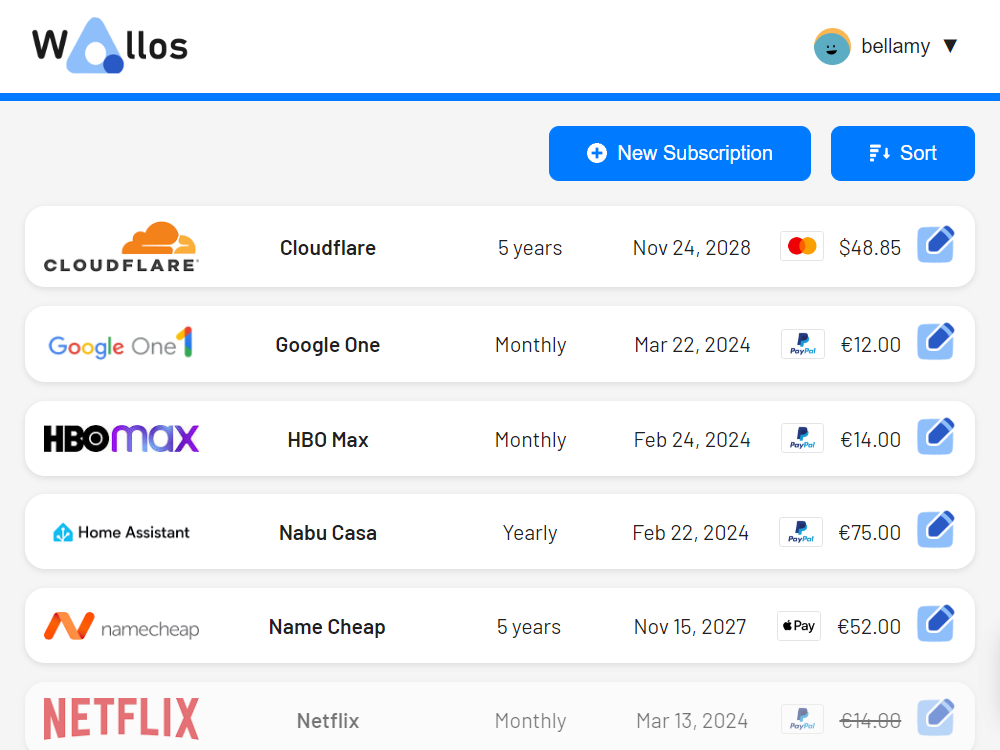
Wallos is a self-hosted subscription and recurring payment tracker. It gives you a clean dashboard showing every subscription you pay for, how much you spend monthly and annually, which payments are coming up next, and which subscriptions might be worth canceling. No bank account connections, no SaaS fees, and your financial data stays on your server.

Why Wallos
The subscription tracking space has several approaches. Here's where Wallos fits:
- No bank account connection required -- Unlike Rocket Money or Truebill, Wallos doesn't need access to your bank. You manually enter subscriptions, which means you actually think about each one (that's a feature, not a bug).
- Self-hosted -- Your financial data stays on your infrastructure. No third-party company knows what services you pay for.
- Free and open-source -- No subscription fee to track your subscriptions. No premium tier, no feature gating.
- Clean analytics -- See spending by category, monthly vs. annual costs, upcoming payments, and spending trends over time.
- Multi-currency -- Track subscriptions in different currencies with automatic exchange rate conversion.
- Notifications -- Get reminded before payments are due, so you can cancel before the next billing cycle.
- Household support -- Track subscriptions for multiple household members.
- Logo fetching -- Automatically fetches service logos for a visually appealing dashboard.
- Lightweight -- Runs on minimal hardware with SQLite, no external database needed.
Wallos vs. Other Subscription Trackers
| Feature | Wallos | Actual Budget | Firefly III | Rocket Money |
|---|---|---|---|---|
| Primary focus | Subscription tracking | Full budgeting | Full finance mgmt | Bill negotiation + tracking |
| Self-hosted | Yes | Yes | Yes | No |
| Bank connection | No | No (manual/import) | Optional | Required |
| Subscription tracking | Dedicated | Generic recurring | Generic recurring | Dedicated |
| Notifications | Email + webhooks | No | Push + email | |
| Price | Free | Free | Free | $4-12/month |
| Resource usage | ~50 MB RAM | ~100 MB RAM | ~200 MB RAM | N/A (SaaS) |
| Multi-currency | Yes | Limited | Yes | USD only |
Choose Wallos when you specifically want subscription tracking with a clean dedicated interface. Choose Actual Budget or Firefly III when you want full personal finance management with budgeting, accounts, and transaction tracking. Choose Rocket Money if you want automated detection via bank connections and don't mind a SaaS.
Docker Compose Setup
Wallos is one of the simplest self-hosted apps to deploy:
# docker-compose.yml
services:
  wallos:
    image: bellamy/wallos:latest
    container_name: wallos
    ports:
      - "8282:80"
    volumes:
      - wallos_db:/var/www/html/db
      - wallos_logos:/var/www/html/images/uploads/logos
    environment:
      - TZ=America/Los_Angeles
    restart: unless-stopped

volumes:
  wallos_db:
  wallos_logos:
docker compose up -d
Navigate to http://your-server:8282 and create your admin account. The setup wizard walks you through initial configuration including your preferred currency and household name.
That's the entire setup. No database server, no Redis, no external dependencies. Wallos uses SQLite internally, which keeps the deployment trivially simple.
Adding Subscriptions
Manual Entry
Click "Add Subscription" and fill in:
- Name -- The service name (e.g., "Netflix," "Spotify," "AWS")
- Logo -- Auto-fetched from the service's website, or upload a custom one
- Price -- The recurring amount
- Currency -- The currency you pay in (automatic conversion to your base currency)
- Billing cycle -- Monthly, yearly, weekly, or custom interval
- Category -- Group subscriptions (Entertainment, Productivity, Cloud, Health, etc.)
- Payment method -- Which card or account you pay from
- Next payment date -- When the next charge is expected
- Notes -- Any additional details (account email, plan tier, etc.)
- Household member -- Who uses this subscription
Categories
Organize subscriptions into categories to understand where your money goes:
- Entertainment -- Netflix, Spotify, Disney+, gaming subscriptions
- Productivity -- Microsoft 365, Notion, Todoist, cloud storage
- Cloud & Infrastructure -- AWS, DigitalOcean, domain registrations, hosting
- Health & Fitness -- Gym membership, meditation apps, health tracking
- News & Education -- News subscriptions, online courses, learning platforms
- Communication -- Phone plan, VPN, email service
- Financial -- Banking fees, investment platforms, insurance
Custom categories can be created to match your specific spending patterns.
Payment Methods
Track which payment method is used for each subscription. This is useful for:
- Seeing the total charge on each credit card
- Planning card replacements (when a card expires, you know exactly which subscriptions need updating)
- Identifying subscriptions charged to old or unused payment methods
Want more finance guides? Get guides like this in your inbox — Self-Hosted Weekly delivers one free deep-dive every week.
Notifications and Reminders
Wallos can notify you before subscriptions renew, giving you time to cancel or downgrade before the next charge:
Email Notifications
Configure SMTP in the Wallos settings:
- Go to Settings > Notifications
- Enter your SMTP server details:
- Server:
smtp.fastmail.com(or your email provider) - Port:
465(or587for STARTTLS) - Username: your email
- Password: your app-specific password
- Server:
- Set notification timing (e.g., 3 days before payment)
- Test the notification
Webhook Notifications
Wallos supports webhooks, which lets you integrate with almost any notification system:
- Ntfy -- Self-hosted push notifications
- Gotify -- Self-hosted notification server
- Slack/Discord -- Send alerts to a channel
- Home Assistant -- Trigger automations based on upcoming payments
- Custom scripts -- Hit any HTTP endpoint
Configure webhooks in Settings > Notifications > Webhooks. The payload includes subscription name, amount, currency, and payment date.
Notification Strategy
A practical notification setup:
- 7 days before annual renewals -- Annual subscriptions are the easiest to forget and often the most expensive. A week's notice gives you time to evaluate whether to renew.
- 3 days before monthly renewals -- Quick reminder for monthly subscriptions.
- Immediate notification on price changes -- When you update a subscription's price, Wallos can track the change history.
Analytics and Insights
Wallos provides several analytics views to understand your subscription spending:
Monthly Overview
The main dashboard shows:
- Total monthly cost -- Sum of all subscriptions normalized to monthly amounts (annual subscriptions divided by 12)
- Total annual cost -- Your yearly subscription spending
- Upcoming payments -- What's due in the next 7/14/30 days
- Spending by category -- Pie chart or bar chart breaking down costs
Category Analysis
Drill into categories to see:
- Which category costs the most
- How category spending has changed over time
- Which individual subscriptions within a category are the biggest spenders
This often reveals surprising patterns. Many people discover their "cloud and infrastructure" spending (hosting, domains, SaaS tools) exceeds their entertainment subscriptions.
Spending Trends
Over time, Wallos builds a history of your subscription spending:
- Are you spending more this year than last year?
- Which new subscriptions contributed to the increase?
- Which cancellations saved you money?
This historical view is valuable during annual budget reviews.
Multi-Currency Support
If you pay for services in different currencies (common for international users or businesses):
- Set your base currency in Settings
- Enter each subscription in its actual billing currency
- Wallos automatically converts to your base currency using current exchange rates
- The dashboard shows totals in your base currency
Exchange rates are fetched from a free API and updated regularly. You can also manually set exchange rates if you prefer fixed-rate budgeting.
Household Management
Wallos supports tracking subscriptions across household members:
- Create profiles for each household member
- Assign subscriptions to specific members
- See per-member spending breakdowns
- Identify shared vs. individual subscriptions
This is useful for families where different members have their own subscriptions but you want a unified view of total household spending.
Reverse Proxy Configuration
Caddy
subscriptions.yourdomain.com {
    reverse_proxy wallos:80
}
Nginx
server {
    listen 443 ssl;
    server_name subscriptions.yourdomain.com;

    ssl_certificate /path/to/cert.pem;
    ssl_certificate_key /path/to/key.pem;

    location / {
        proxy_pass http://localhost:8282;
        proxy_set_header Host $host;
        proxy_set_header X-Real-IP $remote_addr;
        proxy_set_header X-Forwarded-For $proxy_add_x_forwarded_for;
        proxy_set_header X-Forwarded-Proto $scheme;
    }
}
Backup and Restore
Wallos stores everything in SQLite, making backups trivial:
# Backup the database and logos
docker run --rm \
  -v wallos_db:/db \
  -v wallos_logos:/logos \
  -v $(pwd)/backups:/backup \
  alpine sh -c "
    tar czf /backup/wallos-$(date +%Y%m%d).tar.gz -C /db . &&
    tar czf /backup/wallos-logos-$(date +%Y%m%d).tar.gz -C /logos .
  "
For automated backups, add this to a cron job:
# crontab -e
0 3 * * 0 docker run --rm -v wallos_db:/db -v $(pwd)/backups:/backup alpine tar czf /backup/wallos-$(date +\%Y\%m\%d).tar.gz -C /db .
Practical Workflow: The Quarterly Subscription Audit
Wallos enables a powerful budgeting practice: the quarterly subscription audit.
Step 1: Review the Dashboard
Open Wallos and look at your total monthly spend. Is it higher than you expected? (It usually is.)
Step 2: Category Deep Dive
Go through each category and ask:
- Am I actively using every subscription in this category?
- Are there overlapping services? (Two cloud storage plans, two note-taking apps, etc.)
- Can any annual subscriptions be downgraded to free tiers?
Step 3: Check Upcoming Renewals
Look at annual subscriptions renewing in the next 90 days. These are your highest-impact decisions -- canceling a $120/year subscription saves $10/month.
Step 4: Act on Decisions
For each subscription you decide to cancel or change:
- Cancel or modify the subscription with the provider
- Update the entry in Wallos (mark as canceled or adjust the price)
- Note the savings
Step 5: Track Progress
Compare this quarter's total to last quarter's. Wallos's historical data makes this comparison easy.
Most people who do this audit for the first time find $50-100/month in subscriptions they forgot about or no longer use. That's $600-1,200/year recovered.
Integration with Other Finance Tools
Wallos focuses specifically on subscription tracking, but it complements broader finance tools:
- Actual Budget -- Use Wallos to track what subscriptions you have, and Actual Budget for full income/expense budgeting
- Firefly III -- Same complementary relationship. Wallos gives you the subscription-specific analytics that Firefly III's generic recurring transactions don't
- Spreadsheets -- Export your subscription data from Wallos to feed into existing spreadsheet-based budgets
Who Should Use Wallos
Wallos is for anyone who:
- Has more than five recurring subscriptions (most people have 10-20)
- Suspects they're spending more on subscriptions than they realize
- Wants to track subscription spending without connecting bank accounts
- Values data privacy for financial information
- Wants a lightweight, low-maintenance self-hosted application
The Docker setup takes two minutes, adding your subscriptions takes fifteen minutes, and the ongoing maintenance is close to zero. For the clarity it brings to your recurring spending, Wallos is one of the highest-value self-hosted applications per minute of setup time.