Self-Hosting a Time Server with Chrony: Accurate NTP for Your Network
Time synchronization is one of those things you don't think about until it breaks. And when it breaks, everything breaks. TLS certificates fail validation because the server thinks it's 2019. Distributed databases lose consistency because two nodes disagree on what "now" means. Log correlation becomes impossible when your servers are seconds apart. Cron jobs fire at the wrong moment. Kerberos authentication fails completely if clocks drift more than five minutes.
Photo by unavailable parts on Unsplash
Running your own NTP time server ensures every device on your network agrees on what time it is, without relying on external services. Chrony is the modern tool for the job — it's faster, more accurate, and more resource-efficient than the classic ntpd.
Why Run a Local Time Server
Most devices sync time from public NTP pools (pool.ntp.org). That works fine for single machines, but running your own time server gives you:
- Consistency — every device on your LAN synchronizes from the same source, eliminating inter-device clock skew
- Reduced external dependency — if your internet drops, your internal clocks keep ticking accurately
- Lower latency — LAN NTP queries are sub-millisecond; internet queries are 10-100ms
- Better accuracy — chrony can maintain sub-microsecond accuracy on a LAN
- Control — you decide the upstream sources, the polling intervals, and the security policy
- Fewer external connections — one server talks to the internet instead of every device on your network
When you don't need this
If you have three servers and a couple of desktops, just point them at pool.ntp.org and call it a day. A local NTP server makes sense when you have:
- 10+ devices that need synchronized time
- Services where clock accuracy matters (databases, logging, certificates)
- An isolated network with limited or no internet access
- Compliance requirements for traceable time synchronization
- A homelab where you want to learn how NTP works
Why Chrony Over ntpd
The classic ntpd (the reference NTP daemon) has been the standard for decades. Chrony was written as a modern replacement and has real advantages:
| Feature | chrony | ntpd |
|---|---|---|
| Initial sync speed | Seconds | Minutes |
| Accuracy | Sub-microsecond | Microseconds |
| Intermittent connectivity | Handles well | Struggles |
| Resource usage | ~1 MB RAM | ~3 MB RAM |
| Security (NTS support) | Yes | No |
| Configuration complexity | Simple | Moderate |
| Default on RHEL/Fedora | Yes (since RHEL 7) | No |
| Default on Ubuntu | Optional | Yes (via timedatectl) |
Chrony synchronizes faster after boot, handles networks that go up and down (laptops, VPN connections), and supports Network Time Security (NTS) for authenticated time. Unless you have a specific reason to run ntpd, use chrony.
Setting Up Chrony as a Time Server
Option 1: Bare metal / VM (recommended)
Time synchronization works best when the daemon has direct access to the system clock. Containers add a layer of abstraction that can reduce accuracy. For a production time server, install chrony directly on the host.
Fedora / RHEL / CentOS:
sudo dnf install chrony
sudo systemctl enable --now chronyd
Debian / Ubuntu:
sudo apt install chrony
sudo systemctl enable --now chronyd
Arch Linux:
sudo pacman -S chrony
sudo systemctl enable --now chronyd
Configuring chrony as a server
Edit /etc/chrony.conf (or /etc/chrony/chrony.conf on Debian-based systems):
# Upstream NTP servers — use geographically close sources
# The 'iburst' option sends a burst of requests on startup for faster sync
server time.cloudflare.com iburst nts
server time.google.com iburst
server 0.pool.ntp.org iburst
server 1.pool.ntp.org iburst

# Allow NTP clients on your local network
allow 192.168.0.0/16
allow 10.0.0.0/8
allow 172.16.0.0/12

# Serve time even when not fully synchronized
# (useful if upstream servers are temporarily unreachable)
local stratum 10

# Record the rate at which the system clock gains/loses time
driftfile /var/lib/chrony/drift

# Enable kernel synchronization of the hardware clock
rtcsync

# Step the system clock if the offset is larger than 1 second
# during the first three clock updates
makestep 1.0 3

# Log statistics for monitoring
logdir /var/log/chrony
log measurements statistics tracking
Restart chrony after making changes:
sudo systemctl restart chronyd
Firewall configuration
NTP uses UDP port 123. Open it for your local network:
# firewalld (Fedora, RHEL)
sudo firewall-cmd --permanent --add-service=ntp
sudo firewall-cmd --reload

# ufw (Ubuntu)
sudo ufw allow from 192.168.0.0/16 to any port 123 proto udp

# iptables
sudo iptables -A INPUT -p udp -s 192.168.0.0/16 --dport 123 -j ACCEPT
Only allow NTP connections from your local network. There's no reason to serve time to the entire internet.
Option 2: Docker deployment
If you prefer containers (understanding the accuracy trade-off), chrony can run in Docker:
version: "3.8"

services:
  chrony:
    container_name: chrony
    image: cturra/ntp:latest
    ports:
      - "123:123/udp"
    environment:
      NTP_SERVERS: "time.cloudflare.com,time.google.com,0.pool.ntp.org"
      LOG_LEVEL: "0"
    cap_add:
      - SYS_TIME
    restart: always
The SYS_TIME capability is required — chrony needs to adjust the system clock. Without it, the container starts but can't actually synchronize time.
docker compose up -d
Note that running NTP in a container means the container adjusts the host's system clock through the kernel. This works, but the additional abstraction layer means you'll get millisecond accuracy rather than microsecond accuracy. For most homelabs, that's fine.
Want more infrastructure guides? Get guides like this in your inbox — Self-Hosted Weekly delivers one free deep-dive every week.
Verifying the Setup
Check chrony's status
# Show current time sources and their status
chronyc sources -v

# Show detailed tracking information
chronyc tracking

# Show statistics about each source
chronyc sourcestats
The sources output looks like this:
MS Name/IP address         Stratum Poll Reach LastRx Last sample
===============================================================================
^* time.cloudflare.com           3   6   377    34   +124us[ +135us] +/-   12ms
^+ time.google.com               1   6   377    33   -234us[ -223us] +/-   15ms
^+ 0.pool.ntp.org                2   6   377    35   +456us[ +467us] +/-   22ms
^+ 1.pool.ntp.org                2   6   377    34   -89us[  -78us] +/-   18ms
Key indicators:
^*— the currently selected source (the best one)^+— acceptable sources that could be selected^-— sources that are excluded by the selection algorithm^?— sources that haven't responded yetReach— should be 377 (all eight recent attempts succeeded)
Check from a client
From another machine on your network:
# Test time sync from a client
chronyc -h 192.168.1.100 tracking

# Or using ntpdate for a quick check
ntpdate -q 192.168.1.100
Configuring Clients
Linux clients
Point chrony on client machines to your local server:
# /etc/chrony.conf on client machines
server 192.168.1.100 iburst

# Optionally keep pool servers as fallback
pool pool.ntp.org iburst maxsources 2
Or use systemd-timesyncd (simpler, good enough for clients):
# /etc/systemd/timesyncd.conf
[Time]
NTP=192.168.1.100
FallbackNTP=pool.ntp.org
sudo systemctl restart systemd-timesyncd
timedatectl timesync-status
Docker containers
Containers inherit the host's clock, so they automatically get accurate time if the host is synchronized. No per-container NTP configuration needed.
Network equipment
Most routers, switches, and access points have NTP settings. Point them to your local server's IP address. This ensures your firewall logs, router logs, and server logs all have consistent timestamps.
Windows clients
For Windows machines on your network:
# Set NTP server (PowerShell as admin)
w32tm /config /manualpeerlist:"192.168.1.100" /syncfromflags:manual /update
Restart-Service w32time
w32tm /resync
Network Time Security (NTS)
NTS is the modern replacement for NTP authentication. It uses TLS to verify that time responses actually came from the server you expect and haven't been tampered with in transit. Without NTS, NTP traffic is unauthenticated — a man-in-the-middle could feed your machines incorrect time.
To enable NTS on your chrony server:
# In /etc/chrony.conf — use NTS-capable upstream servers
server time.cloudflare.com iburst nts
server nts.netnod.se iburst nts

# Enable NTS for clients connecting to this server
ntsserverkey /etc/pki/tls/private/chrony-nts.key
ntsservercert /etc/pki/tls/certs/chrony-nts.crt
You'll need a TLS certificate for your server. Let's Encrypt works fine:
# Using certbot
sudo certbot certonly --standalone -d ntp.yourdomain.com

# Then reference the certs in chrony.conf
ntsserverkey /etc/letsencrypt/live/ntp.yourdomain.com/privkey.pem
ntsservercert /etc/letsencrypt/live/ntp.yourdomain.com/fullchain.pem
NTS is worth enabling if you're serving time to machines outside your trusted LAN. For a home network behind a firewall, standard NTP is fine.

Monitoring
Tracking accuracy over time
Chrony logs statistics that you can graph with Prometheus + Grafana. The chrony_exporter project exposes chrony metrics:
services:
  chrony-exporter:
    container_name: chrony_exporter
    image: superq/chrony-exporter:latest
    ports:
      - "9123:9123"
    command:
      - "--chrony.address=host.docker.internal:323"
    restart: always
Key metrics to watch:
- System clock offset — how far your clock is from "true" time (should be < 1ms on LAN)
- Root delay — round-trip time to the reference clock
- Frequency drift — how fast your clock gains/loses time (crystal oscillator quality)
- Reach — whether upstream sources are responding
Simple health check
A basic script to alert if chrony loses sync:
#!/bin/bash
# Check if chrony is synchronized
LEAP=$(chronyc tracking | grep "Leap status" | awk '{print $4}')
if [ "$LEAP" != "Normal" ]; then
    echo "WARNING: Chrony is not synchronized! Leap status: $LEAP"
    # Send alert via your preferred method
fi
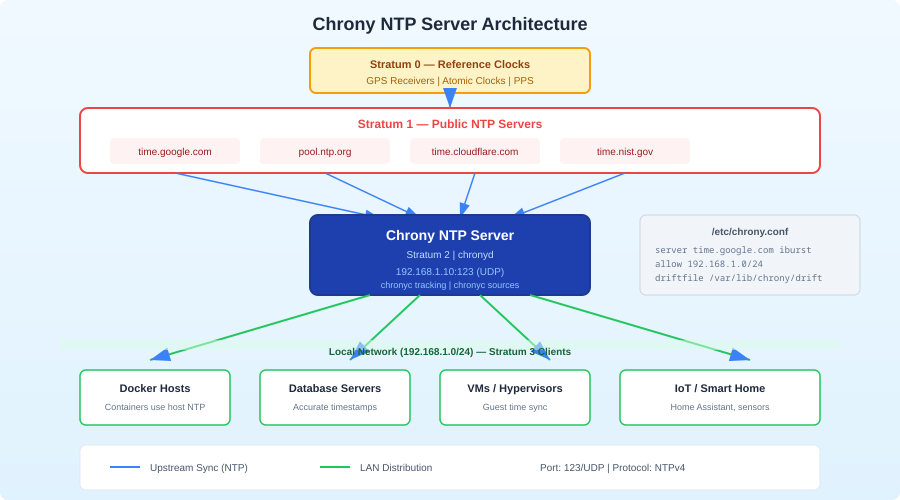
Stratum Explained
NTP uses a hierarchy called "stratum" to indicate how many hops a time source is from an atomic clock:
- Stratum 0 — atomic clocks, GPS receivers (hardware devices, not network-accessible)
- Stratum 1 — servers directly connected to a stratum 0 device
- Stratum 2 — servers synchronized to stratum 1 (most public NTP servers)
- Stratum 3 — your local chrony server (synchronized to stratum 2)
- Stratum 4 — your client machines (synchronized to your stratum 3 server)
Each hop adds a small amount of inaccuracy, but on a LAN, the added offset at each stratum is negligible (microseconds). The local stratum 10 directive in the config is a fallback — it tells chrony to serve time at stratum 10 if all upstream sources are unreachable. This way, at least your machines stay in sync with each other even during an internet outage.
Honest Trade-offs
Run a local chrony server if you:
- Have 10+ devices that need synchronized time
- Run distributed systems where clock skew causes real problems
- Want log correlation across multiple servers
- Need time sync during internet outages
- Want to reduce external NTP traffic from many devices to one
Skip it if you:
- Have fewer than 5 devices (just use pool.ntp.org directly)
- Don't run services that are sensitive to clock skew
- Don't want another service to maintain
- Are already running a domain controller that handles NTP (Active Directory does this)
The bottom line: A local NTP server is low-maintenance infrastructure that prevents an entire class of subtle, hard-to-debug problems. Chrony makes it easy — install it, point it at a few upstream servers, open port 123, and forget about it. Your future self will thank you the first time you need to correlate logs across five servers during an incident.