
Mattermost: Self-Hosted Team Chat That Enterprises Actually Trust
Every message your team sends through Slack travels through Slack's servers, gets stored on Slack's infrastructure, and lives under Slack's terms of service. For many teams this is fine. But if you work in healthcare, finance, government, defense, or any field where data residency matters, "trust us" from a SaaS vendor is not good enough. You need the messages on your metal, in your jurisdiction, under your control.
Photo by Kevin Ache on Unsplash
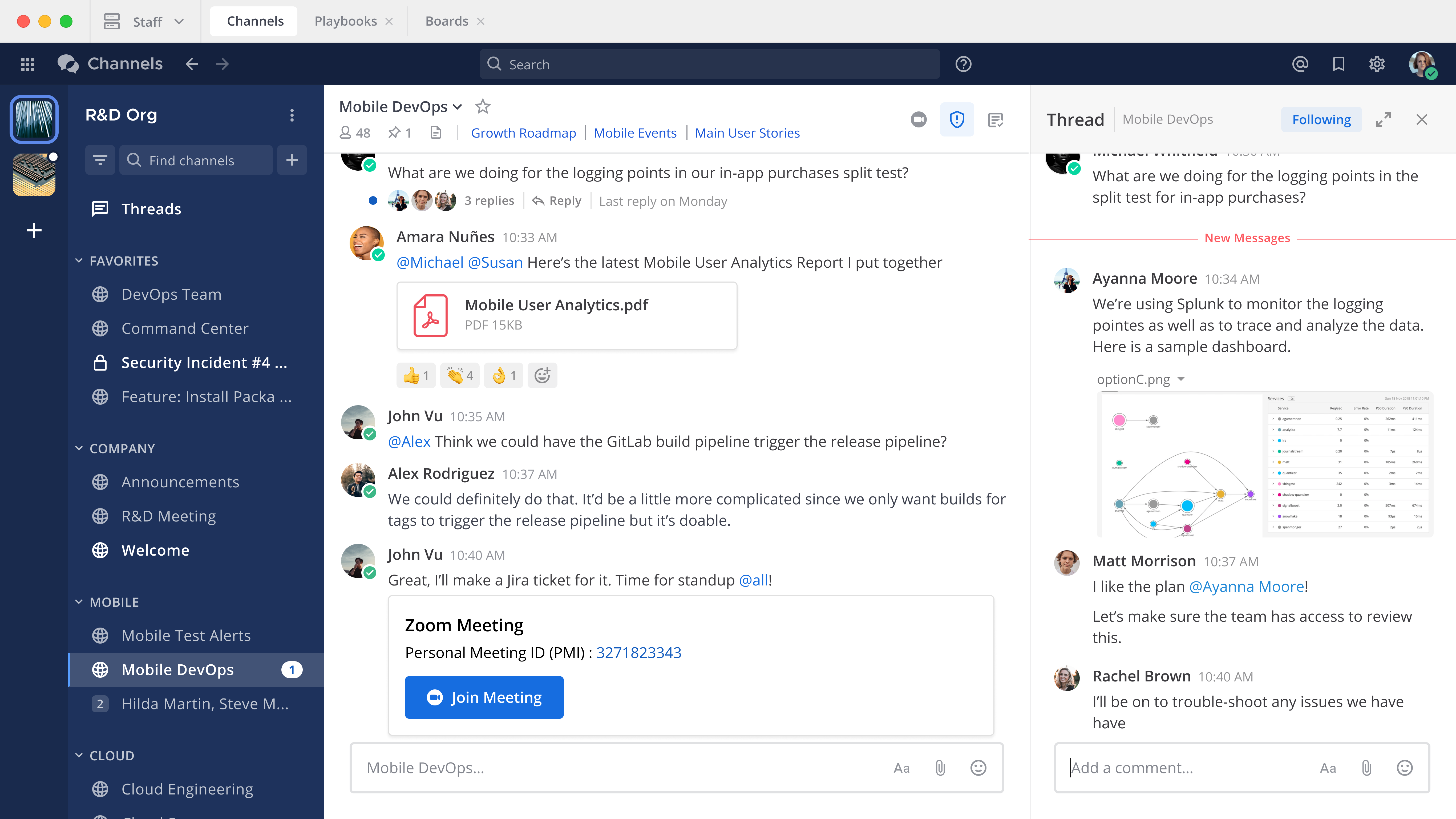
Mattermost is the self-hosted team chat platform that takes this problem seriously. It looks and feels like Slack -- channels, threads, file sharing, integrations, mobile apps -- but everything runs on infrastructure you own. It's written in Go and React, it's open source (MIT license for the Team Edition), and it's deployed by organizations like the U.S. Department of Defense, Samsung, and Deloitte. If you want a Slack replacement you can actually put in front of a compliance auditor, Mattermost is the strongest contender.
The Self-Hosted Chat Landscape
Mattermost isn't the only option. Here's how the major self-hosted team chat platforms compare:
| Feature | Mattermost | Rocket.Chat | Element (Matrix) | Zulip |
|---|---|---|---|---|
| Protocol | Proprietary (REST/WS) | Proprietary (DDP/REST) | Matrix (federated) | Proprietary (REST) |
| Language | Go + React | Node.js + Meteor | Python (Synapse) + React | Python (Django) + React |
| Federation | No (Enterprise only) | Yes (limited) | Yes (core feature) | No |
| E2E Encryption | Enterprise only | Yes | Yes (default for DMs) | No |
| Threading model | Slack-style threads | Slack-style threads | Room-based | Topic-based (unique) |
| Mobile apps | Yes (iOS/Android) | Yes (iOS/Android) | Yes (iOS/Android) | Yes (iOS/Android) |
| Voice/Video | Yes (plugin-based) | Yes (built-in) | Yes (Jitsi/native) | Yes (Jitsi/BigBlueButton) |
| Compliance exports | Yes | Limited | No | No |
| LDAP/SAML | Yes (free LDAP, paid SAML) | Yes | Yes (via Synapse) | Yes |
| Plugin ecosystem | Growing (Go/React) | Large (JS) | Bridges, widgets | Moderate (Python) |
| License | MIT (Team) / Proprietary (Enterprise) | MIT + proprietary | Apache 2.0 | Apache 2.0 |
| RAM (small team) | ~300 MB | ~500 MB | ~500 MB (Synapse) | ~400 MB |
| Difficulty | Easy | Easy | Moderate-Hard | Easy |
When to Choose Each Platform
Choose Mattermost if:
You need a Slack replacement that IT and compliance teams will approve. Mattermost's sweet spot is organizations that care about data sovereignty, audit trails, and enterprise integrations (LDAP, SAML, Jira, GitLab). The Slack-like UX means minimal retraining for your team. If you're migrating off Slack and need something that "just works" the same way but on your servers, Mattermost is the path of least resistance.
Choose Rocket.Chat if:
You want the most feature-rich option out of the box. Rocket.Chat packs in video conferencing, omnichannel customer support, federation, and a massive integration library. It tries to be an all-in-one communication platform rather than strictly a team chat tool. The tradeoff is complexity -- the Node.js/Meteor stack is heavier and the admin interface can be overwhelming.
Choose Element/Matrix if:
Federation is a hard requirement. If you need to communicate across organizational boundaries -- different companies, open source communities, or government agencies -- Matrix is the only protocol here that treats federation as a first-class feature. You also get strong end-to-end encryption by default. The cost is operational complexity: running Synapse, managing bridges, and handling federation edge cases.
Choose Zulip if:
Your team's conversations are dense and technical. Zulip's unique topic-based threading model forces every message into a stream + topic structure, which means conversations don't get tangled together like they do in channel-based chat. It's excellent for open source projects and engineering teams where multiple discussions happen simultaneously. The learning curve for the threading model is real, though -- some teams love it, some can't adjust.
Installation with Docker Compose
Mattermost's Docker deployment is straightforward. You need Mattermost Server and a PostgreSQL database. Here's a production-ready compose file:
services:
  mattermost:
    image: mattermost/mattermost-team-edition:latest
    restart: unless-stopped
    ports:
      - "8065:8065"
      - "8443:8443"
    volumes:
      - mattermost_config:/mattermost/config
      - mattermost_data:/mattermost/data
      - mattermost_logs:/mattermost/logs
      - mattermost_plugins:/mattermost/plugins
      - mattermost_client_plugins:/mattermost/client/plugins
      - mattermost_bleve:/mattermost/bleve-indexes
    environment:
      TZ: UTC
      MM_SQLSETTINGS_DRIVERNAME: postgres
      MM_SQLSETTINGS_DATASOURCE: postgres://mattermost:changeme_mm_password@postgres:5432/mattermost?sslmode=disable&connect_timeout=10
      MM_BLEVESETTINGS_INDEXDIR: /mattermost/bleve-indexes
      MM_SERVICESETTINGS_SITEURL: https://chat.yourdomain.com
    depends_on:
      postgres:
        condition: service_healthy

  postgres:
    image: postgres:16-alpine
    restart: unless-stopped
    volumes:
      - postgres_data:/var/lib/postgresql/data
    environment:
      POSTGRES_USER: mattermost
      POSTGRES_PASSWORD: changeme_mm_password
      POSTGRES_DB: mattermost
    healthcheck:
      test: ["CMD-SHELL", "pg_isready -U mattermost -d mattermost"]
      interval: 10s
      timeout: 5s
      retries: 5

volumes:
  mattermost_config:
  mattermost_data:
  mattermost_logs:
  mattermost_plugins:
  mattermost_client_plugins:
  mattermost_bleve:
  postgres_data:
Start it up:
docker compose up -d
Open http://your-server-ip:8065 in your browser. You'll see the Mattermost setup page where you create the first admin account and your initial team.
Reverse Proxy Setup
You'll want to put Mattermost behind a reverse proxy for HTTPS. Here's a Caddy example:
chat.yourdomain.com {
    reverse_proxy mattermost:8065
}
If you're using Nginx:
server {
    listen 443 ssl http2;
    server_name chat.yourdomain.com;

    ssl_certificate /etc/letsencrypt/live/chat.yourdomain.com/fullchain.pem;
    ssl_certificate_key /etc/letsencrypt/live/chat.yourdomain.com/privkey.pem;

    location / {
        proxy_pass http://localhost:8065;
        proxy_http_version 1.1;
        proxy_set_header Upgrade $http_upgrade;
        proxy_set_header Connection "upgrade";
        proxy_set_header Host $host;
        proxy_set_header X-Real-IP $remote_addr;
        proxy_set_header X-Forwarded-For $proxy_add_x_forwarded_for;
        proxy_set_header X-Forwarded-Proto $scheme;
    }
}
The Upgrade and Connection headers are critical -- Mattermost uses WebSockets for real-time messaging, and without these headers you'll get a working UI that never updates until you refresh.
After setting up your reverse proxy, update the MM_SERVICESETTINGS_SITEURL environment variable to match your public URL. Mattermost uses this for generating email links, OAuth callbacks, and push notification routing.
Want more communication guides? Get guides like this in your inbox — Self-Hosted Weekly delivers one free deep-dive every week.
Core Features
Channels and Organization
Mattermost organizes conversations into channels, just like Slack:
- Public channels -- Visible and joinable by anyone in the team
- Private channels -- Invite-only, hidden from non-members
- Direct messages -- 1:1 conversations
- Group messages -- Ad-hoc conversations with up to 7 people
You can create multiple teams within a single Mattermost instance, each with its own channels. This is useful if you're hosting chat for multiple departments or projects that shouldn't see each other's channels.
Threads
Mattermost supports threaded replies in the same model Slack uses -- reply to any message to start a thread, follow threads you care about, and keep the main channel clean. A dedicated Threads view collects all threads you're participating in across channels.
File Sharing and Search
Drag and drop files into any conversation. Mattermost stores them on the local filesystem by default, but you can configure S3-compatible object storage (MinIO, AWS S3, Backblaze B2) for production deployments:
{
  "FileSettings": {
    "DriverName": "amazons3",
    "AmazonS3AccessKeyId": "your-access-key",
    "AmazonS3SecretAccessKey": "your-secret-key",
    "AmazonS3Bucket": "mattermost-files",
    "AmazonS3Endpoint": "s3.amazonaws.com"
  }
}
Full-text search works across messages and file names. Mattermost uses Bleve for search indexing by default (configured in the compose file above), which works well for small-to-medium deployments. For larger instances, you can switch to Elasticsearch.
Plugins and Integrations
Mattermost's plugin system lets you extend the platform with Go (server-side) and React (client-side) code. The Marketplace (accessible from System Console) includes official and community plugins:
- Jira -- Create and manage Jira issues from chat, receive notifications
- GitLab / GitHub -- PR notifications, issue updates, slash commands to create issues
- Zoom / Jitsi -- Start video calls from any channel
- ServiceNow -- Incident management integration
- Autolink -- Automatically convert patterns (like ticket IDs) into clickable links
- Playbooks -- Incident response and runbook automation
- Boards -- Kanban-style project boards (built into Mattermost, similar to Trello)
Install plugins through the System Console or by dropping .tar.gz files into the plugins volume.
Mobile Apps
Mattermost provides native iOS and Android apps that connect to your self-hosted server. Open the app, enter your server URL, and log in. Push notifications route through Mattermost's hosted push notification service (MPNS) by default, which means notification payloads briefly transit Mattermost's infrastructure. If that's a concern, you can compile and host your own push proxy server -- the code is open source.
Advanced Configuration
LDAP and SAML
If you're running Active Directory or an LDAP directory, Mattermost can authenticate against it directly. The Team Edition (free) supports LDAP. SAML requires the Enterprise Edition.
Configure LDAP in the System Console under Authentication > AD/LDAP:
- LDAP Server: Your directory server hostname
- Base DN: Where to search for users (e.g.,
ou=People,dc=company,dc=com) - Bind DN: Service account for LDAP queries
- User Filter: Optional filter to limit which users can log in
LDAP sync runs on a configurable interval, automatically creating and deactivating Mattermost accounts as your directory changes. Group sync maps LDAP groups to Mattermost teams and channels, so new employees get added to the right channels automatically.
Compliance and Audit
This is where Mattermost separates itself from the alternatives. The Enterprise Edition includes:
- Compliance exports -- Export all messages in Actiance, GlobalRelay, or CSV format for regulatory archival
- Custom retention policies -- Automatically delete messages and files after a specified period, per channel or globally
- Audit log -- Every admin action and security event is logged
- Data retention -- Configurable retention periods that satisfy GDPR, HIPAA, and FINRA requirements
Even the free Team Edition logs all messages in PostgreSQL, so you can build your own compliance exports with SQL queries if the built-in tools don't cover your needs.
Custom Slash Commands
Create custom slash commands that call external services. In System Console > Integrations > Slash Commands:
Command: /deploy
Request URL: https://ci.yourdomain.com/api/deploy
Request Method: POST
When a user types /deploy production, Mattermost sends a POST request to your CI server with the command text. Your server responds with a message that gets posted back to the channel. This is a simple but powerful way to trigger deployments, run queries, or interact with internal tools directly from chat.
Incoming and Outgoing Webhooks
Incoming webhooks let external services post messages to Mattermost channels. Create one in System Console, grab the webhook URL, and POST JSON to it:
curl -X POST https://chat.yourdomain.com/hooks/your-webhook-id \
  -H 'Content-Type: application/json' \
  -d '{"text": "Build #142 passed on main branch"}'
Outgoing webhooks trigger HTTP requests when messages match specific words or are posted to specific channels. Use them to build bots that respond to keywords or integrate with external services.
Jira Integration
The Jira plugin is one of Mattermost's strongest integrations:
- Notifications: Get channel notifications for issue creation, status changes, and comments
- Slash commands:
/jira createopens an issue creation modal,/jira view KEY-123shows issue details inline - Subscriptions: Subscribe channels to specific JQL queries
- Issue actions: Transition issues between statuses directly from Mattermost
GitLab Integration
If you're running self-hosted GitLab alongside Mattermost (a common pairing), the GitLab plugin gives you:
- Merge request and pipeline notifications in channels
- Slash commands to create issues and view MR status
- Sidebar links to your GitLab activity
- Automatic channel creation for new projects (optional)
Mattermost was originally built as a feature inside GitLab's Omnibus package, so the integration is particularly tight.
Resource Requirements
| Deployment Size | Users | CPU | RAM | Storage | Database |
|---|---|---|---|---|---|
| Small | 1-50 | 1 core | 512 MB | 10 GB | PostgreSQL (shared) |
| Medium | 50-500 | 2 cores | 2 GB | 50 GB | PostgreSQL (dedicated) |
| Large | 500-2000 | 4 cores | 4-8 GB | 100+ GB | PostgreSQL (tuned) |
| Enterprise | 2000+ | 8+ cores | 16+ GB | 500+ GB | PostgreSQL cluster |
Mattermost is notably lighter than Rocket.Chat and significantly lighter than running a full Matrix/Synapse deployment. The Go backend is efficient with memory, and a single server handles several hundred concurrent users without breaking a sweat. Most self-hosters will sit comfortably in the Small or Medium tier.
File storage grows based on how heavily your team shares files. If file sharing is a core part of your workflow, plan for S3-compatible storage early rather than filling up local disk.
Honest Limitations
Mattermost is excellent, but you should go in with your eyes open:
The free tier has real boundaries. SAML/SSO, compliance exports, custom retention policies, guest accounts, and high-availability clustering are all Enterprise Edition features. LDAP is free, but SAML is not. If your organization requires SAML, budget for the Enterprise license or look at Rocket.Chat, which includes SAML in its free tier.
The plugin ecosystem is smaller than Slack's. Slack has thousands of integrations. Mattermost has dozens of quality plugins and hundreds of community ones. You won't find a Mattermost plugin for every niche SaaS tool. Webhooks and slash commands cover most gaps, but if your team relies on obscure Slack integrations, audit which ones have Mattermost equivalents before committing to a migration.
The Go/React codebase is solid but substantial. Contributing to Mattermost or building custom plugins requires Go and React knowledge. The server codebase is large and well-organized, but it's not a weekend project to understand. If you need deep customization, the learning curve is steeper than a Node.js-based alternative like Rocket.Chat.
Push notifications have a privacy tradeoff. By default, push notifications for the mobile apps transit through Mattermost's hosted push notification service. The content can be configured to show only generic alerts ("You have a new message") rather than message previews, but the notification still routes externally. Running your own push proxy eliminates this, at the cost of building the mobile apps yourself.
No federation in the free tier. If you need to chat across organizational boundaries without federation, you're looking at guest accounts (Enterprise) or external webhooks. Matrix is the clear winner if federation is a hard requirement.
Migration from Slack is good, not perfect. Mattermost provides a Slack import tool that handles channels, messages, and users. File attachments, custom emoji, and most history come across cleanly. But Slack apps, workflows, and Canvas content won't translate -- those need to be rebuilt with Mattermost equivalents.
Practical Tips
Set the Site URL immediately. The MM_SERVICESETTINGS_SITEURL variable must match your public URL exactly. Get this wrong and email notifications, OAuth, push notifications, and file links all break in confusing ways.
Enable Bleve indexing from the start. The Bleve search indexer (configured in the compose file above) provides good full-text search without running a separate Elasticsearch cluster. Create the initial index from System Console > Experimental > Bleve after your first deployment.
Use environment variables over config.json. Mattermost supports configuring everything through environment variables prefixed with MM_. This keeps your config in the compose file (or Kubernetes manifests) rather than in a mutable JSON file inside a volume. Any setting in config.json can be set as an environment variable by converting the JSON path to an underscore-separated uppercase string: ServiceSettings.SiteURL becomes MM_SERVICESETTINGS_SITEURL.
Back up PostgreSQL, not just volumes. A filesystem snapshot of PostgreSQL data files while the database is running can produce a corrupt backup. Use pg_dump for consistent backups:
docker compose exec postgres pg_dump -U mattermost mattermost > mattermost_backup_$(date +%Y%m%d).sql
Set up email notifications. Mattermost works without SMTP, but your users will miss messages. Configure SMTP in System Console > Environment > SMTP or via environment variables. Any transactional email service works -- Mailgun, SES, Postmark, or a self-hosted relay.
Pin your image versions. The compose file above uses latest for clarity, but in production you should pin to a specific version like mattermost/mattermost-team-edition:9.5. Check the Mattermost changelog before upgrading -- major versions occasionally include breaking changes.
Automate updates carefully. Mattermost releases monthly. Run upgrades by updating the image tag, pulling the new image, and restarting:
docker compose pull
docker compose up -d
Database migrations run automatically on startup. Always back up before upgrading, and test the upgrade in a staging environment if you have more than a handful of users.
Resources
- Mattermost Documentation -- Comprehensive official docs covering installation, configuration, and administration
- Mattermost GitHub Repository -- Source code and issue tracker
- Mattermost Docker Deployment Guide -- Official Docker installation instructions
- Mattermost Plugin Marketplace -- Browse available plugins and integrations
- Mattermost Community Server -- Ask questions and connect with other Mattermost admins
- Mattermost Changelog -- Release notes for each version