
Audiobookshelf: Self-Hosted Audiobooks and Podcasts Done Right
Audible locks your audiobooks behind DRM. If you cancel your subscription, you keep your purchases, but they live in Amazon's app forever. You can't move them to another player, share them with family naturally, or back them up to your own storage.
Photo by Arstin Chen on Unsplash
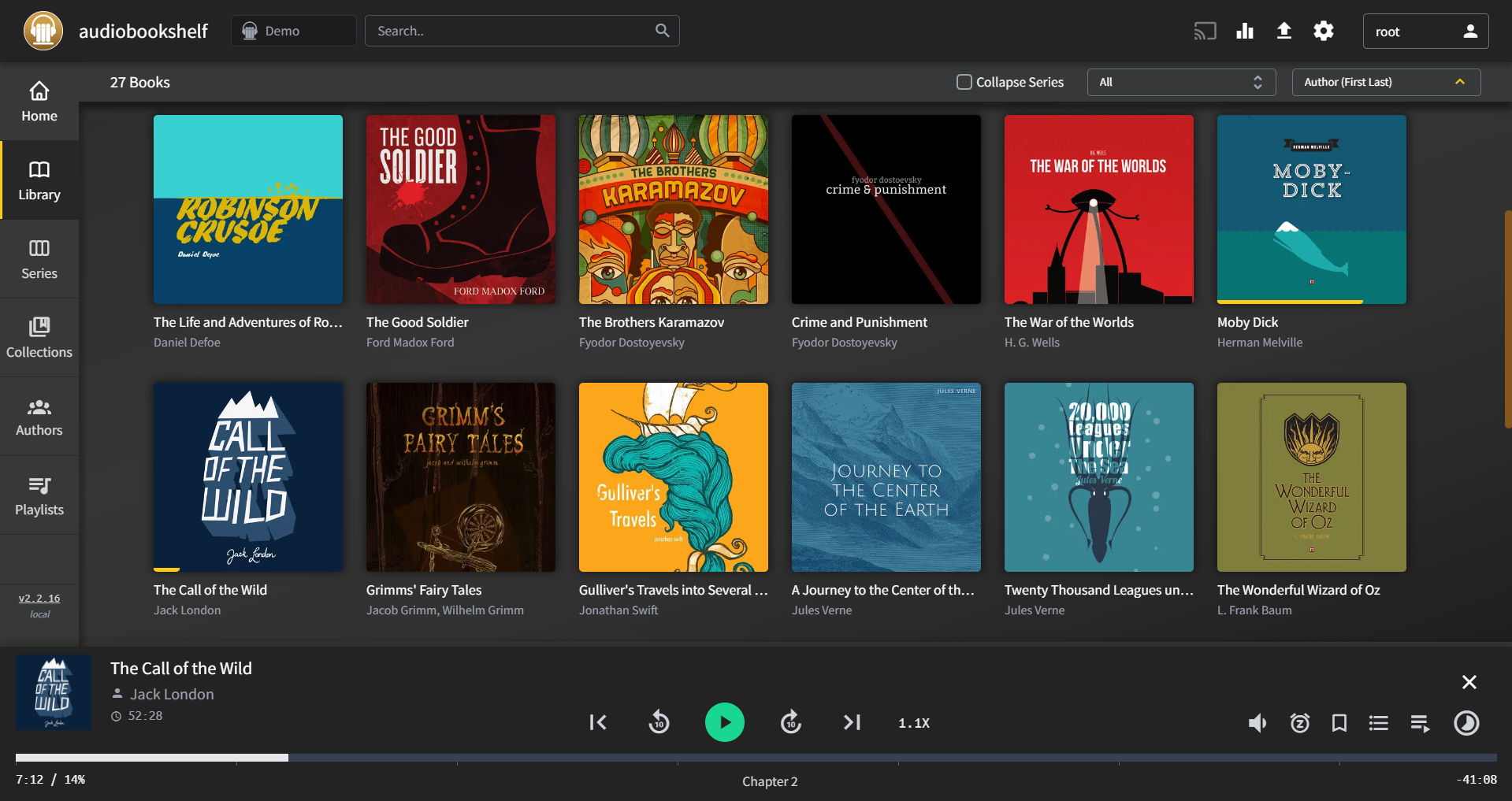
Audiobookshelf is a self-hosted audiobook and podcast server with native mobile apps, progress syncing, and a clean interface. Think Plex for audiobooks — but purpose-built for the format.
Why Not Just Use Plex or Jellyfin?
Plex and Jellyfin can technically serve audiobooks, but they treat them as music albums. That means:
- No bookmarking or sleep timers
- No chapter navigation
- No playback speed controls designed for speech
- No podcast support
- Progress tracking that doesn't understand "I'm on chapter 12"
Audiobookshelf is built specifically for long-form audio. It understands chapters, tracks listening progress per-book, syncs position across devices, and has a podcast manager with automatic episode downloads.
Feature Comparison
| Feature | Audible | Pocketcasts | Audiobookshelf |
|---|---|---|---|
| Audiobooks | Yes | No | Yes |
| Podcasts | No | Yes | Yes |
| Chapter navigation | Yes | Yes | Yes |
| Sleep timer | Yes | Yes | Yes |
| Playback speed | 0.5x-3.5x | 0.5x-3x | 0.5x-3.5x |
| Bookmarks | Yes | No | Yes |
| Progress sync | Yes | Yes | Yes |
| Multiple libraries | No | N/A | Yes |
| Family sharing | Amazon Household | N/A | Built-in (multi-user) |
| DRM-free | No | N/A | Yes (your files) |
| Mobile apps | iOS, Android | iOS, Android | iOS, Android |
| Offline playback | Yes | Yes | Yes (download) |
| Metadata matching | N/A | Automatic | Audnexus, Google Books, others |
| Price | $15/mo (1 credit) | $4/mo (Plus) | Free |
Installation
services:
  audiobookshelf:
    image: ghcr.io/advplyr/audiobookshelf:latest
    ports:
      - "13378:80"
    volumes:
      - ./audiobooks:/audiobooks
      - ./podcasts:/podcasts
      - ./config:/config
      - ./metadata:/metadata
    restart: unless-stopped
docker compose up -d
Visit http://your-server:13378, create your admin account, and add your library paths.
Want more media guides? Get guides like this in your inbox — Self-Hosted Weekly delivers one free deep-dive every week.
Library Organization
Audiobookshelf is flexible about file organization, but the recommended structure gives you the best metadata matching:
/audiobooks/
├── Brandon Sanderson/
│   ├── Mistborn/
│   │   ├── The Final Empire/
│   │   │   ├── chapter01.mp3
│   │   │   ├── chapter02.mp3
│   │   │   └── ...
│   │   └── The Well of Ascension/
│   │       └── ...
│   └── The Way of Kings/
│       └── ...
├── Andy Weir/
│   └── Project Hail Mary/
│       └── Project Hail Mary.m4b
└── ...
Author → Series → Book → Files
Supported formats: MP3, M4A, M4B, FLAC, OGG, WMA, AAC, and more. The .m4b format is ideal for audiobooks since it supports embedded chapters in a single file.
Metadata Matching
Audiobookshelf automatically fetches metadata from multiple sources:
- Audnexus — Audible metadata (descriptions, narrators, cover art, genres) without DRM
- Google Books — Book descriptions, cover art
- OpenLibrary — Open metadata database
- iTunes — Podcast metadata
When you add a book, Audiobookshelf searches these sources and lets you pick the best match. Cover art, descriptions, narrator information, and series order are all pulled in automatically.
Podcast Management
Audiobookshelf doubles as a podcast manager:
- Subscribe by RSS — Add any podcast feed URL
- Auto-download — New episodes download automatically on a schedule
- Organize — Episodes are stored in your podcast directory
- Listen — Stream or download episodes in the mobile app
This is particularly nice if you want one app for both audiobooks and podcasts, and you don't want to rely on a third-party podcast service.
Mobile Apps
Audiobookshelf has official mobile apps for iOS and Android that feel polished:
- Stream or download for offline listening
- Background playback with lock screen controls
- Sleep timer (by time or end of chapter)
- Playback speed control (0.5x to 3.5x)
- Chapter navigation
- Bookmarks with notes
- Car mode (large buttons, simplified controls)
- AirPlay and Chromecast support
Progress syncs automatically between the app and web interface. Pick up on your phone where you left off on your computer.
Multi-User and Family Setup
Create accounts for family members with different access levels:
- Admin — Full control over settings, users, and libraries
- User — Can listen to any book in their assigned libraries
- Guest — Limited access, can't download
Each user gets their own listening progress, bookmarks, and podcast subscriptions. A family of four sharing a library works naturally — everyone's progress is independent.
Getting DRM-Free Audiobooks
The elephant in the room: where do you get audiobooks that aren't locked to Audible?
- Libro.fm — DRM-free audiobooks from an indie bookstore-supporting platform. Same catalog, no lock-in.
- Downpour — DRM-free audiobook store with a rental option
- Google Play Books — Many audiobooks are DRM-free MP3s
- Chirp — Audiobook deal site with DRM-free downloads
- Public domain — LibriVox has thousands of volunteer-narrated classics, all free
If you have Audible purchases: Tools exist to convert your legitimately purchased Audible books to standard formats, but that's between you and Amazon's terms of service.
Hardware Requirements
Audiobookshelf is remarkably lightweight:
| Library Size | RAM | CPU | Notes |
|---|---|---|---|
| < 100 books | 256 MB | 1 core | Runs on a Raspberry Pi |
| 100-1000 books | 512 MB | 2 cores | Most home libraries |
| 1000+ books | 1 GB | 2 cores | Large collections |
The server transcodes on-the-fly if needed (e.g., FLAC to MP3 for streaming), which uses more CPU. If your files are already in MP3 or M4B, CPU usage is minimal.
Backup
Audiobookshelf stores its data in three locations:
# Config and database
/config/

# Metadata, cover art cache
/metadata/

# Your actual audio files
/audiobooks/
/podcasts/
Back up /config/ for your database (listening progress, users, library settings) and obviously your audiobook files. The metadata cache can be regenerated.
The Bottom Line
Audiobookshelf is one of those self-hosted projects that feels surprisingly polished. The mobile apps work well, the metadata matching is solid, and combining audiobooks and podcasts in one place is genuinely useful.
If you have a collection of DRM-free audiobooks — or you're willing to start buying from DRM-free sources like Libro.fm — Audiobookshelf gives you an experience that rivals Audible without the subscription, the DRM, or the lock-in. It runs on minimal hardware, and setting it up takes about five minutes.