PhotoPrism: AI-Powered Photo Management You Can Self-Host
You have years of photos scattered across hard drives, phone backups, and cloud services. You want something that organizes them, finds faces, tags objects, and lets you browse by location — without uploading everything to Google.
Photo by Jeff Chang on Unsplash
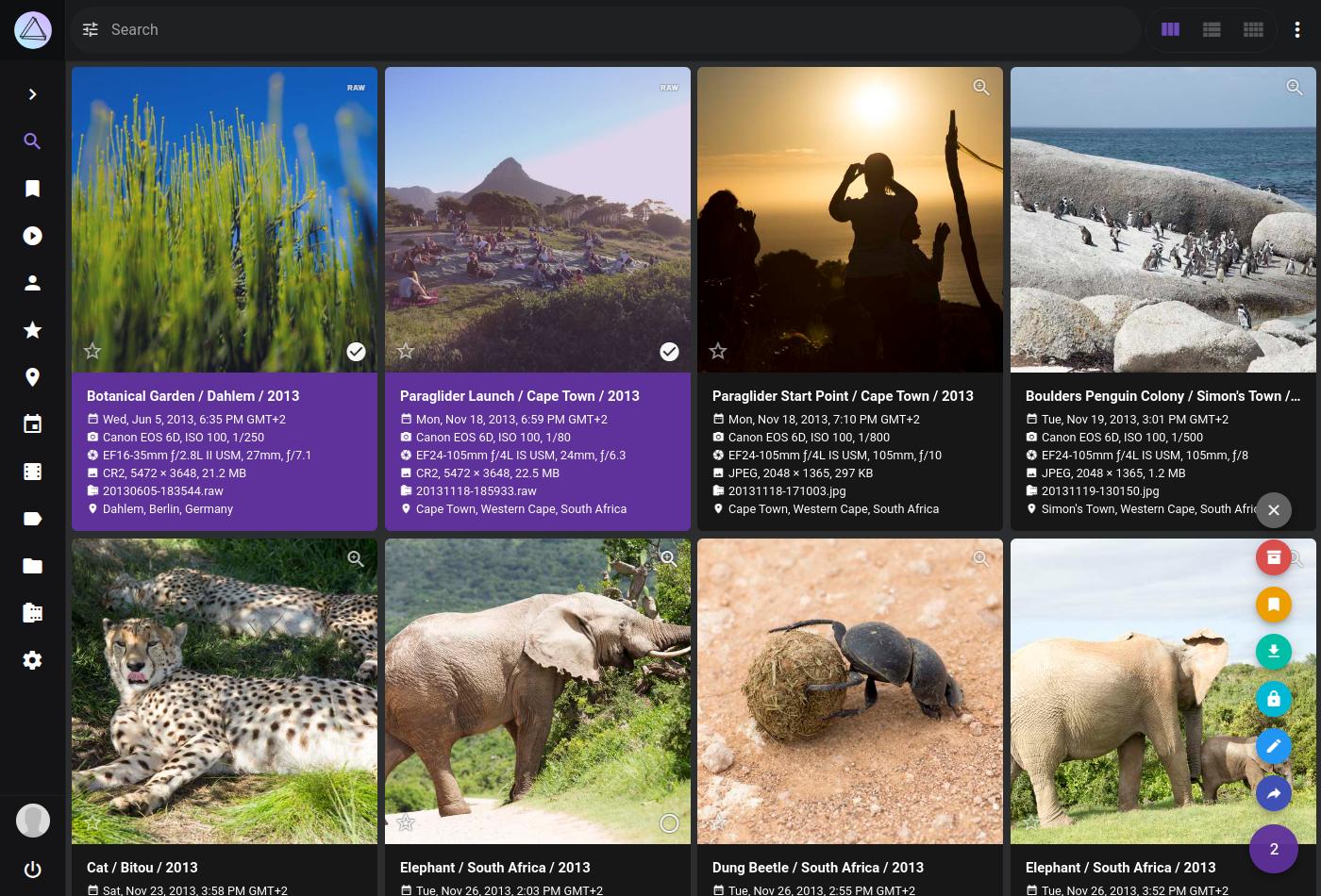
PhotoPrism is a self-hosted photo management application powered by machine learning. It automatically classifies your photos, recognizes faces, detects objects and scenes, reads GPS data, and makes everything searchable through a clean web interface.
What PhotoPrism Does
- AI classification — automatically tags photos with labels like "beach," "cat," "sunset," "food"
- Face recognition — detects and clusters faces so you can browse by person
- Location mapping — plots your photos on a world map using GPS metadata
- RAW support — reads and converts RAW files from most cameras (CR2, NEF, ARW, DNG, etc.)
- Video playback — transcodes and plays videos, including HEVC/H.265
- Full-text search — search by label, location, camera, date, color, or any combination
- Multi-user — separate accounts with configurable permissions
- WebDAV upload — upload photos from any WebDAV client
PhotoPrism vs. Immich
These are the two leading self-hosted photo platforms, but they serve different use cases:
| Feature | PhotoPrism | Immich |
|---|---|---|
| Primary strength | Organization & AI tagging | Mobile backup & sharing |
| Mobile app | PWA (no native app) | Native iOS + Android apps |
| Auto backup from phone | Via WebDAV or sync tools | Built-in, automatic |
| Face recognition | Yes | Yes |
| Object/scene detection | Yes (TensorFlow) | Yes (CLIP-based) |
| RAW support | Excellent | Good |
| Video transcoding | Yes (FFmpeg) | Yes (FFmpeg) |
| Shared albums | Yes | Yes |
| Partner sharing | No | Yes |
| External library indexing | Yes (primary workflow) | Yes |
| Map view | Yes | Yes |
| Live photos | Yes | Yes |
| Maturity | Stable, slower release cycle | Fast-moving, breaking changes |
| Resource usage | Moderate (400-800 MB) | Moderate-high (500 MB-1 GB+) |
When to choose PhotoPrism
- You have a large existing photo library on disk that you want to index in place
- You primarily browse photos on a computer, not a phone
- You want stable software with infrequent breaking changes
- You care about advanced search and AI classification
- You shoot RAW and want good RAW conversion
When to choose Immich
- Automatic phone backup is your primary use case
- You want native mobile apps with a Google Photos-like experience
- You share photos with family members regularly
- You want the most active development and newest features
Both are good. They are different tools for different workflows.
Hardware Requirements
PhotoPrism's ML features need real hardware. Plan accordingly:
| Library Size | RAM | CPU | Storage | Initial Indexing Time |
|---|---|---|---|---|
| < 10,000 photos | 4 GB | 2 cores | 100 GB | 1-3 hours |
| 10,000 - 50,000 | 4-8 GB | 4 cores | 500 GB | 6-12 hours |
| 50,000 - 200,000 | 8-16 GB | 4-8 cores | 1-4 TB | 1-3 days |
| 200,000+ | 16+ GB | 8+ cores | 4+ TB | Days |
Key considerations:
- RAM matters most during indexing. PhotoPrism loads TensorFlow models into memory. 4 GB is the practical minimum; 8 GB is comfortable.
- CPU matters for RAW conversion and video transcoding. More cores = faster processing.
- GPU acceleration is not supported in the standard Docker build. There is a community AVX2 build that uses SIMD instructions, but there is no CUDA/GPU offloading like Immich supports.
- Storage: Plan for originals + sidecar files + thumbnails. Thumbnails can add 10-20% to your total storage.
Can you run it on a Raspberry Pi?
Technically yes, but barely. ARM64 builds exist, but TensorFlow on a Pi 4 is painfully slow. Indexing a library of 10,000 photos could take a week. A Pi 5 with 8 GB is better but still not great. An old x86 desktop or a small NUC is a much better experience.
Want more photos guides? Get guides like this in your inbox — Self-Hosted Weekly delivers one free deep-dive every week.
Docker Compose Setup
services:
  photoprism:
    image: photoprism/photoprism:latest
    restart: unless-stopped
    security_opt:
      - seccomp:unconfined
      - apparmor:unconfined
    ports:
      - "2342:2342"
    environment:
      PHOTOPRISM_ADMIN_USER: "admin"
      PHOTOPRISM_ADMIN_PASSWORD: "change-me-immediately"
      PHOTOPRISM_AUTH_MODE: "password"
      PHOTOPRISM_SITE_URL: "https://photos.yourdomain.com/"
      PHOTOPRISM_ORIGINALS_LIMIT: 5000        # Max file size in MB
      PHOTOPRISM_HTTP_COMPRESSION: "gzip"
      PHOTOPRISM_DATABASE_DRIVER: "mysql"
      PHOTOPRISM_DATABASE_SERVER: "photoprism-db:3306"
      PHOTOPRISM_DATABASE_NAME: "photoprism"
      PHOTOPRISM_DATABASE_USER: "photoprism"
      PHOTOPRISM_DATABASE_PASSWORD: "${DB_PASSWORD}"
      PHOTOPRISM_DETECT_NSFW: "true"
      PHOTOPRISM_UPLOAD_NSFW: "true"
      PHOTOPRISM_RAW_PRESETS: "false"          # Use embedded JPEG for RAW preview (faster)
    volumes:
      - /mnt/photos/originals:/photoprism/originals
      - /mnt/photos/import:/photoprism/import
      - photoprism_storage:/photoprism/storage
    depends_on:
      photoprism-db:
        condition: service_healthy

  photoprism-db:
    image: mariadb:11
    restart: unless-stopped
    security_opt:
      - seccomp:unconfined
      - apparmor:unconfined
    command: >
      --innodb-buffer-pool-size=512M
      --transaction-isolation=READ-COMMITTED
      --character-set-server=utf8mb4
      --collation-server=utf8mb4_unicode_ci
      --max-connections=512
      --innodb-rollback-on-timeout=OFF
      --innodb-lock-wait-timeout=120
    volumes:
      - photoprism_db:/var/lib/mysql
    environment:
      MARIADB_AUTO_UPGRADE: "1"
      MARIADB_INITDB_SKIP_TZINFO: "1"
      MARIADB_DATABASE: "photoprism"
      MARIADB_USER: "photoprism"
      MARIADB_PASSWORD: "${DB_PASSWORD}"
      MARIADB_ROOT_PASSWORD: "${DB_ROOT_PASSWORD}"
    healthcheck:
      test: ["CMD", "healthcheck.sh", "--connect", "--innodb_initialized"]
      interval: 10s
      timeout: 5s
      retries: 5

volumes:
  photoprism_storage:
  photoprism_db:
Create a .env file:
DB_PASSWORD=$(openssl rand -base64 24)
DB_ROOT_PASSWORD=$(openssl rand -base64 24)
Why MariaDB?
PhotoPrism strongly recommends MariaDB over SQLite. SQLite works for small libraries but causes performance issues and locking errors once you get past a few thousand photos. PostgreSQL is not supported — it is MariaDB or SQLite only.
Storage Layout
Understanding how PhotoPrism organizes files is important:
/photoprism/originals/     # Your actual photos (read-only recommended)
/photoprism/import/        # Staging area for new photos
/photoprism/storage/       # App data: thumbnails, sidecar files, config
  ├── cache/               # Thumbnail cache (can be large)
  ├── sidecar/             # JSON metadata, YAML files
  └── config/              # App configuration
The key workflow:
- Originals: Mount your existing photo library here. PhotoPrism indexes it in place and never modifies your original files.
- Import: Drop new photos here. PhotoPrism moves them into the originals folder with configurable naming (by date, camera, etc.).
- Storage: Contains generated thumbnails, sidecar metadata files, and the search index. This is PhotoPrism's working data.
Storage math
For a 100,000 photo library with an average of 5 MB per photo:
- Originals: ~500 GB
- Thumbnails: ~50-100 GB (depending on quality settings)
- Sidecar files: ~5-10 GB
- Database: ~1-2 GB
Plan for originals + 20-25% for PhotoPrism's working data.
Face Recognition Setup
Face recognition is enabled by default. After indexing:
- Go to People in the sidebar
- You will see clusters of detected faces
- Click a face cluster and assign a name
- PhotoPrism merges clusters that you name the same
Face recognition tips
- Give it time: The initial face scan runs during indexing and can take hours for large libraries
- Merge duplicates: The algorithm sometimes splits one person into multiple clusters. Name them all the same and PhotoPrism will merge them.
- Minimum face size: Very small faces in group photos may not be detected. This is configurable but reducing the threshold increases false positives.
- Accuracy: It is good but not Google-level. Expect ~85-90% accuracy in typical libraries. Children and babies are particularly challenging as their faces change rapidly.
RAW File Handling
PhotoPrism has excellent RAW support through a combination of tools:
- Darktable (preferred) or RawTherapee for RAW conversion
- Built-in support for most camera RAW formats: Canon CR2/CR3, Nikon NEF, Sony ARW, Fuji RAF, DNG, and more
- Automatic JPEG sidecar generation from RAW files
By default, PhotoPrism uses the embedded JPEG preview in RAW files for fast browsing. Set PHOTOPRISM_RAW_PRESETS: "true" to use Darktable for higher quality conversions, but this significantly increases indexing time.
To enable Darktable:
environment:
  PHOTOPRISM_DARKTABLE_PRESETS: "true"
Darktable is included in the PhotoPrism Docker image — you do not need to install it separately.
Mobile Access
PhotoPrism does not have a native mobile app. Instead it offers a Progressive Web App (PWA):
- Open PhotoPrism in your mobile browser
- Tap "Add to Home Screen"
- It works like a native app with offline caching
For automatic phone backup, you have a few options:
- Syncthing: Sync your camera roll to the PhotoPrism import folder
- WebDAV clients: Upload directly to PhotoPrism's WebDAV endpoint
- Nextcloud + external storage: Sync to Nextcloud, mount as PhotoPrism originals
None of these are as seamless as Immich's native app. This is PhotoPrism's biggest weakness compared to Immich for phone-centric users.
Performance Tuning
Thumbnail pre-generation
By default, PhotoPrism generates thumbnails on demand. For large libraries, pre-generate them:
docker exec photoprism photoprism thumbs
This prevents slow first-load times when browsing.
Database tuning
The MariaDB --innodb-buffer-pool-size in the Compose file above is set to 512 MB. Adjust based on your available RAM:
- 4 GB total RAM: 256 MB buffer pool
- 8 GB total RAM: 512 MB - 1 GB buffer pool
- 16+ GB total RAM: 1-2 GB buffer pool
Disabling features you don't need
If resources are tight, disable ML features you don't use:
environment:
  PHOTOPRISM_DISABLE_FACES: "true"       # Disable face recognition
  PHOTOPRISM_DISABLE_CLASSIFICATION: "true"  # Disable object/scene detection
  PHOTOPRISM_DISABLE_VECTORS: "true"     # Disable vector graphics support
Multi-User Setup
PhotoPrism supports multiple users with different roles:
- Admin: Full access, can manage users and settings
- User: Can browse, search, and manage their own uploads
- Viewer: Read-only access to shared albums
- Guest: Limited access via shared links
Create users via Settings → Users or the command line:
docker exec photoprism photoprism users add -p "password" -r user username
Each user can have different access to originals folders, which is useful for shared family libraries where some folders should be private.
Honest Limitations
- No native mobile app: The PWA works but is not as polished as Immich's native apps. No background upload.
- MariaDB only: No PostgreSQL support. If your homelab is standardized on Postgres, you'll need a separate MariaDB instance.
- No GPU acceleration: The standard build uses CPU-only TensorFlow. Large libraries take days to index initially.
- Sponsor features: Some features (like enhanced search and certain UI elements) require a paid sponsorship. The free tier is fully functional but the project monetizes through feature gating.
- Memory hungry during indexing: TensorFlow models eat RAM. Don't try to index a large library on a machine with only 2 GB of RAM.
- No partner sharing: Unlike Immich, there is no built-in way for two users to see each other's entire library. You can share albums, but not full timeline access.
Backup Strategy
- Originals: These are your actual photos. Back them up with your normal backup strategy (rsync, Borg, Restic).
- Database:
docker exec photoprism-db mariadb-dump -u photoprism -p photoprism > photoprism-db.sql - Storage volume: Contains thumbnails and sidecar files. Thumbnails can be regenerated, but sidecar files contain your edits and metadata changes.
The originals are irreplaceable. The database and sidecar files contain your organizational work (names, albums, labels). The thumbnails can be regenerated.
The Bottom Line
PhotoPrism is the right choice if your primary workflow is organizing and browsing a large existing photo library on a computer. Its AI features genuinely help — automatic labeling, face recognition, and location mapping turn a pile of files into a searchable, browsable collection.
If your main need is automatic phone backup with a Google Photos-like mobile experience, Immich is the better fit. But if you're a photographer with terabytes of RAW files on a NAS, or someone who wants powerful search and organization for an existing library, PhotoPrism delivers.
Resources
- PhotoPrism documentation
- PhotoPrism GitHub
- Hardware requirements
- Supported RAW formats
- PhotoPrism Demo — try it without installing