Mealie: Self-Hosted Recipe Manager and Meal Planner
You find the perfect chicken tikka masala recipe online. It has great reviews, the photos look incredible, and the ingredient list is exactly what you want. You bookmark it. Three months later, you go back to make it — and the site is gone. Maybe it pivoted, maybe the author deleted it, maybe it's stuck behind a new paywall. Your bookmark leads nowhere.
This is the fundamental problem with relying on the internet for your recipe collection. Recipe websites are designed to generate ad revenue, not to reliably store your recipes. They're plastered with ads, packed with SEO-bait life stories above the actual recipe, and they can vanish at any moment. Even paid apps like Paprika, Mealime, and Yummly have their own issues: subscription fees, locked-down data exports, and limited integrations.
Mealie is a self-hosted recipe manager and meal planner that solves all of this. Your recipes live on your server, in a clean interface, with no ads, no subscriptions, and no risk of link rot. It also happens to be one of the most polished self-hosted applications you'll ever deploy.
What Is Mealie?
Mealie is an open-source, self-hosted recipe management application built with Vue.js and Python (FastAPI). It handles the entire cooking workflow: finding recipes, organizing them, planning meals, generating shopping lists, and sharing everything with your household.
What sets Mealie apart is its focus on polish and user experience. The interface is modern, responsive, and genuinely pleasant to use. It doesn't feel like a developer's side project — it feels like a product.
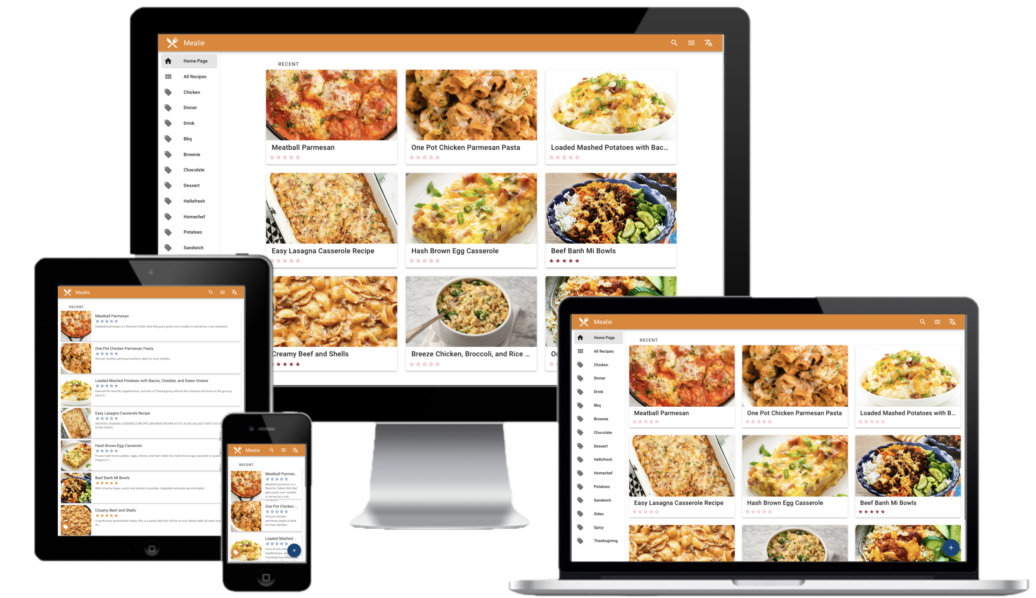
Key highlights:
- One-click recipe import from any URL using Schema.org recipe markup
- Meal planning calendar for organizing your week
- Shopping lists auto-generated from your meal plan or individual recipes
- Nutritional information pulled from recipe data
- Multi-user and household support with granular permissions
- Full REST API for automation and integrations
- PWA support for mobile-friendly access
- Webhooks for notifications and external integrations
Key Features in Detail
Recipe Import from URLs
This is Mealie's killer feature. Paste a URL from virtually any recipe website, and Mealie extracts the structured recipe data — title, ingredients, instructions, prep time, cook time, servings, and photos. It uses the Schema.org Recipe markup that most recipe sites include for SEO purposes, which means it works on the vast majority of popular cooking sites.
The import strips away all the noise: no ads, no life stories, no pop-ups asking you to subscribe. Just the recipe, clean and readable.
If a site doesn't have proper schema markup, Mealie falls back to heuristic parsing. You can always edit the imported recipe afterward to fix anything the parser missed.
Meal Planning Calendar
The meal plan feature gives you a visual calendar where you drag recipes onto specific days. You can plan breakfast, lunch, dinner, and snacks for each day. The calendar view shows your entire week (or month) at a glance, making it easy to ensure variety and balance.
You can also set up meal plan rules — for example, "Meatless Monday" or "Fish on Fridays" — and Mealie will suggest appropriate recipes from your collection when you're filling in those days.
Shopping Lists
Once your meal plan is set, Mealie generates a consolidated shopping list from all the recipes. It intelligently combines duplicate ingredients: if two recipes call for onions, you get one entry with the total amount needed. Lists can be organized by category (produce, dairy, pantry, etc.) to match how most grocery stores are laid out.
Shopping lists sync in real-time across devices. Your partner can check items off in the store while you add last-minute items from home. You can also create standalone shopping lists for items that aren't tied to recipes.
Nutritional Information
Mealie displays nutritional data for recipes when available — calories, protein, carbohydrates, fat, and other macronutrients. This data comes from the recipe's schema markup. It's not a replacement for a dedicated nutrition tracker, but it's useful for a quick overview of what you're cooking.
Multi-User and Household Support
Mealie supports multiple users organized into households. Each household has its own recipe collection, meal plans, and shopping lists. Everyone in a household shares access to everything in that space — great for families where multiple people cook, plan meals, and shop.
Installation with Docker Compose
Mealie is distributed as a single Docker image that bundles the frontend and backend. It uses SQLite by default (no separate database container needed), which keeps the deployment simple. For larger households or heavier use, PostgreSQL is also supported.
Here's a production-ready Docker Compose setup:
# docker-compose.yml
services:
  mealie:
    image: ghcr.io/mealie-recipes/mealie:latest
    ports:
      - "9925:9000"
    environment:
      ALLOW_SIGNUP: "true"       # Disable after creating accounts
      PUID: 1000
      PGID: 1000
      TZ: America/Los_Angeles
      MAX_WORKERS: 1
      WEB_CONCURRENCY: 1
      BASE_URL: https://meals.yourdomain.com
    volumes:
      - ./mealie-data:/app/data
    restart: unless-stopped
Start it up:
docker compose up -d
Visit http://your-server:9925 to access Mealie.
Tip: The default SQLite backend is perfectly fine for households of up to ~10 users and thousands of recipes. You don't need PostgreSQL unless you're running a very large instance.
PostgreSQL Setup (Optional)
If you prefer PostgreSQL for larger deployments or better concurrent access:
# docker-compose.yml
services:
  mealie:
    image: ghcr.io/mealie-recipes/mealie:latest
    ports:
      - "9925:9000"
    environment:
      ALLOW_SIGNUP: "true"
      PUID: 1000
      PGID: 1000
      TZ: America/Los_Angeles
      MAX_WORKERS: 1
      WEB_CONCURRENCY: 1
      BASE_URL: https://meals.yourdomain.com
      DB_ENGINE: postgres
      POSTGRES_USER: mealie
      POSTGRES_PASSWORD: your-secure-password
      POSTGRES_SERVER: db
      POSTGRES_PORT: 5432
      POSTGRES_DB: mealie
    volumes:
      - ./mealie-data:/app/data
    depends_on:
      - db
    restart: unless-stopped

  db:
    image: postgres:16-alpine
    environment:
      POSTGRES_USER: mealie
      POSTGRES_PASSWORD: your-secure-password
      POSTGRES_DB: mealie
    volumes:
      - ./pgdata:/var/lib/postgresql/data
    restart: unless-stopped
Tip: Generate a strong password with:
openssl rand -base64 24
Want more productivity guides? Get guides like this in your inbox — Self-Hosted Weekly delivers one free deep-dive every week.
Initial Setup
When you first visit Mealie, you'll see a login page with default credentials:
- Username:
[email protected] - Password:
MyPassword
Log in and immediately:
- Change the default password — Go to your user profile and update it
- Update your email — Replace the placeholder with your real email
- Create accounts for household members
- Disable signups — Set
ALLOW_SIGNUP: "false"in your compose file and restart
Under Settings, configure:
- Language — Mealie supports 20+ languages
- Theme — Light, dark, or system-matched
- Units — Metric or imperial (affects recipe display and conversions)
Importing Recipes
From URLs (The Killer Feature)
Click the + button in the top navigation, paste a URL, and hit import. Mealie fetches the page, parses the recipe schema, and creates a clean recipe card with:
- Title and description
- Ingredients (parsed into quantities, units, and items)
- Step-by-step instructions
- Prep time, cook time, and total time
- Serving size
- Recipe photo
- Nutritional information (if the source includes it)
The parser handles most major recipe sites reliably: AllRecipes, Food Network, Serious Eats, Budget Bytes, NYT Cooking (if you have access), BBC Good Food, and hundreds more. Anything that outputs Schema.org Recipe JSON-LD (which is most recipe sites, since Google requires it for rich search results) will work.
Bulk Import
Mealie supports bulk importing multiple URLs at once. Go to the recipe creation dialog, switch to bulk mode, and paste one URL per line. Mealie processes them sequentially, and you can review the results afterward.
This is invaluable when you're first setting up — paste all your bookmarked recipe URLs and let Mealie chew through them.
Manual Entry
For family recipes, handwritten cards, or recipes from physical cookbooks, the manual editor provides a structured form:
- Add ingredients one at a time (the parser understands natural language like "2 cups all-purpose flour")
- Write instructions as numbered steps
- Upload a photo from your phone or computer
- Set prep and cook times, servings, and yield
Import from Other Tools
Mealie can import recipe data from several formats:
- Mealie exports (JSON) — For migrating between instances
- Nextcloud Cookbook — Direct import support
- Paprika (
.paprikarecipes) — Export from Paprika, import into Mealie - Chowdown — Yaml-based recipe format
- Plain JSON — Following the Recipe schema specification
Organizing Recipes
Categories
Categories are broad groupings for your recipes: Breakfast, Lunch, Dinner, Desserts, Appetizers, Soups, Salads, etc. Each recipe belongs to one or more categories. The home page can display recipes organized by category.
Tags
Tags are more flexible and granular: quick-meals, vegetarian, gluten-free, kid-friendly, date-night, meal-prep, under-30-minutes, instant-pot, air-fryer. Use tags to slice your collection any way you want.
Cookbooks
Cookbooks in Mealie are curated collections built from category and tag filters. For example:
- "Weeknight Dinners" — Dinner category + under-30-minutes tag
- "Healthy Lunches" — Lunch category + healthy tag
- "Holiday Baking" — Desserts category + holiday tag
Cookbooks update dynamically as you add new recipes that match their criteria.
Search
Mealie's search is fast and flexible. It searches across recipe titles, descriptions, ingredients, and instructions. You can also filter by category, tag, and cookbook. If you remember that a recipe used "tahini and roasted cauliflower," searching for either term will find it instantly.
Meal Planning
The meal plan is a weekly or monthly calendar view. To plan your meals:
- Open the Meal Planner from the sidebar
- Click on a day to add a recipe
- Choose from your collection or search for something specific
- Assign it to a meal type (breakfast, lunch, dinner, side, snack)
- Repeat for each day
You can drag recipes between days to rearrange your plan. The calendar gives you a bird's-eye view of your week so you can spot gaps and ensure variety.
Random Meal Suggestions
Stuck on what to cook? Mealie can suggest random recipes from your collection, optionally filtered by category or tag. Click the dice icon to get a suggestion, and drag it onto your calendar if it sounds good.
Meal Plan Rules
Set up rules to guide your planning. For example:
- On Mondays, only suggest vegetarian recipes
- On weeknights, only suggest recipes under 45 minutes
- On weekends, suggest any recipe
These rules help you maintain dietary goals or cooking-time constraints without having to think about it every week.
Shopping Lists
Auto-Generated from Meal Plans
Once your meal plan is set, click "Generate Shopping List" to create a consolidated list from all planned recipes. Mealie:
- Combines duplicate ingredients across recipes
- Preserves quantities and units
- Groups items by food category
- Handles unit variations (it understands that "1 lb" and "16 oz" are the same)
Manual Shopping Lists
You can also create standalone shopping lists that aren't tied to recipes. This is useful for pantry staples, household items, or ingredients you want to keep on hand.
Real-Time Sync and Checking Off
Shopping lists sync across devices in real time. Open the list on your phone at the store and check items off as you shop. If another household member adds something from home, it appears on your phone immediately.
Recipe-Linked Items
Each item on a shopping list links back to the recipe it came from. Tap an ingredient to see which recipe needs it — helpful when you're in the store and wondering "wait, why do I need three lemons?"
Multi-User Features
Households
Mealie organizes users into households. A household shares:
- A recipe collection
- Meal plans
- Shopping lists
- Categories and tags
You can run multiple households on a single Mealie instance — useful if you're hosting for friends or family members who want separate recipe collections.
User Permissions
Within a household, users can have different permission levels:
- Admin — Full access to settings, user management, and all data
- User — Can create, edit, and delete recipes, manage meal plans and shopping lists
- Guest — Read-only access to view recipes (useful for sharing your collection)
Recipe Sharing
Users within the same household see all recipes automatically. To share recipes outside your household, Mealie supports public recipe links that anyone can view without an account.
Comparison: Mealie vs the Alternatives
If you're evaluating self-hosted recipe managers, here's how the main options stack up:
| Feature | Mealie | Tandoor | Paprika | Grocy | KitchenOwl |
|---|---|---|---|---|---|
| Self-hosted | Yes | Yes | No | Yes | Yes |
| Cost | Free | Free | $5 one-time (per platform) | Free | Free |
| URL import | Excellent | Excellent | Good | No | Good |
| Meal planning | Yes | Yes | No | Yes (basic) | Yes |
| Shopping lists | Yes (real-time) | Yes (real-time) | Yes (basic) | Yes (advanced) | Yes (real-time) |
| Multi-user | Yes (households) | Yes | No | Yes | Yes |
| PWA / Mobile | Yes | Yes | Native apps | Yes | Yes (native app too) |
| Nutritional info | Yes | Yes (OpenFoodFacts) | No | Yes (barcode scanning) | Limited |
| API | Full REST + OpenAPI | Full REST | No | Full REST | REST API |
| Webhooks | Yes | No | No | No | No |
| UI polish | Excellent | Good | Good (native) | Functional | Good |
| Ingredient parsing | Good | Excellent | Good | N/A | Good |
| Recipe scaling | Yes | Yes | Yes | N/A | Yes |
| Inventory tracking | No | No | No | Yes (full pantry) | Yes (basic) |
| Active development | Active | Very active | Slow | Active | Active |
| Backend | Python (FastAPI) | Python (Django) | Proprietary | PHP | Python (FastAPI) |
When to Choose Mealie
- You want the cleanest, most modern UI
- Quick setup matters (single container + SQLite)
- You want webhook support for automation
- API-first design appeals to you
- Your main workflow is: import recipes, plan meals, generate lists
When to Choose Tandoor
- You want the most fully-featured option overall
- Advanced ingredient parsing matters (Tandoor's is best-in-class)
- You need nutritional tracking via OpenFoodFacts
- You want import/export from the widest range of formats
We also have a full Tandoor guide if you want to compare hands-on.
When to Choose Grocy
- You want pantry/inventory management alongside recipes
- Tracking expiration dates, stock levels, and household chores matters
- You need barcode scanning for grocery items
- You're looking for a full household management system, not just recipes
When to Choose KitchenOwl
- You want native mobile apps (iOS and Android) alongside the web interface
- Real-time collaborative shopping lists are the priority
- You want a balance between Mealie's polish and Tandoor's features
When to Choose Paprika
- You don't want to self-host anything
- Native mobile apps are essential and PWAs aren't good enough
- You only need personal recipe management, not household sharing
- A one-time purchase with no maintenance appeals to you
Mobile Experience
Mealie is built as a Progressive Web App (PWA), which means it works great on mobile without a dedicated app:
- Open Mealie in your phone's browser
- Tap "Add to Home Screen" (Safari) or the install prompt (Chrome)
- Mealie appears as an app icon on your home screen
- It launches fullscreen, caches data for offline use, and feels native
The mobile interface is responsive and well-designed. Recipe pages are easy to read, ingredient lists are tappable (to check off as you cook), and the meal planner works with touch gestures.
The main trade-off compared to native apps: push notifications are limited on some platforms, and the "add to home screen" step is less discoverable than downloading from an app store.
API and Integrations
REST API
Mealie exposes a comprehensive REST API with full OpenAPI/Swagger documentation available at https://your-mealie-instance/docs. You can programmatically:
- Create, read, update, and delete recipes
- Manage meal plans
- Add and remove items from shopping lists
- Manage users and households
- Trigger recipe imports from URLs
This opens up endless automation possibilities.
Home Assistant Integration
Mealie integrates with Home Assistant via its API. Common automations:
- Display today's meal plan on a dashboard — Show what's for dinner on a kitchen tablet
- Shopping list sync — Push Mealie's shopping list to your Home Assistant shopping list
- Voice commands — "Hey Google, what's for dinner?" can query Mealie's API through Home Assistant
- Notifications — Send a reminder at 4 PM with tonight's recipe so you can start prep
There's a community-maintained Home Assistant integration (HACS) that makes setup straightforward.
Webhook Notifications
Mealie can fire webhooks on various events:
- New recipe created
- Meal plan updated
- Shopping list modified
Connect these to n8n, Ntfy, or any webhook-capable tool to send dinner reminders, sync lists, or trigger automations.
Automation Examples
A few examples using the API:
# Import a recipe from the command line
curl -X POST "https://meals.yourdomain.com/api/recipes/create-url" \
  -H "Authorization: Bearer YOUR_API_TOKEN" \
  -H "Content-Type: application/json" \
  -d '{"url": "https://example.com/recipe"}'

# Get today's meal plan
curl -s "https://meals.yourdomain.com/api/households/mealplans/today" \
  -H "Authorization: Bearer YOUR_API_TOKEN" | jq
Backup Strategy
With SQLite (the default backend), backups are simple — it's a single file:
#!/bin/bash
# backup-mealie.sh
BACKUP_DIR="/backups/mealie"
MEALIE_DATA="./mealie-data"

# Copy the SQLite database (use sqlite3 .backup for consistency)
docker compose exec mealie sqlite3 /app/data/mealie.db ".backup '/app/data/mealie-backup.db'"
cp "$MEALIE_DATA/mealie-backup.db" "$BACKUP_DIR/mealie-$(date +%Y%m%d).db"

# Back up recipe images and other data
tar czf "$BACKUP_DIR/data-$(date +%Y%m%d).tar.gz" "$MEALIE_DATA"

# Keep last 14 days
find "$BACKUP_DIR" -mtime +14 -delete
If you're using PostgreSQL instead:
docker exec mealie-db pg_dump -U mealie mealie | \
  gzip > "/backups/mealie/db-$(date +%Y%m%d).sql.gz"
Either way, also back up the mealie-data volume, which contains uploaded recipe images and other media.
The Honest Take
What Mealie Does Well
The UI is genuinely good. This isn't an afterthought interface slapped on top of an API. Mealie looks and feels like a commercial product. The recipe cards are clean, the meal planner is intuitive, and everything is responsive on mobile. If you need to convince a non-technical partner to actually use this thing, Mealie's polish makes that conversation much easier.
Recipe import is reliable. The URL scraper works on the vast majority of recipe websites. It's fast, handles edge cases gracefully, and produces clean results. This is the feature you'll use most, and it delivers.
The API is excellent. Full OpenAPI documentation, comprehensive endpoints, webhook support. If you want to integrate Mealie with Home Assistant or build automations, the API makes it straightforward.
Single-container deployment. SQLite as the default means you can go from zero to running in under two minutes. No database container, no Redis, no complicated networking.
Current Limitations
Ingredient parsing isn't as strong as Tandoor's. Mealie does a good job, but Tandoor has more sophisticated parsing that better handles unusual ingredients, metric/imperial mixing, and complex quantity expressions. For most recipes this doesn't matter, but power users may notice the difference.
No inventory or pantry tracking. Mealie is a recipe manager and meal planner, not a full kitchen management system. If you want to track what's in your pantry, manage expiration dates, or know what recipes you can make with ingredients you already have, look at Grocy or KitchenOwl instead.
Community and development pace. Mealie's development has had periods of very active work followed by quieter stretches. The project is open source with a dedicated core maintainer, but it's not backed by a large team. Check the GitHub repository's recent activity before deciding.
No native mobile app. The PWA works well, but if you need an app store listing, Paprika (commercial) or KitchenOwl (open source with native apps) may be better fits.
Migration between database backends is manual. If you start with SQLite and later want PostgreSQL, there's no built-in migration tool. Plan your backend choice upfront.
Getting Started
Mealie is one of those self-hosted applications that provides immediate, tangible value. You install it in two minutes, paste in the URLs of your 20 favorite recipes, and suddenly you have a clean, ad-free, searchable recipe collection that will never disappear because a website shut down.
Add meal planning and shopping lists on top of that, and it becomes a genuine household tool — not just a hobby project running on your server. The barrier to entry is low (one Docker container), the learning curve is minimal, and the daily value is high.
If you've been meaning to organize your recipe collection, stop bookmarking recipes on ad-ridden websites and give Mealie a try. Import your first 10 recipes, plan next week's meals, and generate a shopping list.
Resources
- Mealie documentation
- Mealie GitHub repository
- Mealie API docs
- Home Assistant integration (HACS)
- Our Tandoor Recipes guide — For a detailed comparison with the other top self-hosted recipe manager