FreshRSS: A Self-Hosted RSS Reader That Respects Your Attention
Social media algorithms decide what you see. News sites bury articles behind popups and paywalls. Email newsletters clutter your inbox. Meanwhile, RSS — the 25-year-old protocol that lets you subscribe directly to content sources — still works perfectly. It just needs a reader.
Photo by Dean Pugh on Unsplash
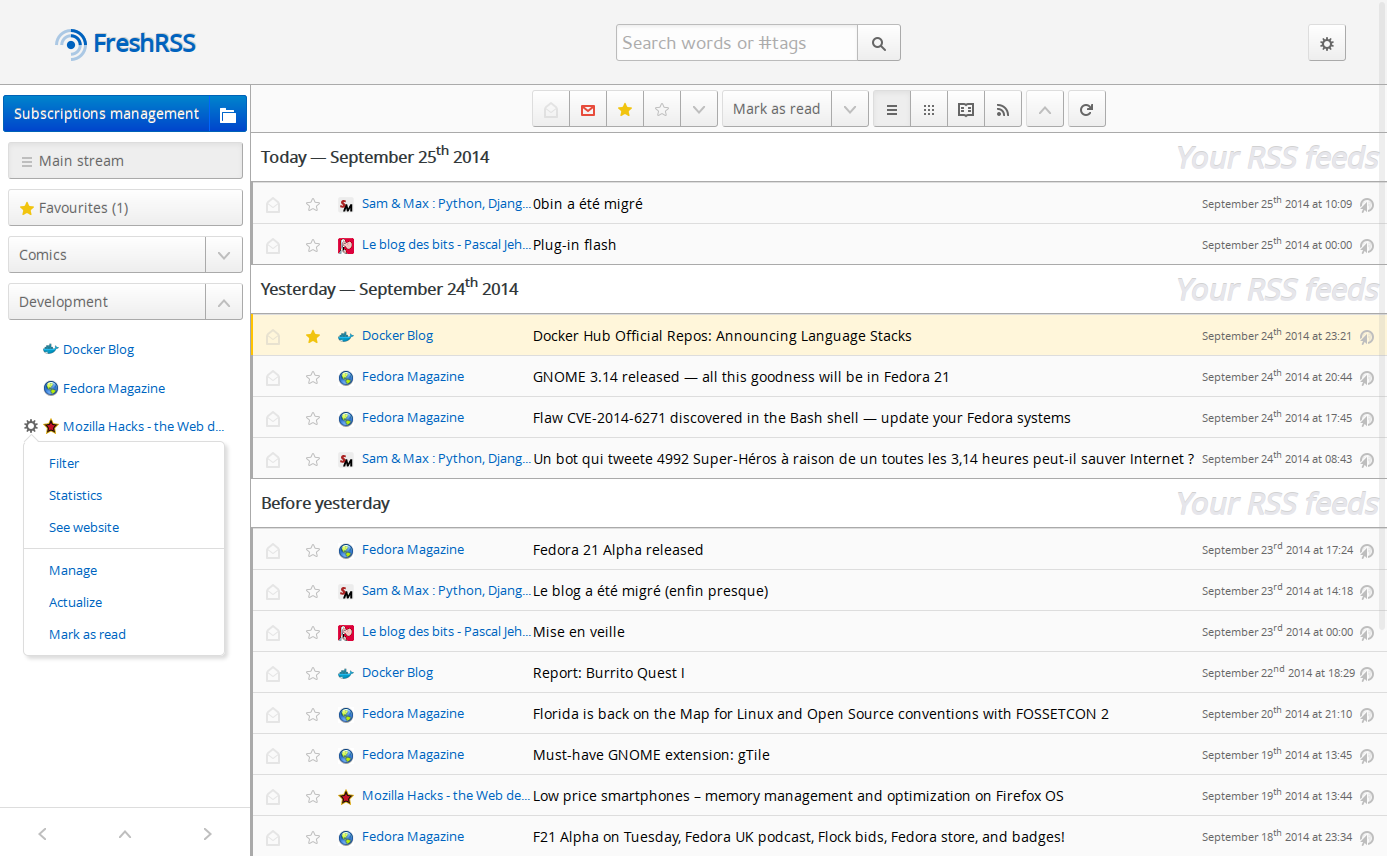
FreshRSS is a self-hosted RSS and Atom feed aggregator. You subscribe to websites, blogs, YouTube channels, podcasts, and news sources. FreshRSS checks them periodically, collects new articles, and presents them in a clean, chronological feed. No algorithm. No ads. No tracking. Just the content you chose to follow.
Why Self-Host an RSS Reader
Cloud RSS readers exist — Feedly, Inoreader, NewsBlur. They work fine, but:
- They disappear: Google Reader was the most popular RSS reader in history. Google killed it in 2013. Any cloud service can do the same.
- They have limits: Free tiers restrict the number of feeds. Premium tiers cost $5-15/month.
- They track you: Your reading habits are data. Self-hosting means your reading list stays private.
- They add noise: Feedly's "AI features" inject content recommendations you didn't ask for.
Self-hosting an RSS reader costs nothing beyond the server you're already running, gives you unlimited feeds, and puts you in complete control.
FreshRSS vs. Miniflux vs. Tiny Tiny RSS
| Feature | FreshRSS | Miniflux | Tiny Tiny RSS |
|---|---|---|---|
| Interface | Feature-rich, customizable | Minimal, fast | Feature-rich, complex |
| Language | PHP | Go | PHP |
| Resource usage | Low (~50-100 MB) | Very low (~20-30 MB) | Moderate (~100-200 MB) |
| Extensions/plugins | Yes (large ecosystem) | No (by design) | Yes (plugin system) |
| Themes | Multiple built-in + custom | Light/Dark only | Multiple + custom |
| API support | Google Reader, Fever | Miniflux, Fever, GReader | Own API, plugins |
| Mobile app support | Via GReader/Fever API | Native + via APIs | Own Android app |
| Multi-user | Yes | Yes | Yes |
| Full-text extraction | Via extension | Built-in | Via plugin |
| WebSub/PubSubHubbub | Yes | Yes | Yes |
| Setup complexity | Simple | Very simple | Moderate |
| Development activity | Active | Active | Slower |
| Philosophy | Feature-rich, extensible | Minimalist, opinionated | Kitchen sink |
When to choose FreshRSS
- You want a feature-rich reader with customization options
- You need good mobile app support via standard APIs
- You want extensions for full-text extraction, YouTube feeds, and other integrations
- You want multiple themes and a familiar reader interface
- You're comfortable with PHP (it's just a deployment detail for Docker users)
When to choose Miniflux
- You prefer minimalism — fewer features, less UI clutter
- You want the lowest possible resource usage
- You prefer reading articles on the original website and just need a feed tracker
- You want a single Go binary with no dependencies beyond PostgreSQL
- You value an opinionated, focused tool
When to choose Tiny Tiny RSS
- You want maximum customization through plugins
- You're already familiar with it (TT-RSS has been around since 2005)
- You need very specific features that TT-RSS plugins provide
- Be aware: the project's maintainer is notoriously hostile to user feedback, and development has slowed
For most people starting fresh, FreshRSS or Miniflux is the right choice. FreshRSS if you want features, Miniflux if you want minimalism.
Docker Setup
FreshRSS is one of the simplest self-hosted services to deploy:
services:
  freshrss:
    image: freshrss/freshrss:latest
    restart: unless-stopped
    ports:
      - "8080:80"
    volumes:
      - freshrss_data:/var/www/FreshRSS/data
      - freshrss_extensions:/var/www/FreshRSS/extensions
    environment:
      TZ: America/Los_Angeles
      CRON_MIN: "3,33"     # Check feeds at :03 and :33 past each hour
    logging:
      options:
        max-size: "10m"

volumes:
  freshrss_data:
  freshrss_extensions:
Start it:
docker compose up -d
Visit http://your-server:8080 and walk through the setup wizard:
- Choose your language
- Check system requirements (should all pass in Docker)
- Configure the database (SQLite for simplicity, PostgreSQL for multi-user)
- Create your admin account
- Done
Using PostgreSQL (recommended for multi-user)
For shared or heavily-used instances, use PostgreSQL instead of SQLite:
services:
  freshrss:
    image: freshrss/freshrss:latest
    restart: unless-stopped
    ports:
      - "8080:80"
    volumes:
      - freshrss_data:/var/www/FreshRSS/data
      - freshrss_extensions:/var/www/FreshRSS/extensions
    environment:
      TZ: America/Los_Angeles
      CRON_MIN: "3,33"
    depends_on:
      freshrss-db:
        condition: service_healthy

  freshrss-db:
    image: postgres:16-alpine
    restart: unless-stopped
    volumes:
      - freshrss_db:/var/lib/postgresql/data
    environment:
      POSTGRES_DB: freshrss
      POSTGRES_USER: freshrss
      POSTGRES_PASSWORD: ${DB_PASSWORD}
    healthcheck:
      test: ["CMD-SHELL", "pg_isready -U freshrss"]
      interval: 10s
      timeout: 5s
      retries: 5

volumes:
  freshrss_data:
  freshrss_extensions:
  freshrss_db:
During the setup wizard, select PostgreSQL and enter: host freshrss-db, database freshrss, user freshrss, and the password from your .env.
Want more productivity guides? Get guides like this in your inbox — Self-Hosted Weekly delivers one free deep-dive every week.
Adding Feeds
Standard RSS/Atom feeds
Click Subscription management → Add feed and paste the feed URL. FreshRSS auto-detects the feed format.
Most blogs and news sites still have RSS feeds, even if they don't advertise them:
- Blogs: Usually at
/feed,/rss, or/atom.xml - WordPress sites: Always at
/feed/ - Substack:
newsletter.substack.com/feed - YouTube channels:
https://www.youtube.com/feeds/videos.xml?channel_id=CHANNEL_ID - Reddit: Append
.rssto any subreddit URL (e.g.,reddit.com/r/selfhosted/.rss) - GitHub releases:
https://github.com/user/repo/releases.atom
Organizing feeds
FreshRSS supports categories for organizing feeds:
- News: Major news sources
- Tech: Tech blogs, Hacker News
- YouTube: Video subscriptions
- Podcasts: Podcast feeds
- Personal: Friends' blogs, niche sites
Create categories first, then assign feeds when subscribing.
Feed discovery
If a site doesn't advertise its feed, try these common patterns:
https://example.com/feed
https://example.com/rss
https://example.com/atom.xml
https://example.com/feed.xml
https://example.com/index.xml
Or use a browser extension like "Get RSS Feed URL" to detect feeds on any page.
API Support for Mobile Apps
FreshRSS implements two widely-supported APIs, which means you can use dozens of existing mobile RSS readers:
Google Reader API
FreshRSS implements a Google Reader-compatible API. Enable it in Settings → Authentication → Allow API access.
Set your API password (separate from your login password) under Profile → API Management.
Compatible apps:
- Android: FeedMe, News+, Readrops, EasyRSS
- iOS: Reeder, lire, NetNewsWire (with GReader plugin)
- Desktop: NewsFlash (Linux), Vienna (macOS)
Fever API
An older but widely-supported API. Enable it the same way.
Compatible apps:
- iOS: Unread, Reeder (Fever mode)
- Android: FeedMe (Fever mode), Readrops
Which API to use
The Google Reader API is more feature-complete (supports categories, tagging, starring). Use Fever only if your preferred app doesn't support Google Reader.
Configuration in mobile apps
Most apps need three things:
- Server URL:
https://freshrss.yourdomain.com/api/greader.php(for GReader API) - Username: Your FreshRSS username
- Password: Your API password (not your login password)
Extensions
FreshRSS has an active extension ecosystem. Install extensions by placing them in the extensions directory or using the built-in extension manager.
Essential extensions
CustomCSS: Add custom CSS to change the look of FreshRSS without creating a full theme.
Full-Text RSS: Extracts the full article content for feeds that only provide summaries. This is hugely useful — many news sites only include the first paragraph in their RSS feed.
# Install via extensions directory
git clone https://github.com/kevinpapst/freshrss-fulltextrss \
  /path/to/freshrss/extensions/xExtension-FullTextRss
YouTube/PeerTube: Enhances video feed entries with embedded players.
Auto-Read: Automatically marks articles as read based on rules (useful for high-volume feeds where you only want to see the highlights).
FilterTitle: Filter articles by title keywords — hide clickbait or topics you don't care about.
Installing extensions
- Download or clone the extension into the
extensions/directory - Go to Settings → Extensions in FreshRSS
- Enable the extension
With Docker, mount the extensions volume and clone extensions there:
docker exec freshrss ls /var/www/FreshRSS/extensions/
Feed Refresh Configuration
The CRON_MIN environment variable controls when FreshRSS checks for new articles:
environment:
  CRON_MIN: "3,33"   # Every 30 minutes (at :03 and :33)
Other examples:
CRON_MIN: "*/15"— every 15 minutes (aggressive, may annoy some feed providers)CRON_MIN: "3"— once per hour at :03CRON_MIN: "3,18,33,48"— every 15 minutes
For most use cases, checking every 30 minutes is a good balance between freshness and politeness to feed servers.
WebSub for real-time updates
FreshRSS supports WebSub (formerly PubSubHubbub), which provides real-time push notifications for feeds that support it. Many major services (YouTube, WordPress.com, Blogger) support WebSub.
When WebSub is available, FreshRSS receives new articles instantly rather than waiting for the next poll cycle. This is enabled by default — no configuration needed.
Keyboard Shortcuts
FreshRSS has keyboard shortcuts for efficient reading:
| Key | Action |
|---|---|
j / k |
Next / previous article |
n / p |
Next / previous feed |
o / Enter |
Open article |
v |
Open in new tab |
s |
Star/favorite article |
m |
Mark as read/unread |
shift+a |
Mark all as read |
f |
Toggle full screen |
These follow the conventions from Google Reader (muscle memory preserved for old-school RSS users).
Multi-User Setup
FreshRSS supports multiple users with separate accounts:
- Go to Administration → User management
- Create new users with their own credentials
- Each user has independent feed subscriptions, categories, and settings
Users share the same FreshRSS instance but have completely separate feed lists and read states. This is useful for families or small teams.
OIDC authentication
FreshRSS supports OIDC for single sign-on with Authentik, Keycloak, or other identity providers:
environment:
  OIDC_ENABLED: "1"
  OIDC_PROVIDER_METADATA_URL: "https://auth.yourdomain.com/.well-known/openid-configuration"
  OIDC_CLIENT_ID: "freshrss"
  OIDC_CLIENT_SECRET: "your-client-secret"
  OIDC_SCOPES: "openid email profile"
  OIDC_REMOTE_USER_CLAIM: "preferred_username"
OPML Import and Export
Already have feeds in another reader? Export them as OPML and import into FreshRSS:
- Subscription management → Import/Export
- Upload your
.opmlor.xmlfile - All feeds and categories are imported
Export works the same way — download your feeds as OPML for backup or migration. Regularly exporting your OPML is a good practice even if you're not planning to switch readers.
Resource Requirements
FreshRSS is remarkably lightweight:
| Component | RAM | CPU | Storage |
|---|---|---|---|
| FreshRSS (PHP-FPM) | 30-80 MB | Minimal | 100 MB |
| SQLite (< 500 feeds) | Included | Minimal | 50-500 MB |
| PostgreSQL (optional) | 50-100 MB | Minimal | 100-500 MB |
| Total | ~50-150 MB | 0.5 cores | < 1 GB |
This runs comfortably on a Raspberry Pi. Storage depends on how many feeds you follow and how long you retain articles. With 200 feeds and 90 days retention, expect 200-500 MB of database.
Retention settings
Configure how long articles are kept:
- Settings → Reading → Maximum number of articles per feed: Default 300
- Settings → Reading → Minimum number of articles to keep: Articles below this threshold are never purged
For high-volume feeds (news sites, Reddit), lower retention saves storage. For personal blogs, keep everything.
Honest Limitations
- No native mobile app: FreshRSS relies on third-party apps via APIs. This is fine (the apps are good), but there is no official "FreshRSS for iOS/Android."
- PHP dependency: If you have strong opinions about PHP, this might bother you. In practice, it runs flawlessly in Docker and you never touch PHP directly.
- Full-text extraction is imperfect: The full-text RSS extension works well for most sites but struggles with JavaScript-heavy pages that don't serve content in the initial HTML.
- No AI features: FreshRSS is a straightforward feed reader. There is no "summarize this article" or "show me related content." Some people consider this a feature.
- Web UI can feel dated: The default theme is functional but not modern. Custom CSS and alternative themes help.
Backup Strategy
- OPML export: Regularly export your feed list. This is the most important backup — everything else can be reconstructed.
- Database: For SQLite, back up the data volume. For PostgreSQL,
pg_dump. - Extensions: Back up the extensions directory or keep a list of installed extensions.
- Docker volumes:
docker compose down && tar czf freshrss-backup.tar.gz /path/to/freshrss_data
The Bottom Line
RSS is the best way to follow content on the internet. No algorithm. No ads. No engagement tricks. Just chronological updates from sources you chose.
FreshRSS makes self-hosting an RSS reader trivially easy. It takes 5 minutes to deploy, uses almost no resources, supports every major mobile reader app through standard APIs, and has an extension ecosystem for power users. If you follow more than a handful of websites, blogs, or YouTube channels, self-hosting FreshRSS will improve how you consume information.
The only question is whether you prefer FreshRSS's feature-rich approach or Miniflux's minimalism. Try both — they're both so lightweight you can run them simultaneously and pick the one that fits your style.
Resources
- FreshRSS documentation
- FreshRSS GitHub
- Extension list
- Mobile app compatibility
- FreshRSS Demo — try it without installing