
Self-Hosting Firefly III: A Free Alternative to Mint and YNAB
After Mint shut down in early 2024, millions of people found themselves looking for a personal finance tool they could actually trust to stick around. YNAB costs $99/year. Every free alternative seems to either sell your data or pivot to a paid model within a few years.
Photo by yousef samuil on Unsplash
Firefly III is a self-hosted personal finance manager that solves this permanently. It's free, open source, and runs on your own server. Your financial data never touches anyone else's infrastructure, and no company can decide to shut it down or change the pricing.
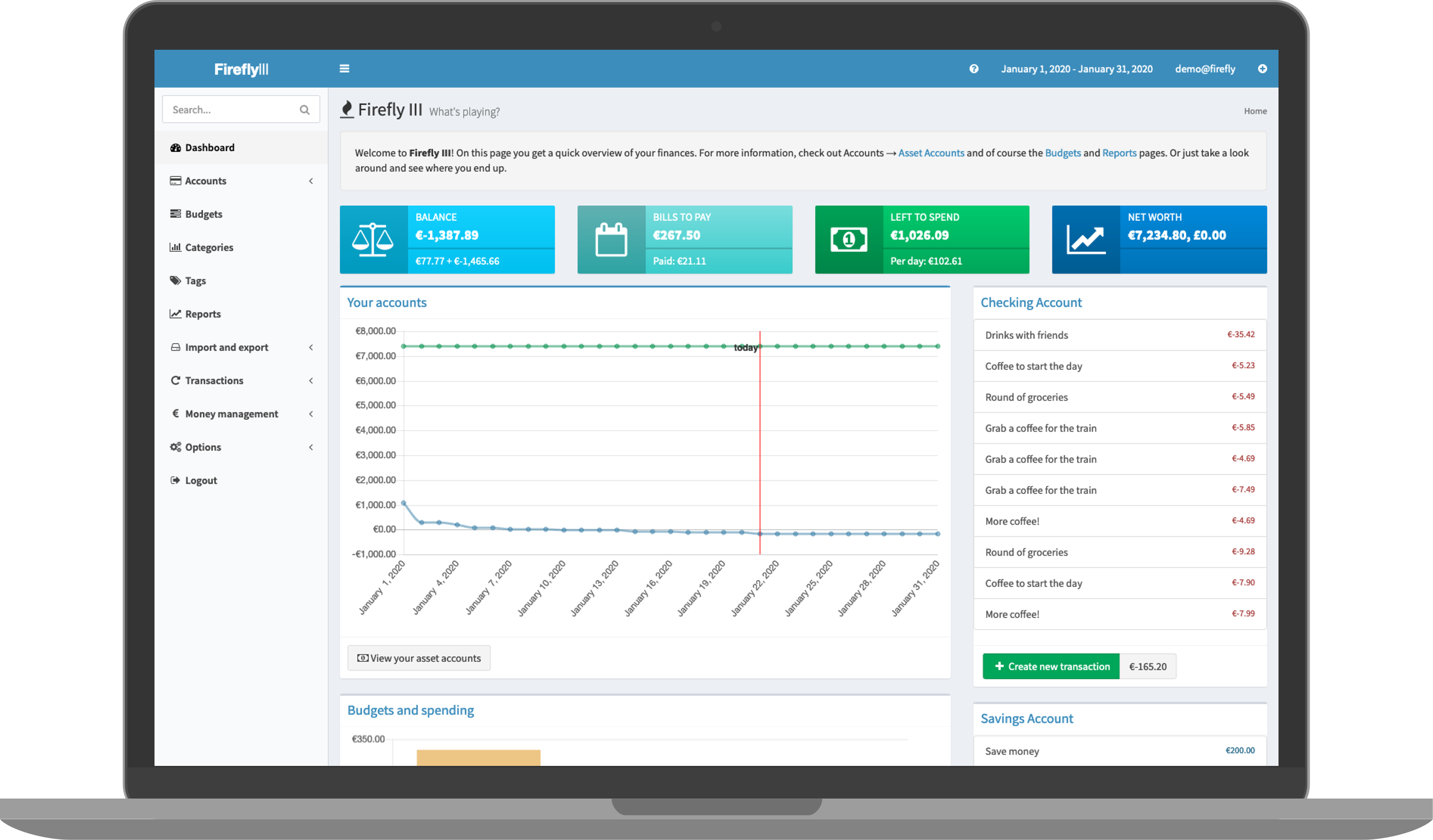
What Firefly III Does
Firefly III is a full-featured personal finance application. Despite the name suggesting it's a third iteration, it's actually the only version -- the "III" is just part of the brand. Here's what it handles:
- Transaction tracking -- manual entry or automated imports from bank accounts
- Double-entry bookkeeping -- proper accounting where every transaction has a source and destination
- Budgets -- monthly spending limits by category with progress tracking
- Categories and tags -- flexible organization for transactions
- Piggy banks -- savings goals with visual progress bars
- Bills and subscriptions -- recurring expense tracking with reminders
- Multi-currency support -- handles transactions in different currencies with automatic exchange rates
- Reports and charts -- spending breakdowns, income vs expenses, net worth over time
- REST API -- full API for automation, imports, and integrations
- Rule engine -- automatically categorize and tag transactions based on patterns
Docker Compose Setup
Firefly III requires a database (MySQL or PostgreSQL) and optionally a data importer for pulling transactions from your bank.
# docker-compose.yml
services:
  firefly:
    image: fireflyiii/core:latest
    container_name: firefly
    ports:
      - "8080:8080"
    volumes:
      - firefly_upload:/var/www/html/storage/upload
    environment:
      - APP_KEY=CHANGE_ME_32_CHAR_RANDOM_STRING_
      - DB_HOST=firefly-db
      - DB_PORT=5432
      - DB_CONNECTION=pgsql
      - DB_DATABASE=firefly
      - DB_USERNAME=firefly
      - DB_PASSWORD=change_this_password
      - APP_URL=http://localhost:8080
      - TRUSTED_PROXIES=**
      - TZ=America/New_York
    depends_on:
      - firefly-db
    restart: unless-stopped

  firefly-db:
    image: postgres:16
    container_name: firefly-db
    volumes:
      - firefly_db:/var/lib/postgresql/data
    environment:
      - POSTGRES_DB=firefly
      - POSTGRES_USER=firefly
      - POSTGRES_PASSWORD=change_this_password
    restart: unless-stopped

  data-importer:
    image: fireflyiii/data-importer:latest
    container_name: firefly-importer
    ports:
      - "8081:8080"
    environment:
      - FIREFLY_III_URL=http://firefly:8080
      - FIREFLY_III_ACCESS_TOKEN=  # Generate after first login
    depends_on:
      - firefly
    restart: unless-stopped

volumes:
  firefly_upload:
  firefly_db:
Generate the APP_KEY before starting:
head -c 32 /dev/urandom | base64 | head -c 32
Replace CHANGE_ME_32_CHAR_RANDOM_STRING_ with the output, then start everything:
docker compose up -d
Open http://your-server:8080, create your account, and you're in.
Understanding Double-Entry Bookkeeping
Firefly III uses double-entry bookkeeping, which sounds intimidating but is actually intuitive once you see it. Every transaction has two sides:
- Withdrawal: Money moves from an asset account (your checking account) to an expense account (a category like "Groceries")
- Deposit: Money moves from a revenue account (like "Salary") to an asset account (your checking account)
- Transfer: Money moves between two asset accounts (checking to savings)
In practice, this means:
Paycheck: Revenue:Employer → Asset:Checking ($3,000)
Rent:     Asset:Checking → Expense:Housing ($1,200)
Savings:  Asset:Checking → Asset:Savings ($500)
You don't need to understand accounting theory to use Firefly III. The interface handles the double-entry mechanics for you -- when you record buying groceries, it automatically creates the proper withdrawal from your checking account to the groceries expense category.
Want more productivity guides? Get guides like this in your inbox — Self-Hosted Weekly delivers one free deep-dive every week.
Importing Transactions
Manual entry works for some people, but most want to import transactions from their bank. Firefly III supports several methods:
CSV Import
Most banks let you export transactions as CSV. The data importer (running on port 8081 in the compose file above) handles CSV mapping:
- Generate a Personal Access Token in Firefly III (Options > Profile > OAuth)
- Add the token to the
FIREFLY_III_ACCESS_TOKENenvironment variable and restart the importer - Upload your bank's CSV file
- Map columns (date, amount, description, etc.) to Firefly III fields
- Save the mapping configuration for future imports
Automated Bank Imports via GoCardless
For automated bank syncing (primarily European banks), the data importer supports GoCardless (formerly Nordigen):
- Create a free GoCardless account
- Add your
NORDIGEN_IDandNORDIGEN_KEYto the data importer environment - Connect your bank through the importer's web interface
- Schedule imports with a cron job
# Run import daily at 6 AM
0 6 * * * docker exec firefly-importer php artisan importer:auto-import /import-configs/
Spectre / Salt Edge (Worldwide)
For banks outside Europe, Spectre by Salt Edge provides similar connectivity, though it requires a paid plan for full access.
Setting Up Budgets
Firefly III's budgeting approach is straightforward:
- Create budget categories: Groceries, Dining Out, Transportation, Entertainment, etc.
- Set monthly limits: Assign a dollar amount to each budget
- Track spending: As you record transactions, Firefly III shows remaining budget per category
- Review: Monthly reports show where you went over or under budget
Budgets reset monthly by default. You can set different amounts for different months if your spending varies (holiday season, vacations, etc.).
Unlike YNAB's envelope method where every dollar gets assigned a job, Firefly III's budgeting is more traditional -- you set limits on categories you want to control and let the rest flow through unbudgeted.
Piggy Banks (Savings Goals)
Piggy banks are virtual savings containers linked to an asset account. They don't move real money -- they just help you mentally allocate funds:
- Emergency Fund: Target $10,000, currently $6,500
- Vacation: Target $2,000, currently $800
- New Laptop: Target $1,500, currently $1,500 (done!)
Each piggy bank shows a progress bar and tracks contributions over time. You add or remove money from piggy banks when you record transactions or transfers.
The REST API
Firefly III has a comprehensive REST API that opens up significant automation possibilities:
# List all accounts
curl -s -H "Authorization: Bearer YOUR_TOKEN" \
  http://localhost:8080/api/v1/accounts | jq '.data[].attributes.name'

# Create a transaction
curl -X POST -H "Authorization: Bearer YOUR_TOKEN" \
  -H "Content-Type: application/json" \
  http://localhost:8080/api/v1/transactions \
  -d '{
    "transactions": [{
      "type": "withdrawal",
      "date": "2026-02-09",
      "amount": "45.99",
      "description": "Grocery run",
      "source_name": "Checking Account",
      "destination_name": "Groceries"
    }]
  }'
Useful API automations:
- Import transactions from bank APIs or email receipts
- Generate custom reports not available in the UI
- Sync with spreadsheets or other tools
- Build a mobile shortcut for quick transaction entry
Firefly III vs the Alternatives
| Feature | Firefly III | YNAB | Actual Budget | Mint (defunct) |
|---|---|---|---|---|
| License | AGPLv3 (free) | Proprietary ($99/yr) | MIT (free) | Proprietary (free) |
| Self-hosted | Yes | No | Yes | No |
| Bank sync | Via importer | Built-in | GoCardless | Built-in |
| Budgeting method | Traditional | Envelope (every dollar) | Envelope | Traditional |
| Double-entry | Yes | No | No | No |
| Multi-currency | Yes | Limited | No | No |
| API | Full REST API | Limited API | Sync API | None |
| Mobile app | None (responsive web) | Native iOS/Android | None (responsive web) | Native iOS/Android |
| Learning curve | Medium | Medium | Low | Low |
| Data privacy | Complete | Cloud-hosted | Complete | Third-party access |
When to Choose Firefly III
- You want full control over your financial data
- You prefer proper double-entry bookkeeping
- You need multi-currency support
- You want a comprehensive API for automation
- You're comfortable with self-hosting
When to Choose YNAB Instead
- You want polished native mobile apps
- You prefer the envelope budgeting philosophy (and find it motivating)
- You need seamless, built-in bank connectivity with US banks
- You don't want to maintain a server
When to Choose Actual Budget
- You want something simpler than Firefly III
- You like YNAB's envelope approach but don't want the subscription
- You want local-first with optional sync
Practical Tips
Backup Your Database
Financial data is irreplaceable. Back up the PostgreSQL database regularly:
docker exec firefly-db pg_dump -U firefly firefly > firefly_backup_$(date +%Y%m%d).sql
Use Rules for Automatic Categorization
Under Automation > Rules, set up rules like:
- If description contains "AMAZON" -> Category: Shopping
- If description contains "SHELL" or "CHEVRON" -> Category: Transportation
- If amount is exactly $15.99 -> Category: Subscriptions, Tag: Netflix
Rules run on new transactions and can be applied retroactively to existing ones.
Set Up Recurring Transactions
For predictable bills (rent, subscriptions, loan payments), create recurring transactions. Firefly III will auto-create them on the scheduled dates, saving you from manual entry every month.
Verdict
Firefly III is the most complete self-hosted personal finance tool available. It takes more effort to set up than signing up for YNAB, and it lacks the polish of a commercial product -- particularly on mobile. But it gives you something no commercial service can: permanent, complete ownership of your financial data with no recurring fees and no risk of the product shutting down. For anyone who has been burned by a financial service disappearing (looking at you, Mint), that stability matters.