Authentik: The Self-Hosted Identity Provider That Hits the Sweet Spot
You've outgrown simple reverse proxy authentication. You need actual OAuth2 and SAML support for your services, user self-registration for family members, and maybe an LDAP server so legacy apps can authenticate. But Keycloak feels like deploying an aircraft carrier to protect a fishing boat.
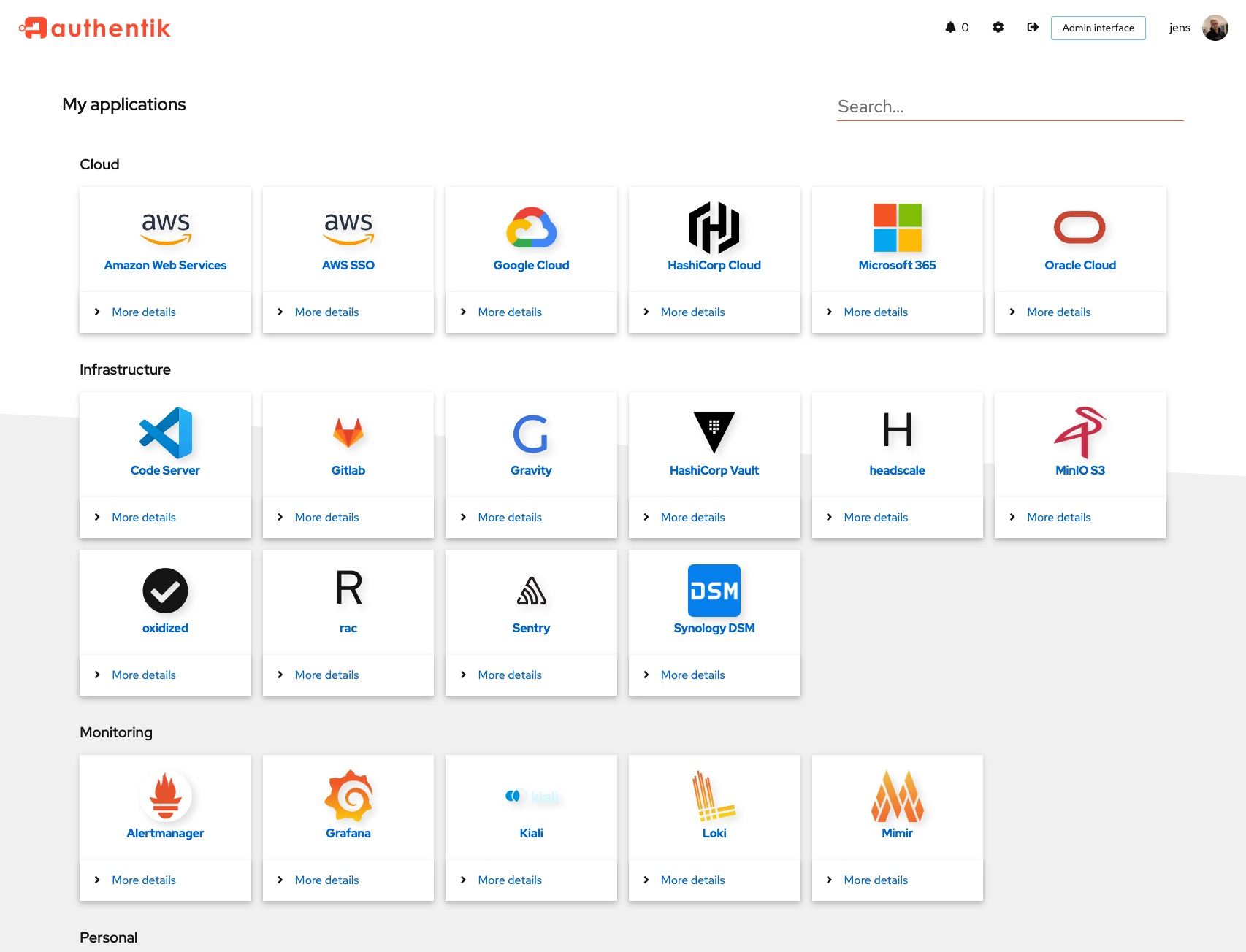
Authentik is an open-source identity provider that slots between the simplicity of Authelia and the complexity of Keycloak. It gives you a real identity provider with a polished admin UI, user self-service, OAuth2/OIDC, SAML, LDAP, and forward auth proxy — without requiring a Java runtime or a week of configuration.
What Authentik Does
- Single Sign-On (SSO) across all your services via OAuth2/OIDC or SAML
- User self-service — password resets, profile management, enrollment flows
- Built-in LDAP provider — expose your user directory as LDAP for apps that require it
- Forward auth proxy — protect services that have no native auth support, like Authelia does
- Multi-factor authentication — TOTP, WebAuthn/FIDO2, SMS, static tokens
- Social login — GitHub, Google, Discord, and other external identity providers
- Customizable flows — build your own login, enrollment, and recovery flows with a visual editor
Authentik vs. Authelia vs. Keycloak
| Feature | Authentik | Authelia | Keycloak |
|---|---|---|---|
| Primary role | Identity provider + proxy | Auth proxy only | Full IAM platform |
| OAuth2 / OIDC | Yes | Yes | Yes |
| SAML | Yes | No | Yes |
| Forward auth proxy | Yes | Yes (primary mode) | No |
| Built-in LDAP server | Yes | No (LDAP client only) | No (LDAP client only) |
| User self-service | Yes (enrollment, recovery) | No | Yes |
| Admin UI | Modern, polished | Minimal login portal | Functional but dated |
| Flow customization | Visual flow builder | YAML config | Authentication flow editor |
| Resource usage | ~300-500 MB RAM | ~30-50 MB RAM | ~500 MB-1 GB RAM |
| Setup complexity | Moderate | Simple | Complex |
| Language / Runtime | Python (Django) | Go | Java (Quarkus) |
When to choose Authentik
- You need a real identity provider (OAuth2, SAML) but Keycloak is overkill
- You want users to manage their own passwords and profiles
- You need an LDAP server for legacy applications
- You want forward auth proxy support alongside native OIDC/SAML
- You want a modern UI that doesn't look like it was designed in 2005
When to choose Authelia instead
- You only need a login portal in front of your reverse proxy
- You don't need OAuth2 or SAML provider functionality
- You're running on a Raspberry Pi or other constrained hardware
- You manage a small number of users (yourself, maybe family) via a config file
When to choose Keycloak instead
- You need enterprise features like Kerberos, complex realm structures, or fine-grained authorization
- You're federating with Active Directory in a corporate environment
- You need battle-tested SAML with complex attribute mappings
- You're already in a Java shop and comfortable with the ecosystem
Docker Compose Setup
Authentik requires PostgreSQL and Redis. Here is a production-ready Compose setup:
services:
  authentik-server:
    image: ghcr.io/goauthentik/server:latest
    restart: unless-stopped
    command: server
    environment:
      AUTHENTIK_REDIS__HOST: authentik-redis
      AUTHENTIK_POSTGRESQL__HOST: authentik-db
      AUTHENTIK_POSTGRESQL__USER: authentik
      AUTHENTIK_POSTGRESQL__NAME: authentik
      AUTHENTIK_POSTGRESQL__PASSWORD: ${PG_PASS:?database password required}
      AUTHENTIK_SECRET_KEY: ${AUTHENTIK_SECRET_KEY:?secret key required}
    volumes:
      - ./media:/media
      - ./custom-templates:/templates
    ports:
      - "9000:9000"
      - "9443:9443"
    depends_on:
      authentik-db:
        condition: service_healthy
      authentik-redis:
        condition: service_healthy

  authentik-worker:
    image: ghcr.io/goauthentik/server:latest
    restart: unless-stopped
    command: worker
    environment:
      AUTHENTIK_REDIS__HOST: authentik-redis
      AUTHENTIK_POSTGRESQL__HOST: authentik-db
      AUTHENTIK_POSTGRESQL__USER: authentik
      AUTHENTIK_POSTGRESQL__NAME: authentik
      AUTHENTIK_POSTGRESQL__PASSWORD: ${PG_PASS}
      AUTHENTIK_SECRET_KEY: ${AUTHENTIK_SECRET_KEY}
    volumes:
      - ./media:/media
      - ./custom-templates:/templates
    depends_on:
      authentik-db:
        condition: service_healthy
      authentik-redis:
        condition: service_healthy

  authentik-db:
    image: postgres:16-alpine
    restart: unless-stopped
    volumes:
      - authentik_db:/var/lib/postgresql/data
    environment:
      POSTGRES_DB: authentik
      POSTGRES_USER: authentik
      POSTGRES_PASSWORD: ${PG_PASS}
    healthcheck:
      test: ["CMD-SHELL", "pg_isready -d authentik -U authentik"]
      interval: 10s
      timeout: 5s
      retries: 5

  authentik-redis:
    image: redis:7-alpine
    restart: unless-stopped
    command: --save 60 1 --loglevel warning
    volumes:
      - authentik_redis:/data
    healthcheck:
      test: ["CMD-SHELL", "redis-cli ping | grep PONG"]
      interval: 10s
      timeout: 5s
      retries: 5

volumes:
  authentik_db:
  authentik_redis:
Create a .env file:
PG_PASS=$(openssl rand -base64 36)
AUTHENTIK_SECRET_KEY=$(openssl rand -base64 60)
Note that Authentik runs two containers from the same image: server handles the web interface and API, while worker runs background tasks like LDAP sync, email sending, and flow execution. Both are required.
First run
docker compose up -d
Navigate to http://your-server:9000/if/flow/initial-setup/ to create your admin account. This setup URL is only available on the first run — once you create the admin account, it disappears.
Want more security guides? Get guides like this in your inbox — Self-Hosted Weekly delivers one free deep-dive every week.
Connecting Services with OIDC
Most modern self-hosted apps support OpenID Connect. The pattern is consistent:
In Authentik
- Go to Applications → Providers → Create
- Select OAuth2/OpenID Connect
- Set a name (e.g.,
Grafana) and configure:- Authorization flow: default-provider-authorization-implicit-consent (or explicit if you want users to approve)
- Redirect URIs:
https://grafana.yourdomain.com/login/generic_oauth
- Copy the Client ID and Client Secret
- Go to Applications → Create and link it to the provider
Example: Grafana
# grafana.ini
[auth.generic_oauth]
enabled = true
name = Authentik
allow_sign_up = true
client_id = your-client-id
client_secret = your-client-secret
scopes = openid profile email
auth_url = https://auth.yourdomain.com/application/o/authorize/
token_url = https://auth.yourdomain.com/application/o/token/
api_url = https://auth.yourdomain.com/application/o/userinfo/
role_attribute_path = contains(groups[*], 'admins') && 'Admin' || 'Viewer'
Example: Portainer
Portainer supports OIDC natively:
- Go to Settings → Authentication → OAuth
- Use the Authentik provider endpoints
- Set the Client ID and Secret
- Map group claims to Portainer teams
Setting Up the LDAP Provider
This is one of Authentik's killer features. Many apps only support LDAP for external authentication — things like Jellyfin, older Nextcloud setups, or network equipment. Authentik can expose your user directory as an LDAP server.
- Go to Providers → Create → LDAP Provider
- Set the Base DN:
dc=yourdomain,dc=com - Set a Bind DN and password for service accounts
- Assign it to an Application
- Add LDAP port mapping to your Compose file:
  authentik-server:
    ports:
      - "9000:9000"
      - "9443:9443"
      - "389:3389"    # LDAP
      - "636:6636"    # LDAPS
Now configure your apps to authenticate against ldap://authentik-server:389 with the Base DN you set. Users managed in Authentik are automatically available over LDAP.
LDAP gotchas
- The LDAP provider is read-only — you can't create users via LDAP, only authenticate them
- Group membership is exposed, so apps that support LDAP groups will work
- Performance is fine for homelabs but might need tuning for hundreds of concurrent LDAP binds
Forward Auth Proxy
For services that have no native auth support, Authentik works as a forward auth proxy — similar to how Authelia works:
- Create a Proxy Provider in Authentik
- Set the external URL of your service
- Configure your reverse proxy to check with Authentik
Traefik example
# On your unprotected service
labels:
  - "traefik.http.routers.myapp.middlewares=authentik@docker"

# On the Authentik server
labels:
  - "traefik.http.middlewares.authentik.forwardAuth.address=http://authentik-server:9000/outpost.goauthentik.io/auth/traefik"
  - "traefik.http.middlewares.authentik.forwardAuth.trustForwardHeader=true"
  - "traefik.http.middlewares.authentik.forwardAuth.authResponseHeaders=X-authentik-username,X-authentik-groups,X-authentik-email"
Caddy example
myapp.yourdomain.com {
    forward_auth authentik-server:9000 {
        uri /outpost.goauthentik.io/auth/caddy
        copy_headers X-Authentik-Username X-Authentik-Groups X-Authentik-Email
    }
    reverse_proxy myapp:8080
}
Customizing Flows
Authentik's flow system is one of its distinguishing features. Flows are visual pipelines that define what happens during login, enrollment, or password recovery.
The defaults work fine for most setups, but you can customize them:
- Add an enrollment flow so new users can register themselves
- Add a recovery flow so users can reset forgotten passwords via email
- Require MFA for specific applications or user groups
- Add terms of service acceptance to the login flow
The flow editor is drag-and-drop in the admin UI. Each stage (password prompt, MFA check, email verification) is a building block you can reorder or add conditions to.
Multi-Factor Authentication
Enable MFA globally or per-application:
- Go to Flows → default-authentication-flow
- Add an Authenticator Validation Stage after the password stage
- Choose which methods to allow: TOTP, WebAuthn, or static tokens
Users can configure their MFA devices at https://auth.yourdomain.com/if/user/ — the self-service portal.
WebAuthn with hardware keys (YubiKey, fingerprint readers) works well and is the strongest option. TOTP with an authenticator app is the practical default for most users.
Resource Requirements
| Component | RAM | CPU | Storage |
|---|---|---|---|
| Server container | 200-400 MB | 0.5 cores | Minimal |
| Worker container | 100-200 MB | 0.5 cores | Minimal |
| PostgreSQL | 100-200 MB | 0.25 cores | 500 MB |
| Redis | 30-50 MB | Minimal | 100 MB |
| Total | ~500-800 MB | ~1.5 cores | ~1 GB |
This is notably more than Authelia (50 MB total) but less than Keycloak (1 GB+). For a typical homelab server, the resource usage is perfectly manageable.
Common Pitfalls
- Two containers, not one: Forgetting the worker container is a common mistake. Without it, background tasks (LDAP sync, email, flow execution) silently fail. You will see things partially working and wonder why.
- Secret key must persist: If
AUTHENTIK_SECRET_KEYchanges between restarts, all sessions and tokens are invalidated. Store it in your.envfile and back it up. - Email configuration: Password recovery and enrollment flows need a working email backend. Configure SMTP under System → Settings or you'll get silent failures.
- Outpost deployment: For proxy auth, Authentik deploys an "outpost" — either embedded (default) or as a separate container. The embedded outpost works for most setups, but separate outposts are needed for distributed deployments.
- Postgres version: Authentik requires PostgreSQL 12+. The
postgres:16-alpineimage is recommended.
Backup Strategy
Back up these things:
- PostgreSQL database:
docker exec authentik-db pg_dump -U authentik authentik > authentik-backup.sql - Media directory: Contains custom branding, icons, and uploaded files
- Secret key: Without it, encrypted data in the database is unrecoverable
- Custom templates: If you've modified login pages or email templates
The Bottom Line
Authentik occupies a genuinely useful niche. Authelia is perfect when you just need a login wall in front of your reverse proxy. Keycloak is the right choice for enterprise-scale identity management. Authentik gives you a real identity provider — with OIDC, SAML, LDAP, user self-service, and a modern UI — without the overhead and complexity of a full enterprise IAM platform.
If your services are starting to outgrow forward auth proxy and you find yourself wishing for proper OAuth2 clients, user registration flows, or an LDAP endpoint, Authentik is likely exactly what you need.
Resources
- Authentik documentation
- Authentik GitHub
- Integration guides — detailed guides for Grafana, Nextcloud, Gitea, and dozens more
- Docker Compose examples